

21
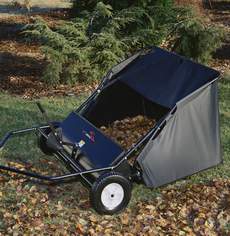 Last year after purchasing our new home I spent 3 days during Thanksgiving raking and blowing leaves. I vowed then and there that I wouldn’t be doing again. Several weeks ago I achieved man hood by purchasing a John Deere Lawn Tractor. As a result, I started investigating lawn sweepers to assist me with removing leaves, pine straw (the worst thing mother nature ever created), sweet gum balls, pine combs along with twigs and small limbs out of my yard. I settled on the Brinly 42inch Lawn Sweeper. Here are the specs:
- Series No. STS-42 LX Deluxe
- Description Tow-behind Sweeper
- Working Width 42″ Working width
- Hamper Capacity 15 Cu. Ft. Capacity
- Brushes (6) 11″ Diameter
- Wheels & Tires 12″ x 3″ Bar tread
- Bearings Shielded Roller
- Reverse Freewheels in reverse
- Storage Stores in a compact upright position
- Warranty 2 Year limited
Putting it together – Score F
It takes about an hour to put the Brinly together, although it may take some 2-3 hours because of the extremely poor manual. You need 2 1/2 wrenches and 2 9/16 inch wrenches. During this stage I was upset to not find any documentation that was clearly labeled as “English”. Brinly is USA made but they seem to have put more effort into documenting things for other languages than English. WTF!? If it wasn’t for my extreme IQ and manliness, I would probably still be putting the dang thing together. Basically you just have to follow the pictures, no words of wisdom will be showered upon you in the manual for putting it together. Brinly can definitely do a better job in this area. Also, there are errors in the manual. Some items are labeled wrong in some pictures and even the pictures they drew aren’t clear. For the person who just spent $239 MSRP on their product, Brinly, you get a big fat “F“.
First Trial Run
After getting the Brinly together I hooked it up behind the John Deere. I started off really slow at first to see how things worked and even varied the speeds. My John Deere runs (according to the manual) about 5.5 miles per hour at full throttle (or wide open as they say in the South). The Brinly can by no means keep up at that speed because the brushes are turning so fast that it slings the leaves and pine combs over the top of the catcher. Speaking the catcher. It is pretty flimsy and I am not sure how long it will last. I had rather have seen them provide a canvas catcher instead of the thin plastic one they provided. Honestly though, leaves don’t weigh much so I understand a little as to why they chose to skimp on the catcher. But since you skimped out on the catcher, you could have put more time in the manual.
But Does it Work? – Score A
The sweet spot to pull the Brinly seems to be about 2-3 miles per hours, probably closer to 2.5 miles per hour. Anything any faster and your leaves will be thrown out of the catcher. After pulling the Brinly around the yard for 45 minutes my yard was starting to look green again. The Brinly does an excellent job and getting up and removing everything I wanted. As a matter of fact, the picture you see to the left is exactly my results. I was really surprised at how well it removed pine straw from the yard as well as twigs.
Broke After 45 Minutes – Score F
After about 45 minutes of going over the yard I was very pleased with the results. But then I turned around and noticed the adjust lever laying over the top of the unit. Aparently the screw worked loose that holds the spring in place on the adjuster. I looked around the yard, couldn’t find it (maybe it got swept up?). So after 45 minutes, I don’t have an easy way to adjust my unit. The way the spring mechanism works isn’t the best design I’ve seen. There is a bolt, washer, spring, screw. Since you can’t tighten the screw all the way (because it then compresses the spring to much and you can adjust the unit), I suspect this is going to be one of those things I will have to do constantly over and over and over. Either that, or do something else to make the screw stay. I had a few screws and washer left over after putting it together so I managed to get the adjuster back in place so I could continue on, but I had to tighten it all the way down and I couldn’t adjust it when going to dump. I called customer service to order another spring and stayed on hold for 30 minutes, only finally to have someone come on to tell me to leave a voicemail. So far it has been 2.5 hours later and no return phone call. Since Indiana is in the EST time zone and I am in Central, my guess is they’ve left for the day.
Conclusion – Score C
The manual is horrible and my unit broke after 45 minutes of use and the quality of the catcher is less than par. With that said though the unit does do what it claims to do and does it very well in my opinion. I know that if I hand raked my yard with a rake I would still be raking. Not on that but the Brinly is going to do a MUCH better job of getting leaves up along with everything else. The easy dumping mechanism of the Brinly is nice although don’t forget to put the rope back into the catcher, otherwise it will get caught up in the brushes (cough, cough, so I was told).”
 It isn’t everyday that you can say you work for #1 but I can. Actually I have said that for the past 2 years. Would you like to work for #1 as well? If you are a .Net Developer / Engineer who is passionate, self-motivated, loves being able to set and manage your own goals and you are looking to work for THE best company to work for in the IT industry in the US, we in turn are looking for you!