Get a Free Copy of Vista and Office 2007!
Posted by Keith Elder | Posted in PC Software | Posted on 28-11-2006
0
Head over to http://www.powertogether.com and watch 3 web casts and you get a copy of of Vista for Business and Office 2007.


Head over to http://www.powertogether.com and watch 3 web casts and you get a copy of of Vista for Business and Office 2007.
I found out the other day that I will be speaking at CodeMash in Ohio during the warm month of January. What am I speaking on? I’ll give you one guess. You guessed it, Smart Clients, ClickOnce, Web Services, SOA, etc. It is a small world sometimes too. The email about me speaking came from Jason Gilmore who I met while at Microsoft this past September during an ASP.Net Summit. Jason and I talked about Media Center and tons of other stuff. Who knew! He was also on the bus when we got struck by some crazy chic.
The resort the conference is at is going to be really cool. Not to mention the entire event is put on by the community and covers tons of technologies. From a .Net presenter perspective these are usually tougher venues to speak at because you aren’t speaking in front of a bunch of people that swallowed the blue pill. For me though, I don’t think that will be a problem since I can talk Linux, OS X, PHP and open source with the best of them.
If you haven’t gotten signed up, what are you waiting for!!!!!!!!!
 Last year when Ellen and I moved into our new home we were excited to cook our first Thanksgiving meal in our new home. That was the general feeling until we spent ALL day in the kitchen preparing the meal. While the meal was excellent, it wasn’t worth a whole day of effort and roughly $300.00 of groceries. I vowed next year I wasn’t going to spend my day off cooking. There had to be a better way. I am a smart guy, couldn’t I figure something out? Turns out there are lots of ways to have a really nice Thanksgiving dinner without all the fuss. This year we ordered Thanksgiving dinner off the Internet and had it shipped all the way in from Dallas, Tx via Mr. Billy’s Cajun Market. The meal costs $129.00 and included all the sides (mashed potatoes, green bean caserole, etc). The meal we got was the Spicy Cajun Fried Whole Turkey Dinner.
The meal included:
The package arrived very nicely packed via Fedex on Wednesday around 2:00 PM. Here are some pics we took as we unboxed it:
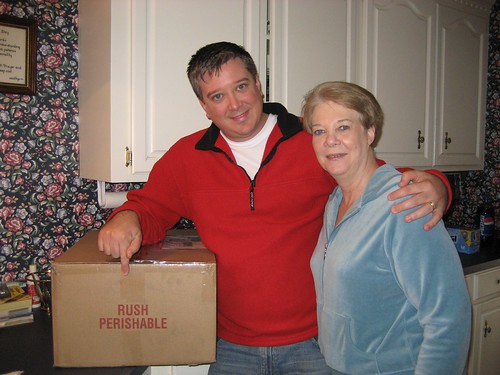
This is a picture of Mom and me. This may be her Blog debut, I’m not sure 🙂
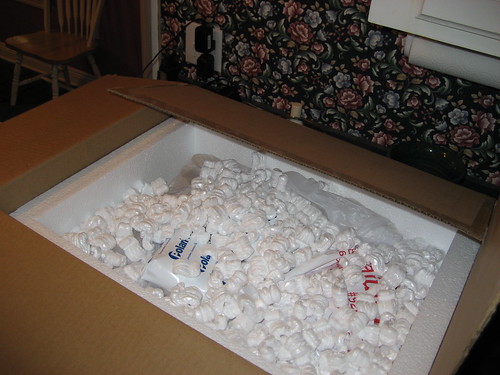
How everything was packaged.
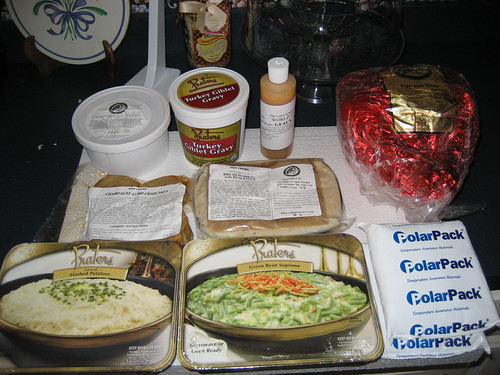
Everything unpacked.
After everything was unpacked we placed it in the fridge and then headed to town later that evening to get some items to round out the meal. Ellen made a strawberry cheescake and brocolli caserole, mom made a caramel cake and the dressing and Ellen’s mom brought a caserole dish. As you can see our cooking was really at a minimum this year. Besides putting the turkey in the oven and heating up everything it was relatively painless and I even got to watch a lot of football earlier in the day (always a plus). So how was everything? Honestly, if you had came over and eaten with us and I hadn’t told you, you would have never known we ordered it. As a matter of fact, we never told Ellen’s mom we ordered it and while she was somewhat in disbelief that I cooked crawfish etoufee, crab cakes and had a spicy cajun turkey fried for Thanksgiving, everything had a home cooked flavor. This was my first spicy cajun turkey and I don’t think I can have Thanksgiving without it again. The turkey was tremendous and easy to heat up, just 5 minutes per lb. All in all it was a great meal and no one killed themselves this year trying to cook.
In Part 3 of this series we learned the x64 ISO of Vista originally uploaded to MSDN was corrupted As a result of this I installed the 32bit version of Vista on my AMD machine. Once the DVD nightmare was over,the installation of Vista went really smooth and offers some new features that are welcomed.
During the install I was happy to be able to load drivers for RAID controllers via USB drives. The installation is completely visual this time around (no more dos looking boot screens) and even things like formatting and partitioning are done with a mouse. One time I forgot to plugin my USB mouse and even though I was in the middle of the install it detected it. Very nice.
Once the install was completed I wanted to checkout my machine’s Vista rating. This seems to be a common practice among those who want to see how there system stacks up. Here’s a screen shot:
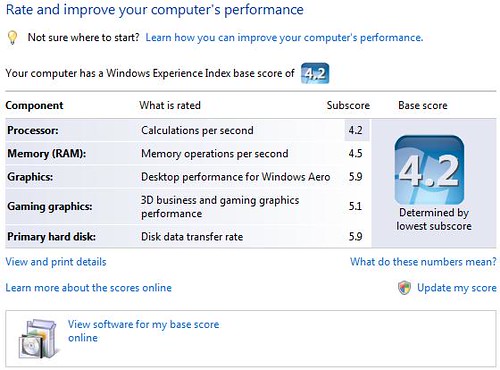
As you see, the overall score is the lowest score which in my case is the AMD 3400+ processor. Apparently Vista loves my BFG 6800 GT video card since it gave the highest possible rating of 5.9. My hard drives running in a RAID 0 configuration faired very well with a rating of 5.9, the highest.
Overall the system is running very fast, and the interface looks gorgeous. If you have Vista installed and if you have a windows key (which is between alt and ctrl on most keyboards) press the window key then tab combination. You’ll get something like this:
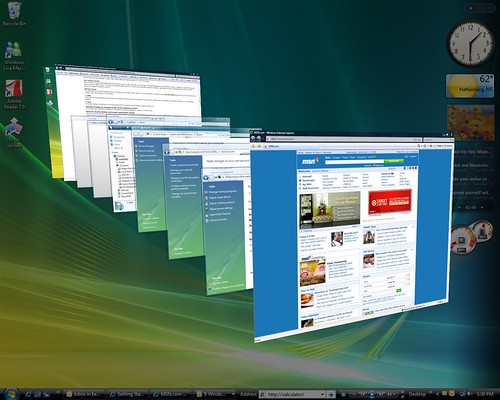
There are tons of enhancements to Windows Vista, too many too mention. Start by looking at the Windows Vista Home Page. There you will find a lot of information on the various versions of Vista and which features they include as well. Here are some nice haves that I am enjoying on Vista:
There are tons of other features and little niceties that I’ve noticed here and there but you’ll have to get busy installing Vista for yourself to really get the feel of it. By the way, I also installed Vista on my Media Center PC and have been running Media Center on Vista Ultimate for the past several days. I’ll try to write something up on it later on.
Sorry for the delay in this thread of posts about installing Windows Vista but I ran into a very nasty virus that kept me away from the computer for several days. In Part 2 the last problem I had encountered was the installation not being able to find the install.wim file. After checking and re-checking my hash, I knew for a fact I had a good download so it had to be the burn of the DVD that was causing my problems.
After searching the Internet I found others that had the same problem. Most were trying to install Vista in Virtual PC or VMWare though (not on a regular PC). More times than not it was always the burned DVD. Some of the users suggested to burn the DVD at the lowest possible burn speed. So I fired up another version of Nero and chose the lowest option available, the 2x option.
Immediately upon booting with the new 2x DVD I burned, the computer read the DVD drive faster, booted faster and things appeared to be in order. Once it got to the license screen I typed in the license key and didn’t get the d:\sources\install.wim error I had previously gotten. I thought I was on my way to an install…… WRONG! After I chose my Promise Fasttrak driver from my USB jump drive I chose my C: as the partition to install Vista too and formatted the partition. After about a minute of the installation copying files, I got this screen.
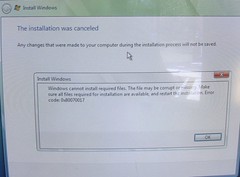
Ok, so here is the WORST part of this. In order to get to this point, I had formatted my main C:\ drive. Yep. Blown away. This meant I couldn’t reboot back into Windows XP and burn another copy or anything. This is one of those cases where having multiple PCs comes in handy. My only other computer that had a DVD burner was my Dell Laptop but I didn’t have the ISO on this laptop but I did backup the ISO to my external drive. I will spare you the hours it took me to get the ISO copied over to the laptop which didn’t have a FireWire port. Moving on.
Once I got the ISO copied onto the laptop, I checked the hash. Yep, it was good. I had to go to town anyway so I decided to pickup some new DVD discs. Further investigation on forums stated this could also be a problem. Once I returned from the store I put the new disc in the drive of the laptop ready to burn yet another DVD. Then another problem appeared. For some reason Alcohol 120% wouldn’t burn the disc, it wouldn’t even start the burn. Thinking that Alcohol 120% was just on the fritz I downloaded CDBurnerXP, a well known and respected free burning program. Same problem. What was going on?
Reading the error logs from the two programs it seemed the best thing to do was to upgrade the firmware on the DVD drive in the laptop. It was suppose to “magically” solve the problem. I upgraded the Sony DVD RW D56A to the latest Sony firmware of PFS3.
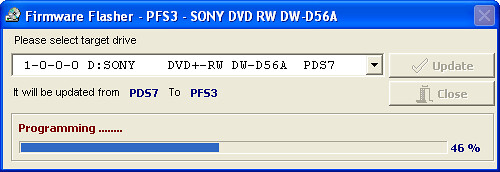
Once I rebooted I thought this was it. I was going to burn a new DVD at lower speed and get Vista installed. After I got rebooted I tried to burn the disc again. It failed to boot. This time, I got the d:\sources\install.wim error. By this point, I am starting to suspect the ISO image.
By this point I am feeling extremely defeated. Nothing I did worked. For whatever reason I happened to decide to download the x32 version of Vista and it was about finished. While I was on MSDN, I noticed that the x64 version of Vista is missing from the site! It honestly isn’t there anymore. The 32bit version is but the 64bit version doesn’t show up anymore on the front page or menus. The only conclusion I can withdraw from all of this having burnt about 15 DVDs at various speeds on various burners and different types of media is the x64 RTM of Vista that was posted to MSDN was corrupt. Plain and simple, it won’t install.