Welcome

You have reached the blog of Keith Elder. Thank you for visiting! Feel free to click the twitter icon to the right and follow me on twitter.

Speaking Engagements For April – May 2007

Posted by Keith Elder | Posted in Speaking | Posted on 28-03-2007

1

For the next several weeks or month I’ve got several events lined up I’ll be speaking at in different parts of the country.  If you are in these areas I hope you can stop in and say hi.

Where:  http://www.alabamacodecamp.com  (Alabama Code Camp)
When: April 14th, 2007
City:  Mobile, AL

Last year we held the Alabama Code Camp in the fall in Montgomery, AL.  On April 14th in Mobile, AL we’re having another CodeCamp.  This CodeCamp is being put on by the Lower Alabama .Net User Group.  Doug and Matthew of the LANUG are doing a great job pulling this camp together.  I’ll be speaking on two topics:  Structure and Guidance for Organizing Applications within Visual Studio and Windows Workflow Foundation.  Other speakers that are going to be there include Jim Barstow, Barry Ralston, Doug Turnure, Joe Healy, Wally McClure, Jim Wooley, Jeff Barnes, Joe Fuentes, Tony Lombardo, Kevin Boles, Robert Cain, Bruce Thomas, Todd Miranda and Brian Hitney.  That’s a heck of a line up!   If you are in the Mobile area come on out.

Day of .Net May 5, 2007 - I'll be there!

Where:  http://www.dayofdotnet.org  (Day of .Net)
When:  May 5th, 2007
City:  Ann Arbor, MI
Location:  Washtenaw Community College

You read that correctly, I’ll be back in Ann Arbor, MI on May 5th.  This is going to be a great home coming event since I lived in Ann Arbor, MI for eight years and also taught at Washtenaw Community College for several years while I lived in Ann Arbor.  Since Ann Arbor, MI is only 20 miles from our company head quarters in Livonia, MI I was able to work it out based on my onsite schedule.  This is going to be another great event with speakers like James Bender, Patrick Steele, Brian Sherwin, Martin Shoemaker, Drew Robbins, Steve Mushkat, Darrell Hawley, Brian Prince, Nino Benvenuti, Josh Holmes, Mark Miller, Dustin Campbell, Jeff Blankenburg, Aydin Akcasu, Chris Woodruff, Justin Kohnen, Dan Hibbitts and Joe Wirtley.  Whew that’s a mouthful!

It is going to be great to be back in Ann Arbor and I look forward to seeing the faculty along with some past students at the event!


Where: http://www.aadnd.org (Ann Arbor Dot Net Developers User Group)
When:  May 9th, 2007
City:  Ann Arbor, MI
Location:  Ann Arbor IT Zone

I’ve spoken at the IT Zone on several occasions but this is going to be the first time I’ll be speaking at the IT Zone on .Net.  Thanks to Darrel Hawley for not giving up on me.   I had to cancel on Darrel twice this year already because of a conflict with another conference (CodeMash) and then the MVP Summit so I appreciate Darrel not giving up on me and sending a hitman to Mississippi to slash my tires or something. 

2007 MVP Summit

Posted by Keith Elder | Posted in Uncategorized | Posted on 24-03-2007

1

I just got back from the MVP Summit in Seattle, WA where 1700 MVP’s from all across the world representing some 90 different countries came together.  I’ve been to various technical conferences including the Office Developer Conference, Tech Ed, and PDC.  All of these conferences are great, but honestly, the MVP Summit was the most interesting one I’ve attended. 

As you notice on my blog I don’t display the MVP logo, and for good reason since I’m not an MVP. I received a special invitation to attend the summit back in January as a special guest this year (very cool).  I’ve been very active in the community the last year or so and it was nice to get recognized for my contributions running an internal .Net User Group as well as speaking at a lot of Code Camps, User Groups, Conferences, etc. 

Sunday

I arrived on Sunday evening to the Westin Hotel where I was staying.  I left the house that morning around 5:30 AM and arrived in Seattle around 5:00 PM.  With the time zone difference I was traveling about 14 hours so obviously I was dead tired.  For those of you that are shocked it took me 14 hours to get to Seattle don’t be.   The funny thing is I was talking to one MVP I met at a summit last September who was from Germany.  We compared notes and apparently it takes longer to fly from Hattiesburg, MS than from Germany.  Go figure. 

After getting unpacked I met up with Josh Holmes, Microsoft Evangelist and friend from the Heartland District, Cory Smith, and Denny (another DE from Microsoft) in the lobby of the Westin.  We then headed to the Party with Palermo with thanks to Corey for giving us a ride.  Party with Palermo is turning into a larger event each year thanks to Jeff’s great party organizing skills (or would that be 5ki11z? 🙂 ).   Jeff did an outstanding job organizing the party complete with sponsors, giveaways and food.   After the event started shutting down everyone piled into the lobby of the Westin and continued the geek conversations way into the night.

Monday

Monday we spent most of the day in the Expo center networking and meeting the MVP Leads after registration.  I think I stood up all day with my back pack on so needless to say my dogs were barking (that’s southern slang for my feet hurt).  When I got to the hotel that evening I was extremely tired but we had to attend the large dinner event.  They organized the dinner parties that night by region.  For example the Americas, Japan, etc.  This made it easy to find people that were in your area and spoke the same language since the dinners were separated.  The best part about the dinner was it was in the Westin so I didn’t have to leave the hotel.  They had karaoke setup for the mixer after the dinner (along with Xboxes) and this one guy sang “Wanted, Dead or Alive” by Bon Jovi and rewrote the words to the entire song to be technical geek speak.  Hilarious!  When it was over I went down the escalator and straight up to the room. 

Tuesday

Tuesday was the big day.  Bill Gates was giving the keynote at 9:00 AM.  Everyone was shuffling around trying to get breakfast and get into the keynote room for good seats.  The keynote Bill gave was about 20 minutes long and very general.  The best part of the keynote was the question and answer.  A high school computer science teacher from Florida asked a great question as to what Bill would do with the $20 he got from Steve Balmer at another conference.  Apparently Steve handed them out to the crowd.  His question was directed at how to build the next generation of computer scientists and what Bill would do with the $20 or even twenty million dollars. 

The best question well, it really wasn’t a question but more like a request, came from Lorin Thwaits who had a copy of an old Altair manual with him.  I won’t repeat what happened, just read the post on Lorin’s blog.  The other thing about this keynote that is of interest is the fact that it may very well be Bill’s last one. 

After the keynote we broke out into sessions.  After the first round of sessions I had lunch with Neal Ford (who gave one of the keynotes at CodeMash where I spoke at in January) and his friend Michael Li from Canada.  There was also an architect from Google as well at our table but I can’t remember his name although he does speak a lot.  I didn’t get a chance to talk to Neal much at CodeMash so it was good to get better acquainted.  The rest of the day was spent in sessions.  INSERT NDA HERE.  That night they bused us to the Museum of Flight where we had dinner, karaoke and a jam session.   I stumbled upon Brian Prince and we hung out near the karaoke area.  The karaoke they did was a little different. They had fake money you had to collect to participate in to win prizes.  Example, if you are wearing a watch you get $400, or you get $100 for any white articles of clothing.  Other examples would be everyone that dances on this next song get $500.  It was a good time.  I have a video of Brian in the conga line that I’ll post soon.  This was the biggest event of the week and a lot of fun.  By this point though, I’m a walking zombie by the time we get back to the hotel at 11:00 PM.  However, everyone is in the lobby chatting it up so the networking and geek talk must continue! 

Wednesday

Wednesday we were on campus meeting with the product teams.  INSERT NDA HERE.  That evening after the sessions the majority of us headed over to the Microsoft Campus store to pickup some goodies.  The line was incredibly long and the whole process took several hours.  I picked up a new VX6000 camera since my Logitech camera doesn’t support Vista drivers.  Then we headed over to the evening dinner with the product teams.  There I hooked up with Joe Healey, Developer Evangelist from Florida, and I got introduced to a lot of the guys in his area including Stan Schultes, Tom Fuller, and Florida Regional Director Shervin Shakibi.  Since we got back to the hotel early, we hung out with Joe at the Redline Hotel and grabbed some solid food (hot wings, a true southern delicacy) since there wasn’t any food left at the dinner that night by the time most of us got there from the campus store.  They were absolutely hilarious.  Great bunch of guys.

Thursday

Thursday we were back on campus wrapping up the sessions from the product teams.  INSERT NDA HERE.  

Summary

As you can see it was a busy week.  I left a lot of people out that I talked to above so I hope to work them in here during the summary.  The people at the summit is what makes this summit so great.  I had deeper technical discussions at this summit than any other conference I’ve attended.  It was awesome to be surrounded with such intellectual people who are truly passionate about their technology.   It is so easy to identify people based on their expertise of their MVP award who have the same interest to immediately start comparing notes.  I remember Cory Smith and I got into a conversation with Nick Parker in the hotel lobby about the value of Smart Clients.  Nick was playing devils advocate which made it just that more interesting. We were also sitting with Scott Hanselman that night in the lobby of the hotel as well which will make any conversation interesting.  DonXML and I had a great conversation about DataSets and when to use and not to use them.   I had another great conversation with a special guest named David.  We talked about the Smart Client Software Factory and compared notes on building Winform apps as well as Smart Clients.  Jim Wooley, who I met in Montgomery at a CodeCamp, and I tackled about everything it seemed.  Jim is “all in” when it comes to LINQ so if you want some LINQ info, check his blog.  Jim and I are for the most part in the same area or are involved in the same community area (Georgia, Alabama, Mississippi) so we’ll be seeing more of each other I’m sure.  Bill Wagner, Josh Holmes and I got into a Google Maps vs Live Search Beta discussion when it comes to Pocket PC.   The conclusion was you need to load both on your Pocket PC phone since depending on the area you are in, one has better map support than the other.  Shawn Wildermuth and I got into a “which RSS Reader” is best.  He’s a fan of Google Reader, and I like to use RSS Bandit.  He broke out his laptop and gave me a whirlwind tour of how and why he likes Google Reader.  Shawn, in case you read this by chance, I’ve been using Google Reader for a week now just for kicks.  Stay tuned for a future posts about it 🙂  There are numerous other conversations and people I met and I wish I had more time to cover them all. 

 All in all it was a great time and an awesome experience.  Thanks to everyone who I met and thanks to Microsoft for allowing me to attend, it was awesome! 

Creating Smart Application Layouts with Windows Forms 2.0

Posted by Keith Elder | Posted in Uncategorized | Posted on 24-03-2007

0

While this article is about, hmm, 9 months old right now, I just stumbled across it.  Call it fate if you like that I was eventually destined to read it.  The article covers some great tips on how to make FlyOut panels and how to create things like Collapsible Menus in Windows Forms 2.0. 

The examples are in VB, but they do have C# and VB in the samples download.  The article can be found here:

http://msdn2.microsoft.com/en-us/library/aa730847(VS.80).aspx

My Programmer Personality

Posted by Keith Elder | Posted in Uncategorized | Posted on 01-03-2007

1

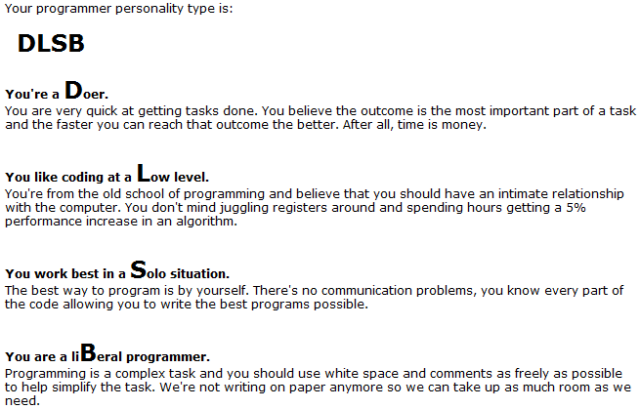
I just took the Programmer Personality Test which is based on the Myers-Briggs Personality Test.  I am a DLSB – Doer Low level Solo situation liBeral programmer.  If you want to take it you can take it here:

http://www.doolwind.com/index.php?page=11

Cingular 8525 Pocket PC Phone Review and First Impression

Posted by Keith Elder | Posted in Uncategorized | Posted on 01-03-2007

4

Some call it the best windows mobile phone currently available, others call it too expensive, others, well they are just jealous.

Several days ago I got an opportunity to get a new phone so I took it.  A friend of mine who was so smitten with my Cingular 8125 cell phone that I won at Tech Ed 2006 went out and got one themselves several months ago.  A few days ago their phone was stolen.  Since they only owned the phone for a very short time, it was going to cost the full retail price to replace it.  Most of us are familiar with how the carriers contracts work.  My contract period happened to expire recently and I could upgrade.  My friend offered me a fair market price for my phone and I decided to take the offer as an opportunity to get a newer model.  I know, I know, I’m a great friend 🙂

My Previous Phone – Cingular 8125

I was really happy with my 8125 in terms of the features.  There were a few things that bugged me about the 8125 though.  I wouldn’t call it the “perfect” device and for the record I never recommended it to anyone unless they were a power user.  I always loved the keyboard sliding out and seeing everyone’s eyes get big as if they were 8 years old and had just watched a Transformers commercial for the very first time.  The 8125 only had a 200MHz processor so it wasn’t the fastest kid on the block.  With a lot applications open, switching views (by sliding the keyboard out) could get sluggish more times than not.  It did play movies and MP3s with ease and was good at multi-tasking and was extremely stable (unlike previous Treo’s I’ve owned). 

The form factor of the 8125 is what I really liked about the device.  Having a big keyboard to type on is nice.  The downside to this form factor is it isn’t a one handed device.  To do pretty much anything it required sliding the keyboard out.  The keyboard was really too large to type with one hand.  Good luck doing anything if you had another hand occupied (steering wheel for example).  

The first time you open the 8125 the reaction is, wow, nice keyboard.  Then you try to use it and start to notice things aren’t as easy as they should be.  The keyboard took up the entire area allowed but things were too crammed.  I couldn’t easily dial numbers with the keyboard since they were on top of the row.  The two action buttons were too close to the top and hard to press.  Since the keyboard did take up the whole allowable area you had to use two hands to type on it or dial numbers.  The device is great at doing email and text messages and this is where the keyboard shines.  I could type faster on this device than any other I’ve ever owned (including Blackberry, Treo, Danger).  Obviously there are some areas to improve with the 8125.  So how does the newer 8525 stack up?

Cingular 8525

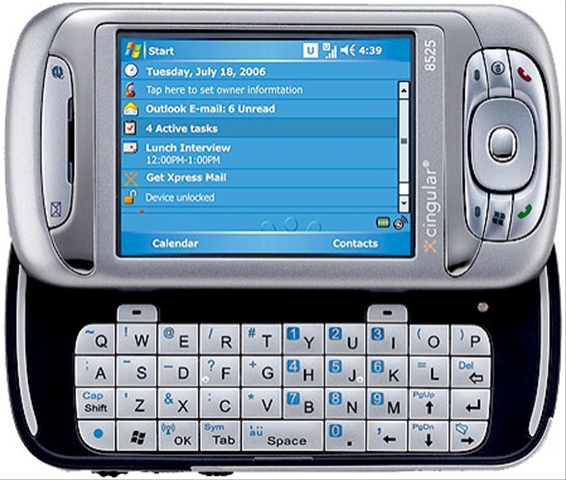
The 8525 builds upon the 8125’s form factor and fixes a few usability problems.  If you’ve owned the 8125, you really notice the small details they fixed.  For starters let’s start with the keyboard.  Based on the picture above notice it doesn’t take up the entire area.  This means it is smaller and easier to navigate with one hand.  They also removed the numbers from the top row, and made them blue and put them in the keyboard itself to make it faster to enter numbers.  The action buttons on the very top are not jammed up against the bottom of the device and are easier to press.  The keyboard itself also has a completely different feel and even though the keys are smaller, they are extremely easy to use and type with. 

Another major addition in terms of usability is the addition of the scroll wheel and “ok” buttons which are positioned on the left of the device.  This is a very welcomed feature and allows you to do a lot of things quicker and easier.  For example if you are on the phone screen, simply scroll down and you will see your speed dial options.  Much faster than having to press speed dial then the number you want to dial.  When reading emails you can press and hold the scroll wheel and a context menu appears whereby you can delete or move emails.  Honestly it reminds me of my blackberry days a lot.  The only difference is I can touch the screen to carry out actions instead of relying on the scroll wheel for my only way to interact with the device.

On the front of the device they added a windows button and an ok button.  Honestly I think these keys are useless and they are there to only make the other keys smaller and harder to hit.  This is one area I wish they’d left alone because I was perfectly happy with the way the 8125 was.  I actually wanted them to add this to the 8125 but since you have the scroll on the 8525 these buttons on the front aren’t needed I don’t think.

The 2.0 megapixel camera takes decent pictures.  Much better than the 1.3 megapixel camera on the 8125.  It also has a slider on the back which allows you to move between portrait and landscape mode.  I haven’t used it honestly but it is there.  Here is a picture I took from the back of my deck over looking the back yard.  Click it to view the full 1600×1200 picture.  This was taken on the highest settings available.

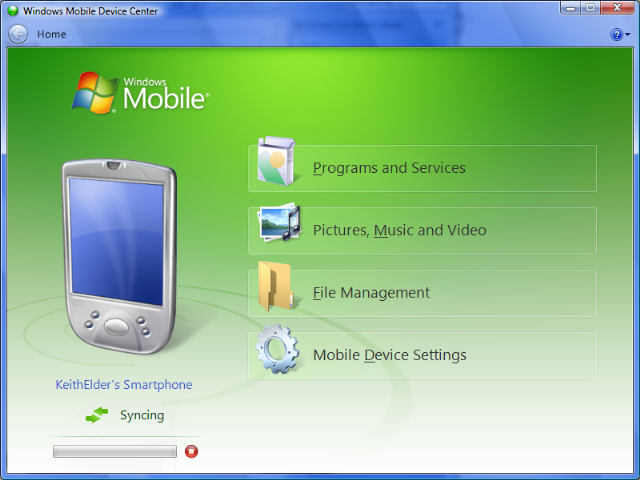
 Another welcomed feature is the 400MHz processor.  So far the device has been really responsive and the battery life has been better than expected.  Syncing with the device in Windows Vista works very well.  I like the way they integrated tagging of pictures and videos when syncing with the new Vista Windows Photo Gallery application.  If you haven’t used the new Windows Mobile Center here is what it looks like below.  This new version in Vista completely replaces Active Sync which leaves all of us warm and fuzzy inside.

The 8525 has other features such as Bluetooth, WIFI, and oh, 3G baby!  It also has a built-in light sensor which detects if it is dark and then turns on the blue back light on the keyboard.  A feature that is extremely welcomed.  On the 8125 I constantly pressed the space bar to get the keyboard to turn the back light on.  I did read somewhere that someone holds their finger on the sensor to make it come on although I haven’t had to do this yet.  If you have an Exchange Server you can also get your email in real-time just like a blackberry and with 3G, the wireless modem feature allows you to get on the Internet wherever service is available with your notebook.

Push to talk is also incorporated with the 8525 although it will not be available until a few months.  This is kind of a bummer since my sister and her husband have push to talk on their phones.  At least I have someone to play PTT with 🙂

Windows Mobile 6.0 also just got released recently and I hope this device gets an update ROM soon.  Mobile 6 has a lot of nice features and since it is the latest, I of course want it! 

If you haven’t looked into this device and you are a power user I would say give it a shot.  By far the best device I’ve owned to date and I hope I have another friend that gets their phone stolen when the next model comes out. 🙂