Featured Post

Creating Custom SQL CLR User-Defined Types

Since SQL Server 2005 .Net developers and DBAs have had the ability to create custom SQL CLR types.  It wasn’t until recent I found a few uses for them.  Not only did I find a use for them but a DBA who is a team member did as well.  If you would like more information about SQL CLR types or...

Read More

Workaround For WCF NetMsmqBinding Bug: The service ‘~/queue’ does not exist.

Posted by Keith Elder | Posted in .Net, WCF | Posted on 24-11-2008

8

There is an extremely nasty bug in WCF (Windows Communication Foundation) that I have discovered as of late.  I know it is a bug because after several weeks with an open support call into Microsoft it was confirmed as a bug.  It was so perplexing because it was hard to replicate.  It even took the .Net Framework developers a week or more to track it down.  Here’s a full blown error message:

An unhandled exception occurred and the process was terminated.

Application ID: /LM/W3SVC/2/ROOT

Process ID: 4428

Exception: System.ServiceModel.EndpointNotFoundException

Message: The service ‘~/unittestqueue’ does not exist.

StackTrace:    at System.ServiceModel.ServiceHostingEnvironment.NormalizeVirtualPath(String virtualPath)
   at System.ServiceModel.Channels.MsmqHostedTransportManager.HostedBindingFilter.MatchFound(String host, String name, Boolean isPrivate)
   at System.ServiceModel.Channels.MsmqBindingMonitor.MatchQueue(MatchState state)
   at System.ServiceModel.Channels.MsmqBindingMonitor.ProcessFoundQueues(MessageQueue[] queues, Dictionary`2 knownQueues, Boolean isPrivate)
   at System.ServiceModel.Channels.MsmqBindingMonitor.OnTimer(Object state)
   at System.ServiceModel.Channels.IOThreadScheduler.CriticalHelper.WorkItem.Invoke2()
   at System.ServiceModel.Channels.IOThreadScheduler.CriticalHelper.WorkItem.OnSecurityContextCallback(Object o)
   at System.Security.SecurityContext.Run(SecurityContext securityContext, ContextCallback callback, Object state)
   at System.ServiceModel.Channels.IOThreadScheduler.CriticalHelper.WorkItem.Invoke()
   at System.ServiceModel.Channels.IOThreadScheduler.CriticalHelper.ProcessCallbacks()
   at System.ServiceModel.Channels.IOThreadScheduler.CriticalHelper.CompletionCallback(Object state)
   at System.ServiceModel.Channels.IOThreadScheduler.CriticalHelper.ScheduledOverlapped.IOCallback(UInt32 errorCode, UInt32 numBytes, NativeOverlapped* nativeOverlapped)
   at System.ServiceModel.Diagnostics.Utility.IOCompletionThunk.UnhandledExceptionFrame(UInt32 error, UInt32 bytesRead, NativeOverlapped* nativeOverlapped)
   at System.Threading._IOCompletionCallback.PerformIOCompletionCallback(UInt32 errorCode, UInt32 numBytes, NativeOverlapped* pOVERLAP)


Ok, you see the error message above where it says the service ‘~unittestqueue` does not exist?  Well that queue DOES exist on the server but there isn’t a service mapped to that queue. 

The kicker to this is that I’m not even using the unittestqueue at all within my code.  This begs the question, why is a queue that I’m not even using showing up in my error list?  The netMsmqBinding I had configured used another queue called logEntries.  Here is the WCF configuration so you can see how this is configured.

   1: <system.serviceModel>
   2:         <serviceHostingEnvironment>
   3:             <baseAddressPrefixFilters>
   4:                 <add prefix="http://keithelder.net/"/>
   5:             </baseAddressPrefixFilters>
   6:         </serviceHostingEnvironment>
   7:         <client/>
   8:         <bindings>
   9:             <netMsmqBinding>
  10:                 <binding name="msmqBinding">
  11:                     <security mode="None">
  12:                         <transport msmqAuthenticationMode="None" msmqProtectionLevel="None"/>
  13:                         <message clientCredentialType="None"/>
  14:                     </security>
  15:                 </binding>
  16:             </netMsmqBinding>
  17:         </bindings>
  18:         <services>
  19:    <service behaviorConfiguration="LogEntriesBehavior"
  20:     name="KeithElder.MsmqService">
  21:     <endpoint address="net.msmq://keithelder.net/private/LogEntries"
  22:      binding="netMsmqBinding" bindingConfiguration="msmqBinding" name="msmq"
  23:      contract="KeithElder.ILogMsmqService" />
  24:     <endpoint binding="mexHttpBinding" bindingConfiguration="" name="wsdl"
  25:      contract="IMetadataExchange" />
  26:    </service>
  27:   </services>
  28:         <behaviors>
  29:             <serviceBehaviors>
  30:                 <behavior name="LogEntriesBehavior">
  31:                     <serviceMetadata httpGetEnabled="true"/>
  32:                     <serviceDebug includeExceptionDetailInFaults="false"/>
  33:                     <serviceThrottling/>
  34:                 </behavior>
  35:             </serviceBehaviors>
  36:         </behaviors>
  37:     </system.serviceModel>

The endpint is set to net.msmq://keithelder.net/private/LogEntries.  This means that messages received on this endpoint will be stored in the private queue logEntries.  Once stored, the messages call the method written in WCF to take the message from the queue and process it.  Really, this is all slick when it works and opens the door for a lot of scenarios. 

Obviously we aren’t supposed to be getting this error, especially about a queue WE AREN”T EVEN USING!

By the way, when this error occurs, it kicks off the jitdebugger and will slow your machine to a crawl.  It isn’t something fun to debug, trust me.

The Fix

If you have run into this error, and find this entry on my blog somehow, here is the workaround for this.  Again, this is a workaround, not optimal by any means.  There are two things you have to do (at least as far as I can tell with my testing).

Fix #1

Do not have any additional private queues other than the queue required for your service.  Obviously this has problems because other applications may be writing to private queues as well. 

Fix #2

Deploy the application to a virtual directory in IIS.  This is where I first started noticing the problem because I couldn’t get our test server to work when I deployed the code even though it worked on my machine. 

Fix #3 (added 12/3/2008)

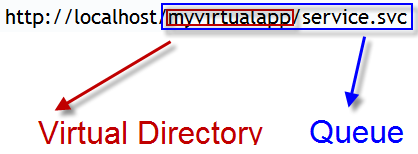
Support from Microsoft said you can do one or the other, but I am still getting errors in the event log even though the application is deployed in a virtual directory with two private queues.  If I delete all queues and have it deployed in a virtual directory things are happy.  Changing the endpoint to the name of the path of the service does fix the problem and allows multiple queues to be on the machine.  I’ve tested this extensively.  Here’s an example:
image

So instead of having the queue named “LogEntries”, changing it to “myvirtualapp/service.svc” fixed the problem and things work normally.

Official Fix

I was told by Microsoft Support this bug would be fixed in the next service pack and also the .Net Framework 4.0. 

IIS7 – Service Unavailable Error App Pool Permissions

Posted by Keith Elder | Posted in Windows | Posted on 24-11-2008

0

I just spent two hours trying to figure out why I couldn’t deploy a Windows Communications Service to my local IIS setup.  I kept getting the famous error:

503 – Service Unavailable

This error is about as helpful as a toothpick in a snow storm.

It turned out my problem was simple to solve, I just wasn’t paying attention. 

I had an application pool setup with my domain credentials so the service could run under my username and access the resources it needed to.  The problem was it had been so long since I  had worked on the application, my password for my domain account had expired.  Thus the application pool wouldn’t start.  I changed the password and things are working now. 

Hopefully this will help someone out there not waste a few hours of work.  I’m off to kick myself for not catching this earlier.

Deep Fried Bytes Episode #20: Windows Azure – The Overlord in the Cloud

Posted by Keith Elder | Posted in Internet, Podcast, Windows | Posted on 21-11-2008

0

 Listen To This Episode 

http://deepfriedbytes.com/podcast/episode-20-windows-azure-the-overlord-in-the-cloud/


It isn’t everyday you get to talk to an Overlord but in this episode we did!  In this episode we talked to the Overlord of Windows Azure, Steve Marx.  Steve gives us the scoop on Windows Azure which we renamed to the Overlord in the Cloud.  We found it much more fitting. 

In this episode we break down Azure and discuss what it is, why you might want to use it, cost, availability and much more.

Enjoy.

How To Listen To The Show

1. Directly From The Web Site (or click the link above)

When you visit the site look for this:

Clicking the triangle will launch the Yahoo! media player and automatically start playing the show for you. As long as you leave the browser window open the player will stay open. Clicking off the page WILL stop the player!

2. Subscribe via iTunes and Zune

If you have iTunes or Zune installed on your computer you can subscribe to our show. In iTunes open the Music Store and search for “Deep Fried Bytes”. In the Zune software, go to the MarketPlace select Podcast and search for “Deep Fried Bytes” to subscribe to the show. You can also click either of the two icons below to automatically subscribe to the show if you have iTunes or Zune installed.

Subscribe via iTunes Store Subcribe via Zune Market Place

3. Subscribe to RSS Feed

To stay current and up to date with the show, subscribe to the site’s RSS Feed. If you don’t know about RSS feeds you can read more here: http://en.wikipedia.org/wiki/RSS_(file_format)

If you already have an RSS reader installed and setup, click the feed icon below to grab our news feed.

Subscribe to our podcast!

Our Xbox Avatars

Posted by Keith Elder | Posted in XBOX 360 | Posted on 20-11-2008

3

The new Xbox Experience launched yesterday.  I got up early in the morning to update the system and play before walking to work.  Overall I like the new experience, it definitely has a more social appeal to it and things are more discoverable.   

Last night, Ellen and I sat down to make our avatars.  This turned out to be tougher than expected because, honestly, there weren’t enough basic options.  For example, there was only one page of noses and only a few mouths.  Ellen and I went through every option on the menus and this is the best we could come up with for me.  My picture is at the top of this blog, so I’ll let you be the judge as to how close we were able to get.

image

We  then started working on Ellen’s and I think we were able to get a better resemblance with her.  Here is hers. 

image image

If you are curious as how to get your full body avatar here is the secret.  You go to this link:

http://avatar.xboxlive.com/avatar/{YOURNAME}/avatar-body.png

By the way, my Xbox handle is “Z0rka” (that is a zero not an oh) and Ellen’s is “Sonata109”.  Friend up with us if you like.

AT&T iPhone/Mobile Tethered Users Beware: One Gigabyte of Wireless Bandwidth: $503.00

Posted by Keith Elder | Posted in Apple, Mobile Devices | Posted on 16-11-2008

3

imageAT&T recently announced they were going to support tethering for the iPhone.  I am sure a lot of users are happy about this move, I know I am as that has been the one thing that has stopped me from not getting an iPhone and to this day is why I continue to use my Blackjack II.  This announcement, coupled with a reader commenting on a previous article about whether I would recommend tethering the Blackjack II if someone traveled 70% of the time, got my curiosity up.  Thus I started to dig in. 

To answer the comment from the reader, in my opinion, that much travel would warrant more of a dedicated device.  Curious I went over to the AT&T web site to check out the AT&T USBConnect Mercury device they’ve been advertising for months now.  You know the one, the one that Bill Kurtis finds the Internet with?

Right now the device is free after mail-in rebate. Here is a screen shot for posterity sakes.

image

If you walk through the shopping cart the next thing you have to do is add a data plan.  Currently only one plan is available and the monthly cost today is $60 / month which gives you 5GB of data. 

Currently AT&T offers a tethering option for phones like the Blackjack II and others.  Both the tethering data plan and the USBConnect Mercury use the same calculations, 5GB to start with and then so much for additional data.

Pay Attention!

Ok, here is the kicker to this that a lot of people probably won’t pay attention to.  The additional data cost is:

$0.00048/KB

Here’s a snapshot of the value from AT&T’s web site (for posterity):

image

Someone may read this and go, cool, that sounds really cheap.  There are a lot of zeros in there.  But don’t be fooled!

The key here is they measure cost in terms of KB (kilobytes).  For those that don’t know how this works, there are 1,024 bytes in a Kilobyte.  To put this into perspective, if you visit the home page of http://www.amazon.com, you will download roughly 300KB to load the page.  As you can see, this is a really low level of measurement, really we can only go one step lower and that is to just measure bytes.  

There are 1024KB in a Megabyte and 1024MB in a Gigabyte.  Thus our formula for calculating how much it would cost a consumer that downloaded an extra GB (gigabyte) of data during the month by either tethering an iPhone or using the USBConnect Mercury is as follows:

1024(KB) = 1MB
1024(MB) = 1GB
Cost per KB:  $0.00048

1024 * 1024 * .00048 = $503.31


$12/GB for First 5GB, and then $503/GB After That

Can you just say wow?  I couldn’t believe this when I added this up.  I was in so much disbelief I had a few programmer buddies calculate this as well. 

It would make more sense logically speaking for AT&T to say they gave you 5GB at $60.00, and then if you use another GB, then it is going to be $11.99.  But that would be too easy to calculate.  For some reason AT&T thinks they can justify charging $503 for one GB of wireless data, yet sell you others at $12 a GB. 

For those that are thinking they can use their iPhone any and everywhere as much as they want, seriously, be careful!  These words of wisdom aren’t just for iPhone users, but for anyone tethering a device to AT&T’s network like the USBConnect Mercury or other mobile phones that is a heavy user and traveler.