Featured Post

My Pathway to Software Development

Michael Eaton threw the gauntlet at me last week wondering why I hadn’t blogged about how I got into software development.  Here are the series of questions he proposed and the answers. How old were you when you started programming? I attempted to program a Timex Sinclair 1000 that I got for Christmas...

Read More

Google Latitude – Useful or Too Early to Tell?

Posted by Keith Elder | Posted in Internet | Posted on 27-02-2009

0

In the future the phrase “Where are you?” may be a thing of the past.  Google’s new application called Latitude allows users to update their locations from mobile phones as well as their computers.  Yesterday I took my first road trip with Google Latitude enabled and had a friend track my location while I was out. 

Instead of me explaining the ins and outs of Latitude.  Watch this short video on how the service works.

There are several mobile phones supported currently although the iPhone is listed as “coming soon”.

  • Android-powered devices, such as the T-Mobile G1
  • iPhone and iPod touch devices (coming soon)
  • most color BlackBerry devices
  • most Windows Mobile 5.0+ devices
  • most Symbian S60 devices (Nokia smartphones)
  • many Java-enabled (J2ME) mobile phones, such as Sony Ericsson devices (coming soon)

A Quick Mobile Tour

To install Google Latitude on your phone go to http://www.google.com/latitude/intro.html and type in your cell phone number.  A text message will arrive almost immediately providing a link where the software can be downloaded.  I’m using it on my Blackjack II running Windows Mobile 6.1 currently.

Once installed, launch Google Maps on the phone.  Here are a few screen shots that should give you an idea what to expect on a Windows Smartphone.

 sshot002

Launch Latitude from the main menu.

 sshot003

I can see Brad and Chris are where they are supposed to be but Shawn is already in Washington for an up and coming conference we’ll both be at.
sshot004

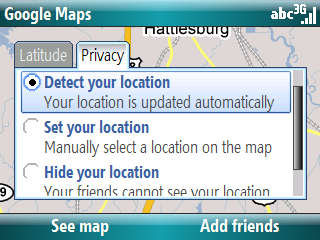
There are several privacy settings.  Auto detect is the default but you can also “fake” your location or just hide it.
 sshot005

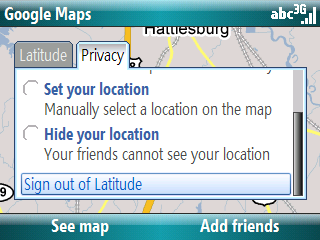
It is not intuitive how you sign out of Latitude so note you sign out at the bottom of the privacy tab.
 sshot006

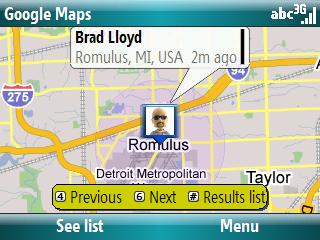
There are hot keys to jump from friend to friend on the map.
 sshot007

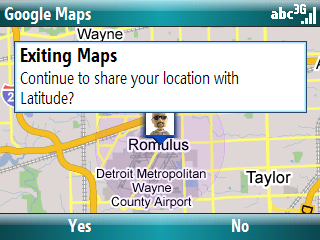
Once you exit the application, it asks if you would like to continue to share your location.  There doesn’t appear to be any settings yet on frequency.

Road Testing Latitude

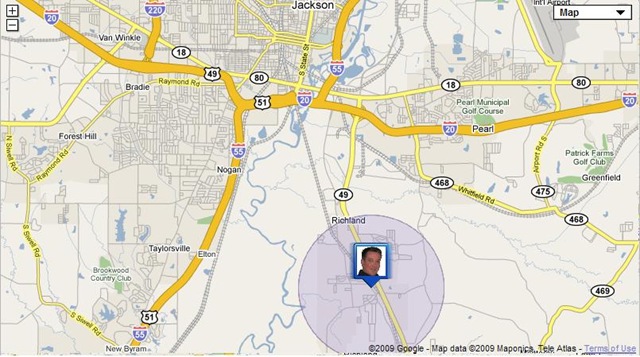
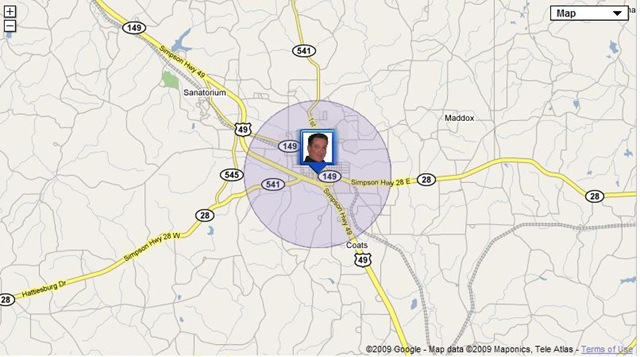
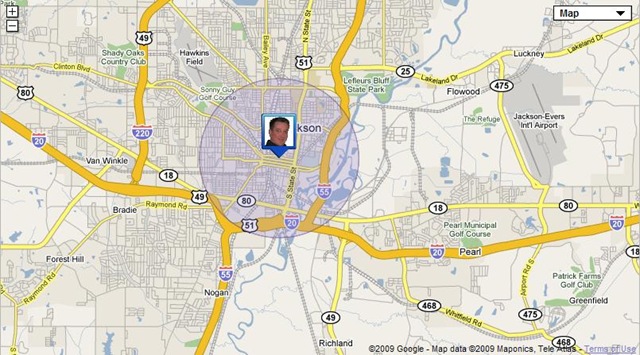
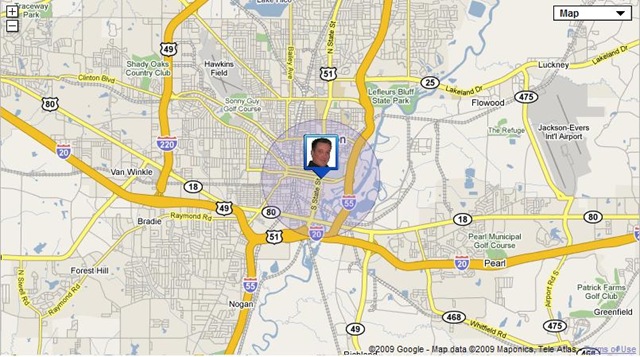
As we were leaving Jackson, MS yesterday I emailed Brad and asked him to take screen shots of Google Latitude every 15 minutes as we were on the way back home.  Brad obliged but said the location seemed to update only about every 20 minutes.  Here’s what it looked like from Latitude as we drove from Jackson, MS back to Hattiesburg, MS (about a 2 hour drive).
a

b

c

d 

Useful or Not?

At this point and time only early adopters are using the service it seems.  There hasn’t been enough “buzz” around it yet to get massive adoption, at least not within my network.  Out of the thousands of connections I have, I have only four Latitude invites (that’s pretty sad).  As more people sign up I may find it more useful.  As it stands right now I haven’t found a real-world use for it.  With that said though…

Tomorrow I’ll be traveling to Seattle for the MVP Summit.  It *may* be useful to know where all of my friends are located during a conference.  Which building is Woody in on campus?  Has Jason left yet?  Is Alan back at the hotel?  Where is McWherter?  Are they still home?  Stuck at the airport? Etc.  The only way to find out if it is “useful” is to get more traction within our social networks and use it.

If you want to connect to join the party you can send an invite to this email address.

MVP Summit 2009 Twitter Hash Tag

Posted by Keith Elder | Posted in Internet | Posted on 24-02-2009

0

We came, we voted, we agreed.  The official twitter hash tag for the MVP Summit 2009 is #mvp09.

image

It is short, sweet, and to the point, leaving you with 134 characters left to break the NDA agreement. :)   Kidding!  Don’t do that. 

If you want to keep track of what’s happening at the MVP Summit next week, give  http://twitterfall.com/#mvp09 a try. 

Demystifying WCF on DNRTV

Posted by Keith Elder | Posted in WCF | Posted on 23-02-2009

8

imageI had the pleasure last week of sitting down to record an episode of DNRTV with Carl Franklin.  I decided to do a strip down version of a talk I give on WCF called Demystyfying Windows Communication Foundation.  The purpose of the talk is to get developers interested in WCF by taking out some of the mystery of the new technology.   I know a lot of developers out there are still using ASMX to build services and have hesitations of moving to WCF because of the learning curve.  I tried to break down WCF and remove the mystery behind it as well as give a lot of comparisons as to what developers will find different when moving from ASMX services to WCF.

You can watch the episode using Silverlight here:

http://www.dnrtv.com/default.aspx?showNum=135

The slide deck can be downloaded from here:

http://keithelder.net/Presentations/DemystyfyingWCF/DemystifyingWindowsCommunicationFoundation.pptx

Update

I tried to fix the power point problem John was having below by re-saving it in 2007 format.

Deep Fried Bytes Episode #27: Present and Future of the C# Language

Posted by Keith Elder | Posted in C#, Podcast | Posted on 23-02-2009

0

Listen To This Episode 

http://deepfriedbytes.com/podcast/episode-27-present-and-future-of-the-csharp-language/


In this episode we sat down with Mads Torgersen, Language PM for C# at Microsoft, at the Codemash 2009 conference.  We discussed a variety of languages including Beta, Self, IronPython, IronRuby, F# and of course C#.  Listen in as we discuss the ins and out of C# and why C# and VB are on the same feature path.

Pre-Depression Picture Goes Global

Posted by Keith Elder | Posted in General, Internet | Posted on 18-02-2009

2

imageThis past weekend I posted an article entitled “Pre-Depression”.  Within that blog post was a picture that inspired me to write the article.  Since the article was published the picture within the article has gone global.  Who knew a picture taken with a Blackjack II Windows Mobile phone would be seen by thousands of people across the Internet.  If you haven’t read the blog article the picture was originally in, I do encourage you to read the back story about the picture.   The picture first got picked up on Digg.Com.  Throughout the day it started to climb and then made the home page of Digg which drove crazy numbers of people to the photo, and then ultimately this blog. 

image Yesterday evening I was contacted by Laura Conaway of NPR’s Planet Money and was asked to be interviewed on the phone about the photo.  You can listen to the interview online at their website.

Since the photo was taken it has been viewed by over 138,000 people at this point, just on Flickr.  That doesn’t count all the web sites that copied the photo and reproduced it on their site. 

The blog article has been read over 12,500 times since Saturday. 

Why all the noise over a photo?  I think it has to do with timing, the economy and also something we are all too scared to hear, the word “depression”.  You know the really crazy thing about the sign in the photo?  It has been up for about a year I learned through one commenter on my blog.  Who knows, maybe the store owner is a prophet.