Welcome

You have reached the blog of Keith Elder. Thank you for visiting! Feel free to click the twitter icon to the right and follow me on twitter.

TechEd Day 2

Posted by Keith Elder | Posted in .Net, Asp.Net, Smart Clients, Web Services | Posted on 07-06-2007

0

It is day two of TechEd and my feet and legs are killing me.  My feet didn’t get a chance to rest after the four day whirlwind tour of Disney World.  I told my wife that I was going to have to go to TechEd just so I could rest 🙂  Here is day two’s activities.

Biztalk WCF Adapter

The first session I attended this morning was an overview of the WCF Adapter for Biztalk which is in the R2 release.  Don’t get your hopes up just yet because it isn’t available.  I was told it  wouldn’t be out until 3rd quarter.  The good thing is the WCF adapters bring a lot of cool things to the table.  I can’t remember all the reasons they gave but the one that a lot of people will use is the ability to do TCP binary messages to Biztalk I am sure.  Actually there are seven WCF adapters, one for each binding type.  The demo they showed was a message from a smart client being sent to Biztalk, and then Biztalk hitting SQL Server and then another service.  The orchestration had to route the message and handle the transaction so if the write to SQL Server failed or the the other service failed then it rolled back the data in SQL Server.  Definitely a real world example and it shows the ability of WCF to handle transactions.   

Wondering Around the Expo

After the Biztalk session I was walking from the north building back to the south building and ran into Bruce Thomas at the MVP booth.  I also saw Joe Healy, Jeff Palermo, DonXML, Miguel Castro, and Joe Fuentes.  I then walked down and caught some of the “Speaker Idol” that Carl Franklin and Richard Campbell were hosting.  This was pretty cool and I wish I had heard about it sooner so I could have entered.  The way it works is a speaker gets up on stage and does a 5 minute presentation.  Then they get judged by a bunch of Regional Directors.  It is a really great way to get feedback about your presentation skills no doubt.  The big challenge is doing just a 5 minute talk!

Smart Client Applications in Visual Studio 2008

After lunch I went to a presentation on the new smart client features in Visual Studio.  Some of these are nothing new in terms of new information (linq and wpf) but they are technically “new” in 2008 and some are new exciting features.

Working With Data

LINQ is of course the new way to work with data in VS2008.  The demos they showed were just connecting to a database locally which isn’t a true Smart Client architecture in my opinion since it isn’t services based.  Nevertheless, LINQ is new in VS2008 and we’ll all love him, hug him and call him George.

Taking Data Offline

This is something that I hadn’t seen yet and it really peaked my interest since we have a lot of uses for it.  SQL Server Compact Edition 3.5 which is in beta right now will be available to us.  You can read about the new features here.  The nice thing about 3.5 is it can be deployed with your application through ClickOnce and it doesn’t run as a service.  It also supports about 2-4 GBs of data which should be PLENTY for any application that needs to run offline.  The other piece is the Sync Agent which is tasked with the joy of keeping data in sync.  As soon as they said this I immediately thought “Smart Clients shouldn’t connect to the database directly” and as soon as I thought that the presenter said it supports sync via services.  Hotness! 

User Profiles

Something else that is new is Client Application Services.   Today web applications can store user profile information which is used for themes, preferences and so on but it is tough for Smart Clients that are service enabled.  Client Application Services allows us to reuse the existing profile and role based mechanisms Asp.Net offers today to allow us to centrally store profile information.  This may not sound like a big deal but today we have to create a lot of plumbing in Smart Clients to store application preferences and profile information away from the client’s desktop machine.  Storing preferences on the desktop machine doesn’t allow users to move from machine to machine and have the application setup the same way. Client Application Services fixes this by leveraging existing functionality so this will be good.  There will be a new services tab when you right click on properties on your project.  In the services tab you point to a web server which will hold the profile settings and any settings you create in your app are stored and retrieved from there. 

User Experience

Another new feature in VS2008 is going to be WPF.  They call this the “user experience” but a lot of us already know about WPF.  This will change how we build Smart Clients no doubt but we’ve been hearing about WPF since 2005 so nothing to see here.  Moving on.

Deployment

In VS2005 we got a new deployment technology called ClickOnce.  In VS2008 ClickOnce doesn’t go away, it just gets enhanced.  There are six new enhancements to it but the one I like the best is the ability to change the deployment URL and not have to rebuild the entire manifests.  I didn’t write them all down but there was something mentioned about ISV branding in ClickOnce in VS2008. 

Reusability – Acropolis

This was the new bomb shell that was dropped called “Acropolis”.  Acropolis is a framework that simplifies building composite clients and will replace the Smart Client Software Factory moving forward.  Bryan Adams just blogged about this on June 4th so read his initial post if this is your first time to hear about it (just remember you heard it hear first 🙂 ).  After you read that, read this one with more questions and this one with additional information including video and live docs.

Certification Study Hall

After the what’s new in Visual Studio 2008 I went to the certification center where I started practicing some certification exams.  At TechEd you can take certification exams for $50 here onsite as well as go through tons of test questions.   I studied until I just about fell asleep and then rolled to the hotel.  Day two is now in the books.
TechEd Day 1

Posted by Keith Elder | Posted in Uncategorized | Posted on 04-06-2007

2

I’ve actually been in Orlando since Thursday but today TechEd 2007 officially got underway.  I took a few personal days from work so Ellen and I could go to Disney World before TechEd started.  We hit all four theme parks, one per day.  I told her that I was going to have to go to TechEd just so I could rest!  It was tiring, but fun. 

Last night we officially kicked off TechEd with Party with Palermo at the Glo Lounge.  The who’s who of the developer community showed up.  Lots of people showed up, several hundred if I had to guess.  Jeff just keeps making his event bigger and bigger.  There is no end in sight!  I rode with Jason Follas to the party and we stopped off at the convention center before heading to the party so I could get registered.  While I was getting registered, Dustin Campbell called and we picked up him across the street at his hotel.  He fit nicely into the back of Follas’s Mustang (haha).  At the party we saw lots of people and talked geek shop until late in the evening.

Keynote

The keynote was this morning at 8:30 AM and I had a hard time finding a parking spot but I made it on time to still catch breakfast with Josh Holmes and Drew Robbins.  After breakfast it was off to the keynote.  The keynote was mostly about server products.  The developer stuff they showed I already knew (silverlight, wpf).  It seems that Microsoft is really making their virtual server offerings stronger with Server 2008.  MOM (Microsoft Operations Manager) also appears to be doing some really cool things.  One of the demos showed how virtual servers were created on the fly to scale a web site and when the web site had errors MOM was alerted.  I really like the server side of IT but I just don’t get to play in that space much.

First Session – Microsoft and Mobile Devices

After the keynote the first session I went to was a talk about how Microsoft handles roughly 40,000 mobile devices.  The talk was given by Microsoft IT employees who support mobile devices for Microsoft.  The session wasn’t that great really, mostly because the presenters were not that good.  I could have had them tell me what they wanted to say before hand and done a better job I think.   There were some good tips on things people should do before adopting a mobile platform.  One of the questions that was asked at the end was “What are your most popular devices your users use?”.  The answer is about what I expected.  Most people they said use a device similar to my Cingular 8525 form factor as well as the T-Mobile Dash form factor. 

After the session ended I headed down to the Microsoft TechEd store and picked up a few t-shirts and then went to the Mobile Planet store and picked up a 1GB microSD memory card for $10.  I hadn’t purchased a memory stick for my cell phone and haven’t been able to take a lot of pictures and store applications on it so it was a good $10 investment.

Dynamics CRM 3.0

After lunch I went to a session on Microsoft Dynamics CRM 3.0.  The CRM session was interesting to me since our team builds the CRM for our company and I haven’t had a chance to view their product.  I mainly went to the session to get new ideas for our CRM and see how the other half lives.  When the presenters finally got to the demo of the product I was surprised at what I saw.  The contact screen in CRM 3.0 looks pretty much the same as ours.  It is funny because I have never seen their product.  When I built ours I simply mocked the screens up based on our business needs and how the information would best be represented.  It was cool to see the exact same design. 

I really like the way they did their customizations and how forms are designed but the Outlook integration and customizations is where I started to see why we made the right decision in investing in our own CRM system.  The windows presentation relationship views they showed during the demo were neat but how many CRM systems have pictures of each contact?  Probably zero.  There are a lot of things CRM 3.0 does that we really wouldn’t want.  For example, the ability to export data to excel would be something we wouldn’t want as well as the offline capability.  Also the advanced find functionality is something that would need to be “gumped”.  I suspect that if you had 4000 desktop users using the advance search capabilities as we do it wouldn’t scale the way it is done.  It would really need to be moved to a data mart but I don’t know if the architecture supports that. 

After the session I went down to the expo floor to talk to the CRM team so I could see the product up close and personal and ask questions.  The product seems to be very customizable in terms of being agile for a business but at the end of the day it just isn’t customizable enough for our needs.  For example although CRM 3.0 integrates with Outlook, the main contact screen where you work contact records is actually a web page that is skinned to look like Outlook.  Being a Smart Client fan this really turns me off.  For example there are only so many events that can be fired on a textbox or other controls.  We use a lot of these events to trigger validation and other things behind the scenes.  When I looked at the customization there was only an onchange event that could be wired up via JavaScript.  There are other things that just aren’t possible with the way we customize our CRM.  For example in our system when a user enters a valid phone number into a phone field we display a CTI icon next to the phone number so our users can call the person using our internal CTI system.  I asked if this was possible and was told no.   Well, technically no because that kind of customization would have to be done by a certified partner.   This is where I stopped investigating CRM 3.0 and moved on.   In the end I did take away some ideas about how to handle a few things but I think we have a much stronger middle tier. 

Wrap Up 

Once I got done with the CRM investigation it was time for the Expo Reception.  I joined Jason Follas in the Virtual TechEd where Carl Franklin and Richard Campbell were doing a live show and giving away swag.   Both Jason and I won a copy of Coderush and Refactor.  After the show I spoke to Carl about doing an up and coming DNRTV show.  Stay tuned for future info on that.   Coderush and Refactor are two tools I’ve been wanting for a long time.  We decided to head to the Developer Express booth (the guys the write coderush and refactor) and bumped into Mark Dunn, Regional Director.  We wound up swapping war stories with Mark for about 30 minutes and are formulating a plan of attack to get some community going on in Mississippi.  Then it was off the the Developer Express booth to rub our winnings in the faces of Dustin Campbell and Mark Miller (who write coderush and refactor for Dev express, both MVPs).  We also met Ray the CEO of Developer Express. 

Long day to say the least and my dogs are a barking (my feet hurt). 

Technorati tags:

Cingular 8525 – New ROM, New Features, Fixes and Internet Connection Sharing

Posted by Keith Elder | Posted in Uncategorized | Posted on 04-06-2007

22

I wrote a blog post a few weeks ago how to setup the Cingular 8525 to connect to the Internet with your laptop.  After that post a new updated ROM was released by HTC which brands the phone with AT&T instead of Cingular and it also provides a lot of updates and fixes.  For example the top of the phone now properly displays Edge or 3G depending which high speed data network you are on.  It also adds support for downloading videos, music and even enables PPT (push to talk) on the phone. 

I’ve used the PPT feature some but I only have two people that I know who have push to talk on their phones (my sister and her husband).   If you have PPT feel free to ping me at 601.467.9744.  I haven’t decided if I will keep the feature or not.  I guess it depends on the number of people that I know that have it.  It also cost extra money too.  Time will tell.

The coolest feature that I want to shout from the roof tops is the new Internet Sharing program.  Previously this was known as “Wireless Modem”.  As you can see from my previous post on how to use the 8525 with your laptop, it takes time to setup and isn’t common knowledge.  The new program which is called “Internet Sharing” just absolutely rocks.  It works like this under Windows Vista. 

1.  Plug up phone cable to laptop.

2.  Launch “Internet Sharing”.

3.  Press Connect.

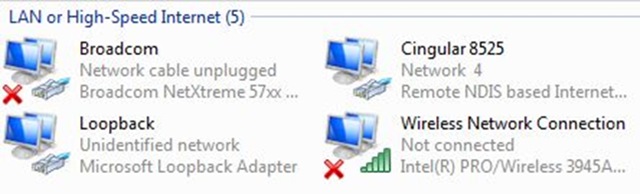
InternetConnectionSharingVistaThat is it!  You are done.  What happens is it creates an on the fly network adapter, gets an IP address and sets everything up.   I renamed the network 4 adapter on mine to “Cingular 8525” as you see in this picture.  Wow is this “GUMP”.  Plug the phone in, launch the app and you are online.

This feature rocks and is very welcomed.  Just be sure you you have the all you can eat wireless plan before turning this on or it will cost you a fortune.  This week we are in Orlando, Fl for Tech Ed and the hotel wants to charge $9.99 for 24 hours of Internet usage.  Orlando supports the high speed 3G network and with Internet Sharing built-in now, I have high speed Internet for free.  Thank you Hilton for offering Internet but I’ll keep my $9.99!

http://Correlate.Us – Launch

Posted by Keith Elder | Posted in Uncategorized | Posted on 01-06-2007

0

One of my long time geek friends (Joe Stump) launched a new web site today that has some potential to possibly fill a void a lot of us have on the Internet.  The web site is called Correlate.Us.  Here is what Joe posted on his blog about the launch:

The basic idea is that you authenticate your various Web 2.0 accounts and then correlate.us goes out and aggregates that data, groups it by tags and makes it generally more browseable for everyone involved.

The best part about it is that you can add friends. Once you’ve added a few friends you can view your friends’ activity online in an aggregated view as well.

Right now you can correlate the following:  Del.icio.us, Twitter, Digg (where Joe works), and Flickr

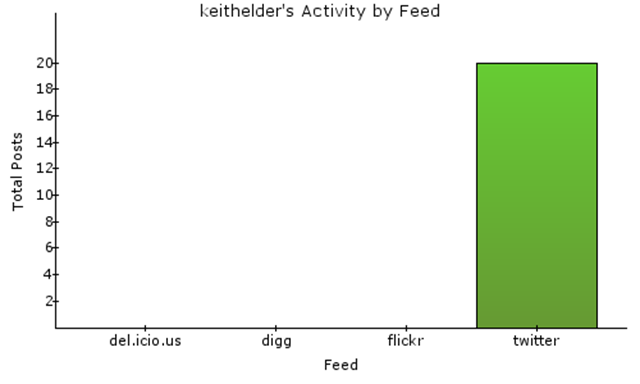
Here are my stats after I added my Twitter account (not enough time to add the others).


image

Anyway, check it out when you get time.

Community Credit 6th Place for May

Posted by Keith Elder | Posted in Uncategorized | Posted on 01-06-2007

0

ShockingAlarmClockI joined the http://www.community-credit.com site for the month of May and I placed 6th place when things were all said and done.  My “stupid prize for smart people” was this alarm clock.  I will cherish it forever.   May was a good month for me to join since I had multiple speaking engagements scheduled and a lot of blog articles in the fire.  I am still working on my multiple part series on “Leveraging Workflow Foundation“.  Part 3 will hopefully come out this week if I get time.  It is going to be tough with Tech Ed though.  Thanks to Community Credit for my prize.