Welcome

You have reached the blog of Keith Elder. Thank you for visiting! Feel free to click the twitter icon to the right and follow me on twitter.

Upgrading AT&T 8525 to Windows Mobile 6

Posted by Keith Elder | Posted in Mobile Devices, Windows | Posted on 05-11-2007

AT&T finally released their official ROM to upgrade the 8525 to Windows Mobile 6.  Living on the cutting edge I downloaded the ROM during lunch on Friday and started the update.  The download is currently available from the HTC web site although it is stated the ROM will no longer be available after February 2008.   Why the upgrade will disappear I’m not sure I haven’t investigated it yet.  It is worthy to mention that Good Mobile Messaging users are instructed to not to upgrade to this version.  Below you will find out how the upgrade went along with what features are enabled by default by this ROM.  Although I did the update on Friday I wanted to run it phone for a few days before posting this article.  Let me say that so far it has been really stable and I haven’t found any problems as of yet.

Performing The Upgrade

Once you get the download onto your machine double click the executable.  After a long series of checking your download you will be presented with this screen.
image

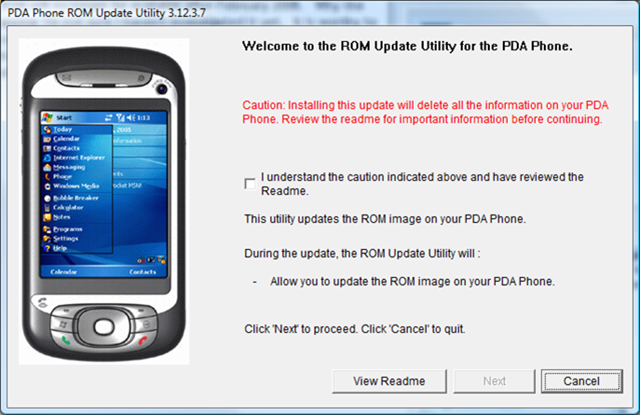
What follows next is a series of screens that for some reason scare the crap out of you and make you press next, next, next, OK, Yes I understand, Ok, next, you get the idea.  Basically these screens are telling you to not be an idiot.  Before you start make sure your phone is charged.  Also shut down other applications on your computer and just do the ROM update.  You never know when something could blow up leaving you holding a $400 door stop.  I’m scared but I’ll press next anyway 🙂
image

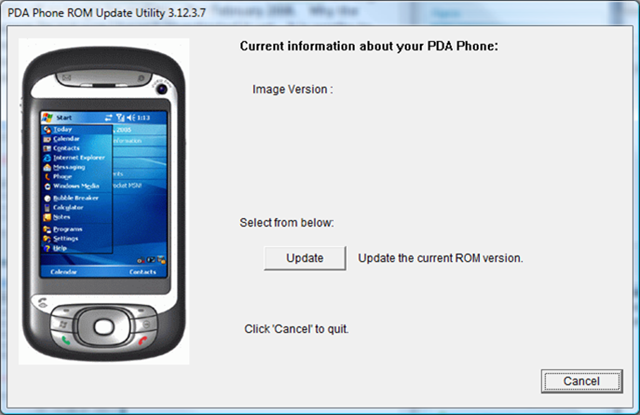
After this step the update queries the phone for a version.

image

I’m not sure why it didn’t find an existing version.  I didn’t care and just said to update the software anyway. 
image

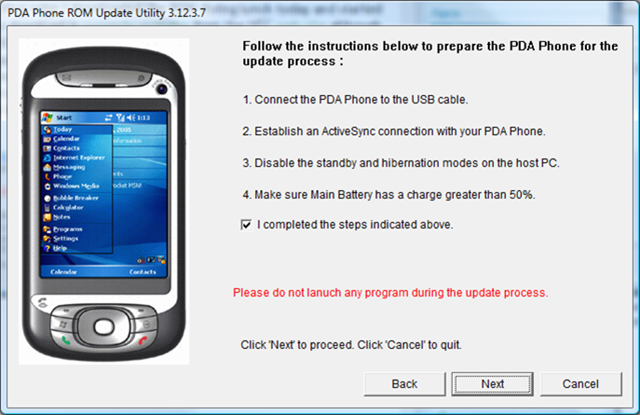
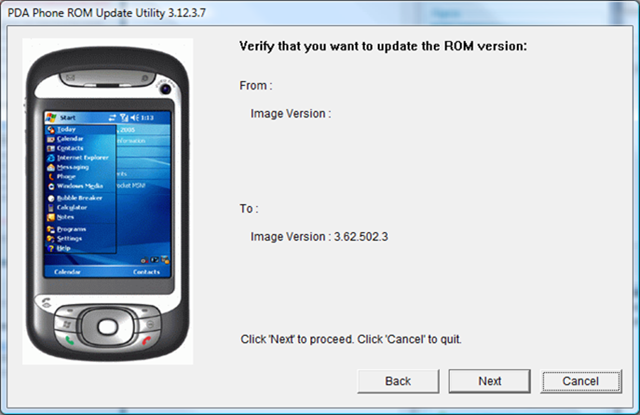
And once again we get another screen as seen below.  I think the programmer that wrote this program should be fired and HTC should do a better job making users feel warm and fuzzy about doing an update like this. There is no reason why we have to go through all these screens.  I will bet a $1,000,000.00 updating Apple’s iPhone will not be this ridiculous with this many steps.  Ignore stupid screen and press next (again).
image

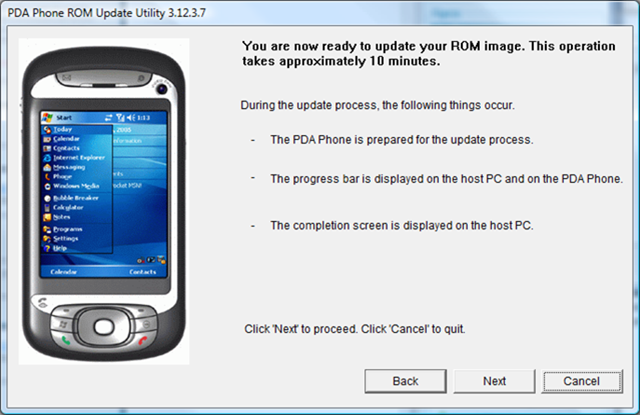
Finally we are brought to a screen that tells us how long it will take.  Can we just get on with the update!?  Click next again.
 

image

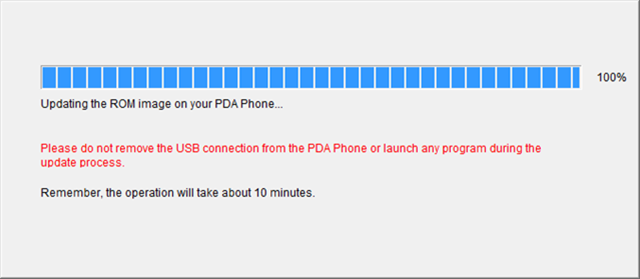
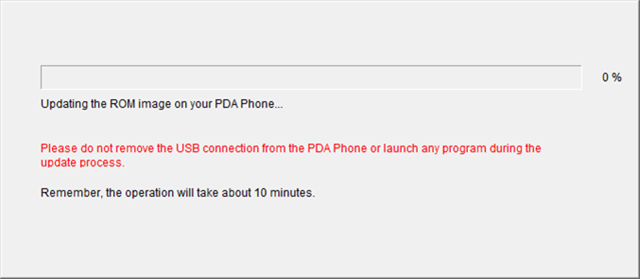
Finally we start updating the phone.  From this point forward it is about a 10 minute wait until the update stops.  Be sure there are no lightening storms in your area and it is a clear sunny day.  Or, use a laptop in case the power may go out.  If this point is interrupted, you officially have a bricked phone.   
image

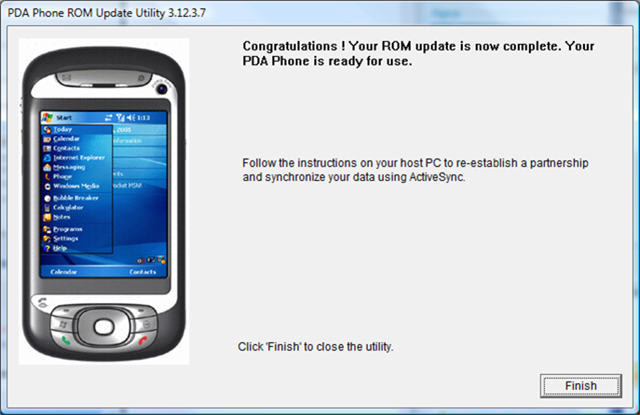
We are done. 

image

Now we are officially done.   

image

After this step finishes the phone will restart and will run the default setup just like it did when you first bought it.  It will then install the AT&T software and configure it for AT&T’s network. So how does it look?  Well, the AT&T setup is really dreary.  Not pretty at all.  The first thing I suggest it going into settings and removing the AT&T theme and applying the windows mobile 6 theme.  This them is green and looks updated.  Much nicer. 

Screen Shots

Here are some screen shots to show you what is installed and how the phone looks after setup.

This is what the Today screen looks like after the install.  Compared to what it *could* look like it is sad.
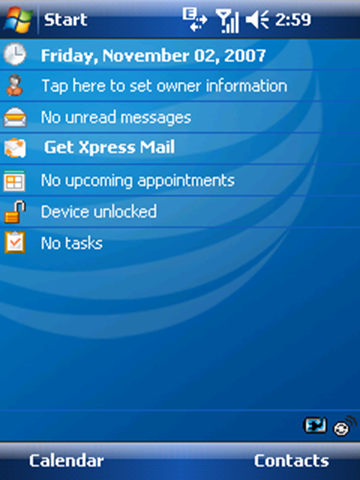
TodayScreen

A new feature that I noticed is the airplane mode in the Comm  Manager screen.  The previous version of Mobile 6 I was running didn’t have it.  A nice touch.  It has been so long since I used Mobile 5 I can’t remember if it had this or not.  I don’t think it did but you could turn on flight mode easily in Mobile 5 without it.
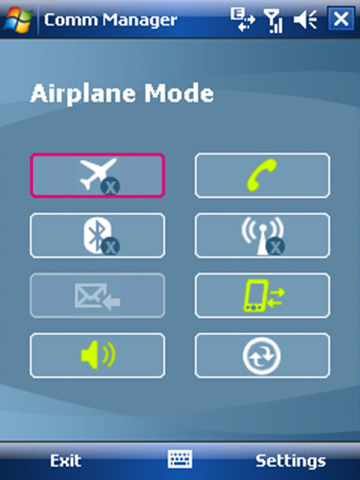
AirPlaneMode

 If you are curious which office applications are included you’ll find them under Office Mobile.   Having the ability to read native documents is great and we’ve had this since Mobile 5.
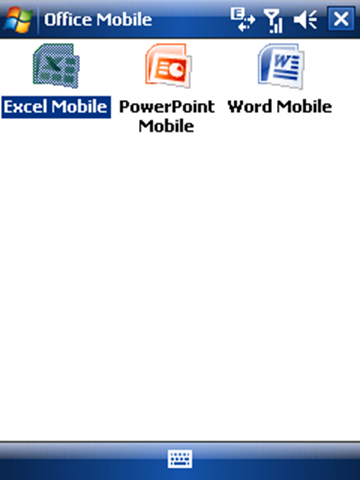
OfficeMobile

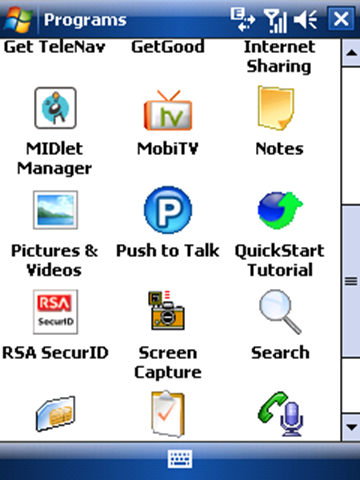
AT&T puts a lot of useless crap into your programs folder.  Mainly things they want you to spend money on.  I mean after all, why should they include any applications of real value.  That would just be too cool.  Personally I don’t use any of their bundled apps just the standard built-in ones. 
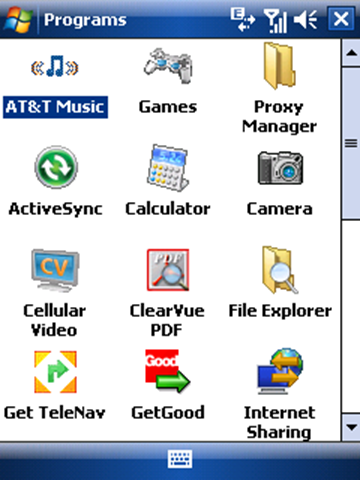
DefaultPrograms1

More programs below.  FYI RSA and Screen Capture aren’t included by default I added those.
DefaultPrograms2

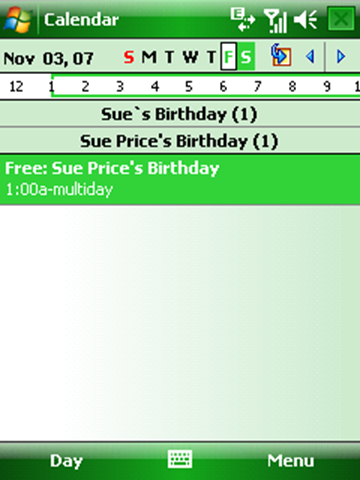
I mentioned the default theme is pretty bland so I changed it to the Mobile 6 theme.  Here is a screen shot of how that looks.
CalendarMobile6Theme

You’ll notice that nowhere on the phone via these screens shots is there any resemblance of Live search or messenger.  Those applications are not on this ROM update at all.  What the hell AT&T?!  I use Live Search all the time to lookup things and I can’t believe they didn’t include it.   I am also shocked by this because I’ve seen Mobile 6 demo after demo and this is a standard *feature* of Mobile 6.

Things that are bad about this update are 1) the install is still overly complicated and 2) lack of bundled applications.  While we can fix the bundled application problem by installing our own but the install process is still way to complicated.  The install process should be two clicks at the most and leave users feeling warm and fuzzy not scare the hell out of them.  I seriously can’t imagine my Mom doing this update and not having to call me. 

I will say that the phone up to this point has been really stable after the upgrade.  It has gone through hundreds and hundreds of emails and text messages without a problem.  As far as speed wise it is about the same as Mobile 5 if not just a tad faster. 

Should You Upgrade?

Really it is up to you.  I feel that AT&T has stripped this ROM of all of its joy and pleasure by not keeping in the Live stuff.  It just feels very lacking to me and I may seriously consider going back to the XDA ROM release.  If you read Jason Landgridge’s blog post about what’s new in Mobile 6 he outlines a lot of great features but the one missing is live search.  There are some nice features like Internet Sharing and although I get email in HTML format I have yet to have mine look like Jason’s example.  The features in Mobile 6 are good but it isn’t an earth shattering upgrade but it is an improvement.  If you are a geek like myself you would not be caught dead not having the latest ROM, keep your geek points intact and upgrade.  For the rest of the population it is potato potata.  Let me know how your mileage varies.


Technorati tags: , , , ,

Part 3: Leveraging Workflow Foundation – Understanding the Runtime

Posted by Keith Elder | Posted in Workflow Foundation | Posted on 05-11-2007

Workflow Foundation‘s “brain” is the runtime.  The runtime’s main function is to handle all workflow instances, load the appropriate services, and keep track of what needs to happen next.   Before jumping in with Workflow Foundation it is important to understand the pieces that make up the workflow runtime and where the extensibility points within the runtime are located.  In this part, Understanding the Runtime, we’ll look at the pieces that makeup the runtime and discuss various things developers will want to consider.  To get started let’s look at a simple example of starting the runtime and executing a workflow. 

            using (WorkflowRuntime runtime = new WorkflowRuntime())
            {
                AutoResetEvent waitHandle = new AutoResetEvent(false);
                WorkflowInstance instance = runtime.CreateWorkflow(typeof(WorkflowConsoleApplication3.Workflow1));
                instance.Start();
                waitHandle.WaitOne();
            }

As we can see from the example above hosting the workflow runtime is really simple in this context.  Essentially once our runtime is created we use it to create our workflow from a type and then start our workflow instance.  The truth of the matter is the runtime isn’t really doing anything other than loading our workflow.  In other words in any application that leverages Workflow Foundation there would be a lot more lines of code to setup the runtime.  Workflow runtimes need to take into account several other factors before hitting the production floor such as setting up additional services and events for monitoring.   There are three things in particular developers starting out with Workflow Foundation should consider. 

One – Don’t Re-instantiate the runtime for every workflow instance

The first thing I recommend to developers starting out with Workflow Foundation is to use a singleton pattern or a factory pattern to make sure there is only one running instance of the WorkflowRuntime.  The reason we want one instance is there is a lot of overhead setting up and tearing down the WorfklowRuntime.  To give you an idea of the time it takes to just setup the runtime I ran a quick benchmark on my dual core 2.0GHz notebook.  The average time in milliseconds was between 40-42.  While that may not seem like a lot of time remember the runtime didn’t have to read any settings from the app.config file and it wasn’t using any additional services nor events.  It isn’t unusual to see one-two hundred millisecond start up times once you start getting into a production scenario depending on the amount of services.  Other than startup time the other reason we want to do this is we do not want workflow runtimes competing against each other.

Two – Understand Services

The second thing we need to familiarize ourselves with are services.  Think of workflow services as the main features of the runtime and an extensibility point whereby new features can be added.  For example tracking, scheduling, persistence, and profiling are services that ship out of the box.  By default the runtime uses the DefaultWorkflowSchedulerService.  This service handles how workflow instances are scheduled and manages the threads that runs workflows asynchronously.  While this is great the runtime uses this by default it doesn’t work in all scenarios.  Specifically if you are hosting within IIS or need to run workflows synchronously.  Other services such as the SqlWorkflowPersistenceService and the SqlTrackingService are unique services that allow developers to leverage SQL Server to store persistence and tracking information.  SQL Server schema information for these services is provided with the .Net 3.0 framework. Schemas and stored procedures for persistence and tracking can be found in the following location:

c:\windows\Microsoft.Net\Framework\v3.0\Windows Workflow Foundation\SQL

For more information about the various services and their roles be sure to browse the following links that discuss the various services in detail on MSDN.  We’ll look at several of these services down the road in another part of this series. 

Three – Events

The third thing we need to consider are the runtime events.  For example, a question often asked by developers starting out with Workflow Foundation is “How do I get properties out of my workflow after it runs?”.  In other to do this we have to use one of the events created by the runtime called WorkflowCompleted.  This event is fired once a workflow is completed and will give us access to the WorkflowCompletedEventArgs that provides access to output parameters.  For example if we had a workflow that calculated the max loan amount a client qualifies for that code may look something like this:

workflowRuntime.WorkflowCompleted += delegate(object sender, WorkflowCompletedEventArgs e) 
                { 
                    waitHandle.Set();
                    int maxLoanAmount = (int)e.OutputParameters["MaxLoanAmount"];
                    Console.WriteLine(maxLoanAmount.ToString());
                };

This may seem a little weird at first but it does make sense if you consider long running workflows that may take several minutes to run or even months.  Workflows are more complicated than calling a single method and this is why the output parameters are in the completed event because it isn’t until the workflow gets down that we have all of our calculations.   Just remember what was said earlier about the default scheduling service.  If you are running calculated workflows like the example above that calculates if a person qualifies for a loan amount using the built-in rules engine of workflow more than likely it is going to need to run synchronously and therefore the default scheduler would need to be replaced by the manual scheduler within the runtime.

Of course there are others to consider as well such as WorkflowTerminated.  Depending on how the runtime is hosted your workflow you may want to be alerted when the runtime starts or stops and when workflows are persisted.  For example if you are hosting workflows within a Windows Service that is expected to stay running wire up events that sent alerts when the workflow terminated or suspended workflows unexpectedly.

Other Considerations

Hosting the workflow runtime isn’t tricky and can be configured via application config (app.config or web.config) files or within code.  For web hosted applications and services the web.config file is the best place to store workflow runtime information since this allows the runtime to be altered without having to be redeployed.  For windows services and possibly Winforms you may chose to go the API route. 

Developers looking to leverage Workflow Foundation in larger scenarios are going to ultimately want to customize the runtime.  This could be changing how workflows are persisted and tracked to creating their own custom scheduler.  The nice thing is Workflow Foundation is ready to be customized. 

One idea of extensibility may be using the file system to store workflows instead of SQL Server.  For those looking for this option you can find an example already done on MSDN here.  Another extensibility point is scheduling.  There was an example we ran into at work whereby workflow runtimes using the manual scheduler in IIS could not call other workflows.  A custom scheduler did the trick.  You can read more about that problem and resolution here.

In part four of Leveraging Workflow Foundation we’ll look at hosting workflows and how this knowledge in applied in various scenarios.

Part 1: Leveraging Workflow Foundation – It is just an API
Part 2:  Leveraging Workflow Foundation – Invest in your Workflow Infrastructure


Technorati tags: ,

Bobby Flay Cooking Show

Posted by Keith Elder | Posted in Food | Posted on 04-11-2007

My wife and I are Food Network-aholics.  Not that we cook anything we see on the shows hardly but we do watch the Food Network a lot for some reason.  The shows are wholesome shows (no blood, guts, killing, and crime investigations) and they are educational.  If you watch the food network at all you probably have heard of Chef Bobby Flay.  He’s been an Iron Chef since 2003 and has numerous show’s on the Food Network including Throwdown where he shows up to various renowned local places to challenge the chef to a cook off. 

Ellen’s Mom (Sue) had a birthday yesterday and to surprise her Mom we took her to a Bobby Flay cooking show in Mobile, AL.  We picked her up around 10:30 AM at and drove to Mobile, AL arriving around lunch time.  Our first stop was to get some lunch so we stopped in at Felix’s Fish Camp off of Battleship Parkway.  If you are ever in the Mobile area this is one of those places you have to go.  As a matter of fact when we walked in the ladies that greeted us were talking about Bobby Flay because he had eaten supper there the night before.  We sat next to the window over looking the bay.  I had the BBQ Shrimp (again) so I could wear the bib.  After we finished eating we locked in the Mobile Civic Center address into the GPS and headed 3.3 miles to downtown Mobile.  The Civic Center had a bunch of food related vendors there so we walked around.  We bought Ellen’s Mom a new chopping board and she bought us the Bobby Flay Mesa Grill cookbook so we could get it signed. 

The show started at 3:00 and I suspect there were probably 500 – 750 people there.  It was hard to judge but a lot of people just for a cooking show!  He cooked two main dishes and some margaritas.  One of the dishes he cooked was a salmon dish.  Having recently returned from a salmon fishing trip I have to try this recipe.  We were right up front for the show and it was interesting because he wanted people to ask questions as he was cooking.  It was a really open format and I liked it. 

The Mobile Gas company sponsored Bobby coming down so he cooked with a gas grill and a gas stove.  At the end when he was taking a lot of rapid fire questions I had to do it, I just had to ask, “Bobby, when you are grilling, charcoal or gas?”.  Immediately people started laughing because there was this huge sign behind him with “Mobile Gas” on it.  He laughed and said “Both, charcoal has more flavor but gas is quicker and evenly disperses the heat.”  He said he owned both grills and recommends to have both around depending on what you are cooking and how long you have.

All in all it was a fun little side trip and just reminded me why Hattiesburg, MS is such a great town to live in.  We call it the Hub City because it really is the hub of a lot of places to visit.  Literally within 1, 2 or 3 hours you can be anywhere from:

  • Jackson, MS our state capital
  • Fishing in the bayou of Louisiana for red fish
  • On the beach in Florida
  • At a casino in Biloxi or the beach there or fishing
  • A Taledega race outside of Birmingham
  • Cruising up and down Bourburn Street in New Orleans or at a Saints game

You can view pictures from the trip to Mobile here on Flickr:

http://www.flickr.com/photos/keithelder/sets/72157602907666047/

Memphis Day of .Net Keynote Speaker Announced

Posted by Keith Elder | Posted in Uncategorized | Posted on 01-11-2007

image Charles Petzold will be at the Memphis Day of .Net held November 10th speaking as the keynote speaker.  Charles is the author of the recent book “3D Programming for Windows” and many other great windows programming books.  He will be speaking on “The Future of Web and PC Graphics”.   For more information about the Memphis Day of .Net checkout the official web site for registration, dates and times. 

http://dayofdotnet.mnug.net/

When Sending Email – Be Careful Who You Put First In the TO: Line – Order Matters!

Posted by Keith Elder | Posted in Internet | Posted on 01-11-2007

Have you ever sent an email to several people at work and for whatever reason you forgot to put someone in the TO: field initially?  Instead of putting them at the front of the TO: field in your email email you added them to the end of the TO: field.  Depending on various circumstances what do you think you just said to that person subliminally?  I think the order you place people in your TO: list dictates their importance in the conversation, how serious they should take your email and if a response to it is in order.  Do you think about this or am I just weird?  Let’s look at a couple of examples.

Work Example #1

Let’s use a work example to start with since a lot of us that do email spend most of our time emailing people at work.  Let’s say we need to communicate something to people at work.  Let’s start with this list:

  • A & B are 2 team members
  • C – Your team leader
  • D –  Company CIO

The email is about A & B (your team members) who completed a task recently and who both did an outstanding job.  For the record, B did more work than A on the task.  What order do you go with?  The order A, B, C, D doesn’t make sense because you are emailing about A & B.  They would go onto the CC: line since you would want them to know you are emailing to brag on them to leadership. 

In the TO: line do you put D first or C?  In this case I think you could go with D or C first but the safest bet is to go with D then C and place A & B on the CC: line.  D out ranks C and it is safer to just order them in that manner since they have an implicit ranking.  Be careful on the CC: line though and be sure to order A & B properly based on the amount of work they did.  If B did more work than A, then B should be first on the CC: line indicating he was thought of first in your mind. 

Looking at the email when received by D, I think subliminally D looks at the order on the CC: line and makes a mental note of the order without thinking about it, but somehow remembers that B did more work than A on the task. 

Work Example #2

Let’s say you are composing an email to your team members and there are 10 people on the email.  Who do you put first?  Do you put people in order of rank or do you place them in order of their personal priority on the email.  For example if person #10 is really on the email just an FYI, would you put them first?  Probably not.  You’d put the person that needed to take action the quickest first and then order it from there based on everyone’s priority (still considering rank). 

An optional approach in this scenario is if #10 is really on the email as an FYI move them down to the CC: line.  However, if you really want #10 to read the email and possibly respond or take action quicker, leave them on the TO: line.

While this may sound weird to some I think the order and where you place people on email matters.  Think of it this way.  If you had everyone sitting in your office and were speaking your email to the group instead of writing it, would you or would you not direct your conversation to certain people more than others?   Absolutely.  I think the same thing applies to email.

There’s two quick examples where order can matter and why it matters.  The next time you send an email be sure to think about where you are placing people.  Not only does it tell them how they maybe should respond it also tells them how seriously they should take your communication in a lot of cases.   If you can think of some other examples where this is applicable add your comments below.