Welcome

You have reached the blog of Keith Elder. Thank you for visiting! Feel free to click the twitter icon to the right and follow me on twitter.

Enterprise Library 3.0 to have Environmental Overrides

Posted by Keith Elder | Posted in Uncategorized | Posted on 28-02-2007

0


Sometimes you read a blog post and you are so excited to see such a feature announced in a new product that you blog about it yourself.  This is one of those posts.

After moving to Windows Vista I had troubles with RSSBandit and had fallen behind on my news needless to say so sorry for those that already read this announcement from Olaf about EntLib 3.0.

Moving from environment to environment is something a lot enterprise customers deal with.  We spend thousands upon thousands of dollars replicating environments to test our software, yet we are left normally coming up with our own solutions to handle changes from environment to environment. 

That is why I am happy to see this new feature added to the CTP release of Enterprise Library 3.0.  Here is a screen shot of how things will be handled in the console tool:

Environmental Overrides in Configuration Tool


Here is how the system works as quoted by Olaf:

Every environment that is configured in the tool, will maintain its own “Environment Delta File” (or .dconfig file), which is updated after saving the configuration as a whole. This Environment Delta File contains all the differences specific to that environment and some additional metadata for merging the differences into a new and complete configuration file that can be deployed. The main advantage here is that an Environment Delta File can be distributed separately of the original configuration file and managed by someone that has access to all the passwords, server-names and what not of the different environment.

Very cool stuff.  Olaf also noted a command line tool which will assist in automating the build process for each environment.   Great stuff!

ASP.NET Web Services and WCF Very Different Animals

Posted by Keith Elder | Posted in .Net, Asp.Net, Web Services | Posted on 27-02-2007

7

For the past several days I’ve spent a lot of time trying to get up to speed using Windows Communication Foundation.  I’ve seen or watched enough “Hello World” demos of WCF over the past year to choke a good mule to death but I haven’t had a chance to write anything using WCF for real world experience.  I knew I’d get around to it eventually.  This is the point where you actually learn how to use a technology anyway.  Having done large scale applications with Asp.Net web services for quiet sometime I honestly didn’t figure it would be that difficult.   I was wrong.  My first real world venture into WCF left me scratching my head and feeling like a 12 year again. 

My reason for using WCF is I’m staring a new project which will be a Smart Client application used to build and manage business rules for different .Net applications leveraging the Windows Workflow Foundation rules API.  Since I was leveraging the .Net 3.0 framework anyway, I thought now was as good a time as any to jump into WCF. 

Once I defined my database structure and calculated which web service methods I was going to need, I created my ISomethingInterface contract which defined my methods.  I then implemented those methods in my service.  Very simple stuff at first, then I pressed F5 in Visual Studio and I was greeted with errors because my web.config file wasn’t configured.

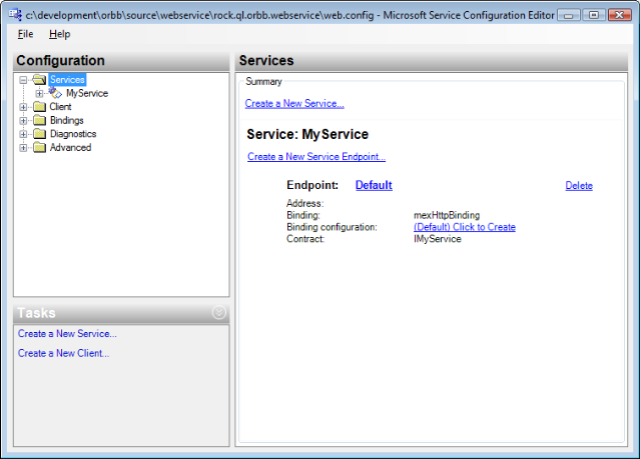
I knew I had to configure the service and so off I went researching how to write the web.config file to expose my service.  I went to MSDN only to learn that I was going to spend the next several hours reading all of these different configuration options (WCF is flexible, but with flexibility comes more to read).  I gave it a college try trying to configure the web.config by hand and then eventually got frustrated because it wasn’t working.  Finally after doing some other searches I see a screen shot of a new item menu in the context menu when you right click the web.config file called “Edit WCF Configuration”.  I click it and get this:

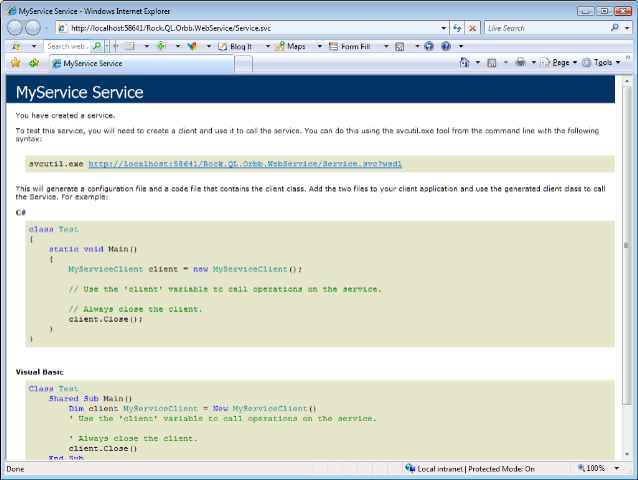
If I’d only know this was there earlier.   After I got my service configured so it gave me a result other than an error page I *thought* I was going to get the same type of page you get with normal Asp.Net web services which is a page that shows you the methods available.  I was wrong.  I got this:

Where’s my list of web methods!?  Not there.  Again different from what I was expecting.  By this point I had resigned myself to throwing everything I knew about ASP.NET Web Services out the window because obviously previous knowledge was not really helping. 

I decided to absorb my new service in my client.  Since I had gotten burned by the right mouse click thing earlier I decided to see if the WCF CTP put a menu item in my project so I could generate the class file with svcutil.exe instead of wsdl.exe. Sure enough it was there.  This was the only thing that left me warm and fuzzy, something I had done before.   I then wrote a quick line to leverage the service (which I had placed in a separate Class Project) and it didn’t work.   The app.config file generated was placed in the project file where the service was generated, but not in the project the application was going to run from.   Luckily I was smart enough to just copy the one created for me and it worked.  Again, different. 

Feeling I had made progress I made the methods I wrote work, wrote unit tests for them and then baked them into the user interface of the application.  Then it hit me that I needed to call these services asynchronously.  So I typed “service.” and waited for intelilsense to see what the async calls were named.  They weren’t there!  Uh oh.

Doing some more digging I learned the svcutil.exe has a switch to generate asynchronous calls. The switch is /async.  Reading further there are different types of async calls and this is where I am currently at, trying to figure out what I really need to do and all the ins and outs of async calls in WCF.  Obviously lots of differences as I move further into WCF.

I did find a really good article which tells the developer what the differences between the two are, you may save yourself some headaches.  There are also some other documents nearby this one in the menu on MSDN that you may want to read as well.

Tips: Using Strong Typed DataSets with Web Services

Posted by Keith Elder | Posted in Uncategorized | Posted on 23-02-2007

11

Before I start this article, let me be up front and state that I do not use DataSets 100% of the time.  I do use the heck out of them in demos and presentations because, well, they demo well.  There is a never ending debate on whether to use DataSets or not.  I say use them, but not in all situations.  That’s my official stance on them.  In a lot of cases they make sense, espeically when doing binding to a DataGrid and reconciling changes, in others they don’t.  We are not here today to argue for or against them though.  What I will share with you are some tips that many may or may not know when using DataSets with Web Services.   

Tip #1:  Include Only What You Need

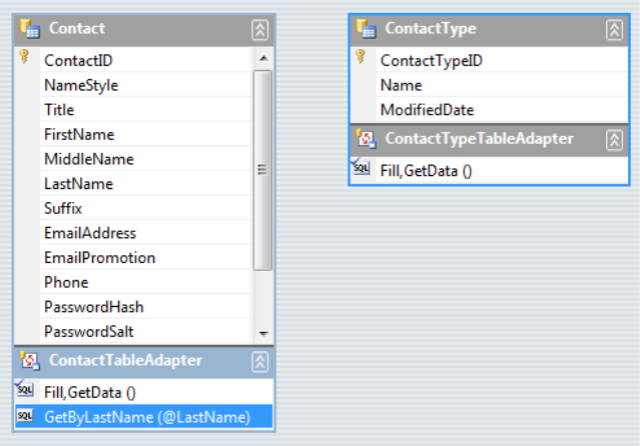
As the tip states, include only the tables you need.   I never create one master DataSet with all of my tables from my Database.  I find it to be hard to work with and typically if I am working on a module basis which means I don’t need everything anyway, just the tables that apply to the module I am working with.  I see a lot of time where people create DataSets where they include the entire database in a DataSet.  I don’t, especially for modules.  A lot of the time I will have a DataLayer that is made up of several different DataSets, not one large one.  Here’s an example of what I’m talking about:


This example from the AdventureWorks database has only two DataTables in it:  Contact and ContactType.  This is all I need if I am going to deal with a Contact.  It is easier to manage and look at, and less of a code footprint.   If you are passing this information over a web service, by default, the schema of the DataSet goes along for the ride.  Having more tables, means more schema information, which brings me to my second tip.

Tip #2:  Don’t Include Schema Information

If you are using a Strong Typed DataSet, before you return your DataSet from a Web Service, mark it to not include the schema.  Here is a sample web method using the Strong Typed DataSet seen above.

       [WebMethod]

        public ContactDataSet GetContactsByLastname(string lastname)

        {

            DataLayer.ContactDataSetTableAdapters.ContactTableAdapter ta = new DataLayer.ContactDataSetTableAdapters.ContactTableAdapter();

            ContactDataSet ds = new ContactDataSet();

            ds.Merge(ta.GetByLastName(lastname));

            return ds;

        }

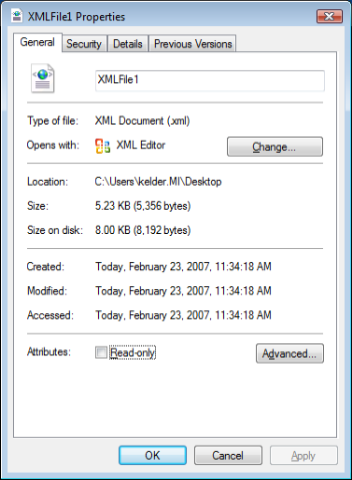
 Here is the output from this web method saved to the file system. 

The majority (95%) of what is in the file is the Schema Definition for the DataSet.  This is why the file is 5.23KB.  The only part we *really* want is the row data.  This is one of the major reasons people stay away from DataSets.  Which is a shame since they provide a lot of functionality.  It turns out we can fix this problem with one line of code.  Here is the new code sample whereby we exclude the schema:

        [WebMethod]

        public ContactDataSet GetContactsByLastname(string lastname)

        {

            DataLayer.ContactDataSetTableAdapters.ContactTableAdapter ta = new DataLayer.ContactDataSetTableAdapters.ContactTableAdapter();

            ContactDataSet ds = new ContactDataSet();

            ds.Merge(ta.GetByLastName(lastname));

            ds.SchemaSerializationMode = SchemaSerializationMode.ExcludeSchema;

            return ds;

        }

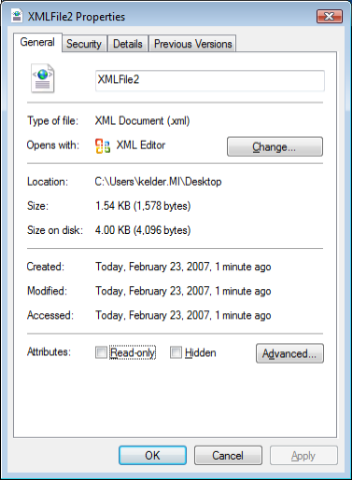
 If we run this example which excludes the XSD, we immediately see a smaller footprint.  We go down from 5.23KB to 1.54KB:

And here is the output from the web service.  Much much smaller than previous, and it contains the data we primarily care about althought it does include a few straglers which I would like to see removed entirely from future versions.  Maybe the .Net team can add a new flag to the enumeration which is SechamSerializationMode.JustGiveMeMyData. 🙂

<?xml version=1.0 encoding=utf-8?>

<ContactDataSet msdata:SchemaSerializationMode=ExcludeSchema xmlns:msdata=urn:schemas-microsoft-com:xml-msdata xmlns=http://keithelder.net/>

    <xs:schema id=ContactDataSet targetNamespace=http://tempuri.org/ContactDataSet.xsd xmlns:mstns=http://tempuri.org/ContactDataSet.xsd xmlns=http://tempuri.org/ContactDataSet.xsd xmlns:xs=http://www.w3.org/2001/XMLSchema xmlns:msdata=urn:schemas-microsoft-com:xml-msdata attributeFormDefault=qualified elementFormDefault=qualified>

        <xs:element name=ContactDataSet msdata:IsDataSet=true msdata:UseCurrentLocale=true>

            <xs:complexType>

                <xs:choice minOccurs=0 maxOccurs=unbounded />

            </xs:complexType>

        </xs:element>

    </xs:schema>

    <diffgr:diffgram xmlns:msdata=urn:schemas-microsoft-com:xml-msdata xmlns:diffgr=urn:schemas-microsoft-com:xml-diffgram-v1>

        <ContactDataSet xmlns=http://tempuri.org/ContactDataSet.xsd>

            <Contact diffgr:id=Contact1 msdata:rowOrder=0>

                <ContactID>19978</ContactID>

                <NameStyle>false</NameStyle>

                <FirstName>Keith</FirstName>

                <LastName>Elder</LastName>

                <EmailAddress>not@telling.com</EmailAddress>

                <EmailPromotion>1</EmailPromotion>

                <PasswordHash>hash</PasswordHash>

                <PasswordSalt>salt</PasswordSalt>

                <rowguid>cd9ea7c0-d192-4a9f-9999-e9a0c6b117a9</rowguid>

                <ModifiedDate>2007-01-30T11:16:48.703-06:00</ModifiedDate>

            </Contact>

        </ContactDataSet>

    </diffgr:diffgram>

</ContactDataSet>

Note, if you are using plain datasets, you have to include the schema, always.

 Tip #3:  Enable GZIP on IIS

The last tip while not exclusive to DataSets is worthy of noting nontheless.  That is to turn on Gzip compression in IIS.   You will notice a drastic performance increase of data moving over the wire.  XML compresses really well with Gzip and I’ve seen 20K or 26K messages get turned in 2-4K easily.  For smaller messages you may don’t want to Gzip since it will actually add to the message footprint.  The good news is when you create your proxy class to call the web service, you can choose if you want to support it or not.  Here’s an example:


MyService proxy = new MyService();
proxy.EnableDecompression = true;

This is supported in .Net 2.0.  The above lines will set the HTTP header when the service is called to tell IIS that Gzip compression is supported and IIS will then zip the contents and send them back down.  If you have a very small message then set this to false, otherwise you will add overhead of the compression. 

Technorati tags: , , , , ,

Like This Article?  kick it on DotNetKicks.com

.Net Engineer Openings – Those Who Have Passion Need Apply

Posted by Keith Elder | Posted in Asp.Net, Smart Clients | Posted on 20-02-2007

2

If you’ve been waiting for the right job to come along, specifically a job opening at one of the top companies in the country, your wait is officially over.   If you are passionate about programming and designing large scale Enterprise systems where you get to have a direct impact on the business, we need you!

We have several .Net Engineer openings available at my current employer Quicken Loans.  You can’t be considered if you don’t apply and you won’t get preferential treatment with your resume if you don’t contact me directly!

We have openings in several different areas and need people who have skills in all sorts of areas including Asp.Net, Smart Clients and back-end people with certain talents ( Biztalk, Workflow, WCF, etc).  The great thing about these positions is you will become part of a team who loves to automate business practices, embrace industry standards, embrace change and adopt early.  You’ll be given all the tools you need to succeed as well as a culture that is unlike any you’ve probably seen. 

If you would like my email address run this code in a console application, or guess the output. 

using System;

using System.Collections.Generic;

using System.Text;


namespace ConsoleApplication1

{

    class Program

    {

        static void Main(string[] args)

        {

            Email myEmailAddress = new Email();

            myEmailAddress.Prefix = “keith”;

            myEmailAddress.Connector = “@”;

            myEmailAddress.Domain = “keithelder.net”;

            Console.WriteLine(myEmailAddress.ToString());

            Console.ReadLine();

        }

    }


    class Email

    {

        private string prefix;


        public string Prefix

        {

            get { return prefix; }

            set { prefix = value; }

        }


        private string connector;


        public string Connector

        {

            get { return connector; }

            set { connector = value; }

        }


        private string domain;


        public string Domain

        {

            get { return domain; }

            set { domain = value; }

        }


        public override string ToString()

        {

            StringBuilder sb = new StringBuilder(3);

            sb.Append(this.prefix);

            sb.Append(this.connector);

            sb.Append(domain);

            return sb.ToString();

        }


    }

}


Logitech Orbit Camera, AOL Instant Messenger, Outlook 2007 Vista Quirks

Posted by Keith Elder | Posted in Uncategorized | Posted on 06-02-2007

1

I started using Vista during my work day now since I recently got a new laptop from work.  There are a few quirks that I’ve ran into.  Only one major road block and that is because of hardware driver support.  More on that in a bit.

The first application  up is Outlook 2007.  Before I go on, let me say that not everyone will have a quirk with Outlook 2007 because my quirk is caused by a vendor not supplying Outlook 2007 updates.  For those of us at work running Outlook 2007 there is a work around, however, this blows my mind that a vendor has known about Outlook 2007 coming for years.  There have been multiple beta releases, CTPs, and other announcements.  Heck, we saw the first glimpse of Outlook 2007 at PDC in 2005!  Why a vendor can’t be “ready” for a new product with 2 years of notice is beyond me.  It isn’t like Microsoft treats their ISVs and employees like Apple does by withholding information.  Microsoft communicates what is coming, the migration paths that need to be taken and so on.  By the way, this vendor’s plugin still relies on old ASP so I can’t say that I’m surprised they aren’t ready for 2007. 

QuickCam OrbitMy biggest stumbling block to this date running Vista has been my Logitech Orbit camera not having Vista drivers.  This camera is expensive ($129) and I use it for work purposes all the time to video conference.  This is yet another case of a vendor that needs to get off their rockers and step up.  The weird thing is they have drivers for the Logitech Orbit MP model which I don’t have.  I called tech support to complain and the tech guy said it was “on the way” but didn’t know when.  Reading their documentation it *really* seems they aren’t even going to support the model I have.  I understand they want to sell more cameras but this is the wrong way to go about it.  Release the driver Logitech or I’m not buying another product of yours for the rest of my life. 

Other than these quirks I’m chugging right along using Vista on a day to day basis.  I find myself staring at the weather sidebar gadget throughout the day.  It saves me from turning around and looking out my window.  Now that is a productivity increase! 🙂  But the main application that doesn’t “feel” like it belongs on my machine is AOL Instant Messenger on Vista (AIM). 

I have a plethora of people on my buddy list.  Tons of co-workers and friends.  Mainly I chat with co-workers during the day that aren’t running our internal company chat for whatever reason (although this is slowing changing).  My first quirk with AIM is the application will not stay in the task tray so I can easily open it when I need to chat with someone.  Just to prove I’m not crazy here’s a shot of my current task tray:

I’ve gone through every possible menu in the application and don’t see an option to minimize to system tray.  I know it was there on previous versions, but I don’t see it.  Hopefully someone will write in and say, it’s over here dummy!

The application is running though.  Look at task manager and see that it is in fact running:

The other thing that drives me nuts is the slowness and response of AIM on Vista.  Here are some weird quirky issues with AIM that I’ve noticed:

  • The colors they use don’t give you a clear idea where the menu is or the top bar of a window is.  If you want to drag the window around, I find that I have to click multiple times to drag it.  This makes overall response seem slow.
  • I highlight text to copy and it feels like I’m running a 486 PC.  Literally the application will eat up 25% of both processors just to highly text.  Other apps don’t do this and actually respond really fast.  Why this one appears to be so slow I don’t know. 
  • Of course I already mentioned the task tray issue but I’m keeping this on the list.
  • Closing windows takes two clicks it seems.  It is weird to explain but when I go to close a window with X in the corner, I have to click it twice.
  • Lastly, why does AIM feel compelled to launch Internet explorer every time it launches?  I hate this.  This reason alone will force me to uninstall it and abandon AIM for ever.

Just an FYI, I would have installed Trillian as my AIM client but reading some discussions things are not working yet with that product in Vista.  To be honest, I’m not that big of a fan of Trillian either.  I don’t like their interface and trillian seems slow to me.  The video, voice, etc isn’t compatible with the other clients.  Even though they do offer secure chat it only works with other Trillian users.  I’ve found the best way to run a chat client is to run the one they built for it.  Otherwise, you are going to miss a lot of features.   Which of course leaves you running three seperate apps.  In the end, I may just stick with Yahoo! and MSN since those two allow you to share contacts.