

Getting Rid of ESET Signatures in Outlook
Posted by Keith Elder | Posted in Software Tips | Posted on 21-03-2009
This is a short simple post that shows how to remove the auto attached messages generated by ESET Antivirus in Outlook. This is a sample message that shows what gets attached. Obviously this can be very annoying and junk up emails.
__________ Information from ESET NOD32 Antivirus, version of virus signature database 3952 (20090320) __________
The message was checked by ESET NOD32 Antivirus.
http://www.eset.com
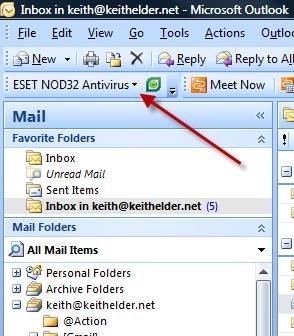
The fix is simple. First, select the ESET NOD32 Antivirus drop down in the Outlook toolbar and choose “scanner setup”.
On the setup page select the “Email Protection” option in the list on the left. Then set the two drop downs to “Never”.
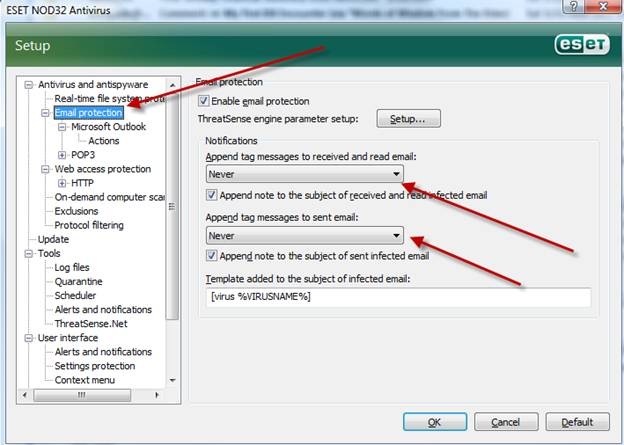
Click OK. That should remove the messages from the body of your emails.
Thank! Really helped.
Thanks! Your the best..
thanx keith
omg thanks! been looking for this since long time ago.. 😀
Thanks Keith, we use NOD32 at our company. I will use this info to get rid of that annoying text on every email.
DebtFREEk!