Featured Post

How to Get Table Sizes in SQL Server

Before I get old and forget this little trick I thought I’d blog it. I’m sure someone else out here on the Internets can use it as well.  Especially if you are hosting your database on a hosting company that charges you by the MB and you want to know how much space you are taking up.  Hope it helps. EXEC...

Read More

Speaking at CodeStock and Deep Fried Bytes Live!

Posted by Keith Elder | Posted in .Net, Speaking | Posted on 23-06-2009

3


Last year I was invited to speak at a lot of conferences and code camps but the one that I didn’t get to go to due to scheduling conflicts was CodeStock held in Knoxville, TN.  This year I made sure it was on my schedule because the majority of my Twitterverse / Tribe will be there and I couldn’t stand to see the tweets from a remote location again this year.


CodeStock Sessions

I’ll be doing two of my “Back To Basics” sessions this year to help those that want to learn .Net get acclimated into the .Net platform.  The two sessions are:

  • What is .Net?
  • A Programmer’s Primer Programming in C#

While these two sessions aren’t about the latest and greatest technology and won’t fill the room, I strongly believe they are a necessity for code camps and other areas.  Speakers tend to focus on the latest and greatest shiny new thing but there is a huge whole whereby those that are starting at ground zero don’t have a place to go.  I’m glad these sessions got picked.

Deep Fried Bytes Live!

On Friday evening from 5:00 – 6:00 Woody and myself will be doing a Deep Fried Bytes episode live! 

But, the coolest announcement is that Elly Mae will be there live and in person to help us kick off the show.  So for those in attendance you’ll get a special treat no doubt getting to meet the truest Southern Belle in the South. 

It is going to be a great weekend with loads of fun.  See you there! (ps – rumor has it there are a handful of tickets left if you still haven’t signed up)

Doing Geek Speak Live Wednesday: Deploying WCF Services

Posted by Keith Elder | Posted in Speaking, WCF | Posted on 23-06-2009

0

If you aren’t doing anything Wednesday, June 24th, around 3:00 EST sign up for the MSDN Webcast called Geek Speak and tune in to see me walk through deploying various WCF bindings such as TCP / MSMQ services in IIS / WAS. 

Register Online Here:

http://msevents.microsoft.com/CUI/WebCastEventDetails.aspx?EventID=1032417610&EventCategory=4&culture=en-US&CountryCode=US

Bring some popcorn or favorite Deep Fried Food, sit back and get your geek own!

Tethering iPhone 3G on Windows 7

Posted by | Posted in Mobile Devices, Windows | Posted on 22-06-2009

43

DISCLAIMER

Doing this is not supported by AT&T and other wireless carriers.  Consult with your carrier before following these instructions. 

Tethering iPhone 3G

Folks, it is here, and it is a reality!  I am writing this blog article from Windows 7 tethered to my notebook via an iPhone 3g.  The best part of all is you don’t have to jail break the phone to do it.  For the record I am using an AT&T locked, non-hacked, standard iPhone.  Nothing has been done to this phone in anyway whatsoever.  Here is what you need to get this setup and working. 

Latest Updates

Be sure you have iTunes version 8.2 installed and then get the latest version of the iPhone OS, version 3.0. 

Install MobileConfigs

After the phone is updated to the latest firmware and version of iTunes go to http://help.benm.at from your iPhone. 

Follow the on screen settings to find your country, provider and so on.  Once the MobileConfig is download go into “Settings->General->Network” on your iPhone and enable tethering. 

Windows 7

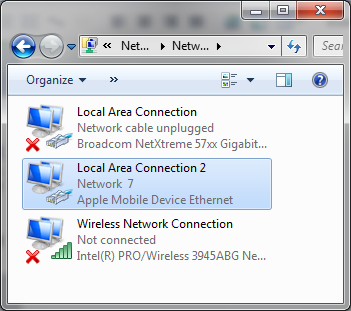
Now connect the phone to your computer and a new driver will install.  You can find it in the control panel under Network called “Apple Mobile Device Ethernet”. 

image

That’s it, you should be online and tethered now.  I bet you expected a really long-winded process?  Nope, it is too simple.

New Hardware: Running Windows 7 With Four LCDs

Posted by Keith Elder | Posted in Computer Hardware, Windows | Posted on 22-06-2009

3

For years I’ve had two monitors on my computers.  Working at home every day in and day out has reminded me that two just isn’t enough.  I find myself constantly flipping between windows and applications, especially since all the development I do is virtualized.  At work we recently upgraded the majority of our developers with new Core i7 machines with two 22inch LCDs.  Since I already had my own machine I asked if I could just get two of the new LCDs.  A few days later two new Dell 22inch LCDs showed up at my house. 

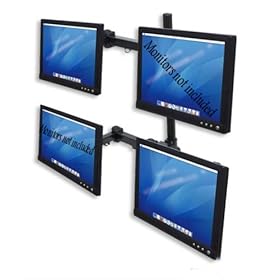
Planning for their arrival I found out we use Humanscale M7 monitor stands at work.  M7’s aren’t cheap retailing for about $500.00.  That was out of my price range to get all four LCDs setup.  After hours of digging around I finally found a quad LCD monitor arm I was comfortable purchasing and it was only $88.00!  Here’s what I settled on:

Quad LCD Monitor stand Fully adjustable New

The product is sold by Tyke Supply on Amazon and is manufactured by http://diwei.com/.  There really wasn’t much to go on to decide if this product was going to hold up and be sturdy enough but I pulled the trigger.

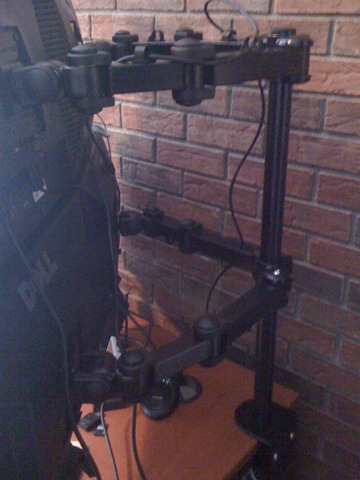
When the product arrived the first thing I noticed was how heavy it was.  As soon as I unpacked it I realized I had a winner.  The arms of the unit are extremely well built, very heavy aluminum.  It even came with an alum wrench to tighten things down. 

One word of caution is make sure you have someone to help you setup the unit.  This is not a one man job as it takes one person to hold the screens while the other person tightens them down on the pole. 

I was extremely surprised how sturdy the unit is once installed.  It doesn’t move once tightened down at all.  As long as you have a hang over on your desk you can install this unit.  As you can see below, it slid right onto my over hang. 

IMG_0091

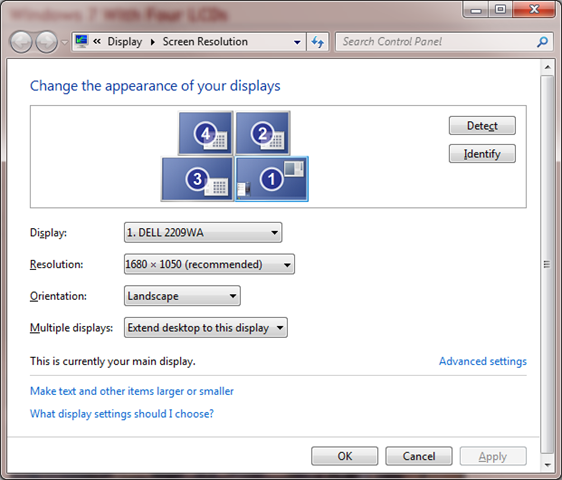
Windows 7 allowed me to easily configure the screens how I wanted them.

image 

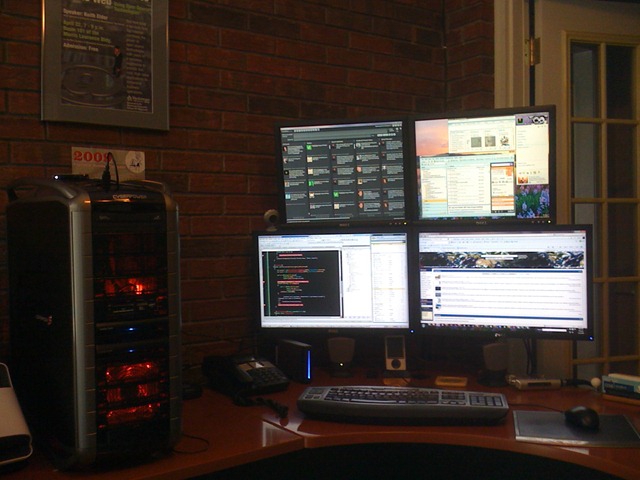
And of course, you have to see all of this screen real estate from the front or this blog post wouldn’t be complete.

IMG_0092

The two LCDs on top were my previous Dell 19inch LCDs I purchased from the Dell refurb store several years ago and the bottom two are the new Dell 22inch LCDs work sent me.  If you are curious as to what is where on all of the screens here is what is running where right now (subject to change):

  • Top Left – TweetDeck
  • Top Right – Windows 7 gadgets, live messenger, pandora, email
  • Bottom Left – VMWare Windows Server 2008 virtual machine (work)
  • Bottom Right – Browser, Explorer, FeedDemon, Live Writer
  • I’ve only had this configuration for a couple of days and with so many screens and windows open I can honestly say that the new features of split screens, Aero Peek and others in Windows 7 make it incredibly easy to get around.

    I may have to cancel all future speaking engagements because I seriously don’t want to leave my desk now.  :)

Deep Fried Bytes #33: Getting the Scoop About Olso and M with Shawn Wildermuth

Posted by Keith Elder | Posted in Podcast | Posted on 18-06-2009

0

 
http://deepfriedbytes.com/podcast/episode-33-getting-the-scoop-about-olso-and-m-with-shawn-wildermuth/


In this episode we sat down with Shawn Wildermuth to discuss Olso, M, MGrammar and Quandrant, the new DSL tools for .Net developers.  We covered a lot of questions around the technology and in true Deep Fried form broke down a fairly complex topic for our listeners.