

How to Get Table Sizes in SQL Server
Posted by Keith Elder | Posted in MVP10, SQL Server | Posted on 25-11-2009
Before I get old and forget this little trick I thought I’d blog it. I’m sure someone else out here on the Internets can use it as well. Especially if you are hosting your database on a hosting company that charges you by the MB and you want to know how much space you are taking up. Hope it helps.
EXEC sp_MSforeachtable @command1=”EXEC sp_spaceused ‘?'”
Here is a sample of what it returns.
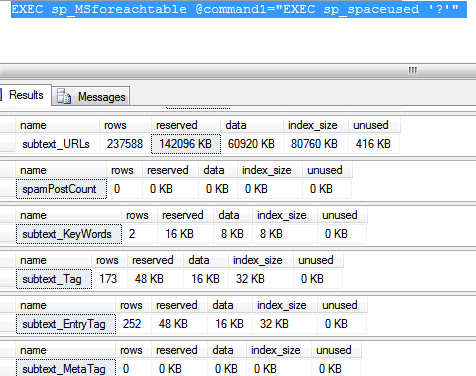
I actually don’t like that output at all – totally unintuitive and very hard to read. I prefer using this SQL statement – does the same thing, but much nicer output!
SELECT
t.NAME AS TableName,
i.name as indexName,
sum(p.rows) as RowCounts,
sum(a.total_pages) as TotalPages,
sum(a.used_pages) as UsedPages,
sum(a.data_pages) as DataPages,
(sum(a.total_pages) * 8) / 1024 as TotalSpaceMB,
(sum(a.used_pages) * 8) / 1024 as UsedSpaceMB,
(sum(a.data_pages) * 8) / 1024 as DataSpaceMB
FROM
sys.tables t
INNER JOIN
sys.indexes i ON t.OBJECT_ID = i.object_id
INNER JOIN
sys.partitions p ON i.object_id = p.OBJECT_ID AND i.index_id = p.index_id
INNER JOIN
sys.allocation_units a ON p.partition_id = a.container_id
WHERE
t.NAME NOT LIKE ‘dt%’ AND
i.OBJECT_ID > 255 AND
i.index_id <= 1
GROUP BY
t.NAME, i.object_id, i.index_id, i.name
ORDER BY
object_name(i.object_id)