Posted by Keith Elder | Posted in MVP10, Podcast | Posted on 27-02-2010
At PDC 2009 Oslo was renamed to SQL Modeling and it left a lot of developers scratching their heads. What better way to sort it all out than to talk with someone deep into the stack. We sat down with Lars Corneliussen to see how this is all going to turn out and what it means for developers. Definitely an interesting show as it paints a different picture about where things are going with M, M Grammar, SQL modeling, Entity Framework, Quadrant and so on.
Posted by Keith Elder | Posted in MVP10, Podcast | Posted on 27-02-2010
According to Wikipedia the definition for Soft skills is a sociological term relating to a person’s “EQ” (Emotional Intelligence Quotient), the cluster of personality traits, social graces, communication, language, personal habits, friendliness, and optimism that characterize relationships with other people. Soft skills complement hard skills (part of a person’s IQ), which are the occupational requirements of a job and many other activities. In this episode.
In this episode we sat down with Brian Prince, Developer/Architect Evangelist for Microsoft, to discuss the soft skills developers and software engineers need. Brian has been speaking at conferences about soft skills for many years. In true Deep Fried fashion this show is chalk full of stories. We discuss tips for handling one’s career as well as life work balance, sales and communication.
Behind the Scenes
What was great about this show is we wound up recording over two and a half hours of audio. Yes over two hours! Brian has been a long time friend of the show and even appeared on show #2 on Interview War Stories. We recorded the show from Brian’s hotel while he was visiting Grand Rapids, MI where Woody lives. Woody drove over to the hotel and setup some gear. We also setup a camera so I could see Brian and Woody from Mississippi. Being able to see each other really helped in the dynamics of the show. I bet if I hadn’t said anything, most would have thought we were sitting in the same room. It is a great show, we hope you enjoy it.
Posted by Keith Elder | Posted in .Net, MVP10 | Posted on 27-02-2010
I committed a major faux pas as far as speakers go. I woke up this morning and realized I had never published my slide decks for the full day Precompiler I did at Codemash 2010 on Back to The Bascis with .NET. To correct this travesty I immediately grabbed the folder, compressed it and uploaded it to my site for the world to enjoy (or print copies of and burn, either way). You can find all five decks along with some of the demos at the following URL:
http://keithelder.net/Presentations/BackToBasics/Codmash2010-BackToBasics.zip
Abstract: This all-day session is targeted to anyone new to .NET. You’ll start out with basic “What is .NET?” and move through building applications on in various .NET technologies. Topics covered include:
- What is .NET? Discusses the fundamentals of the .NET platform, what it is, where it can be used, and a few myths about .NET.
- How to Use Your Hammer – Visual Studio Walks you through how to use Visual Studio features like Intellisense, Source Control integration, debugging, and other critical foundational skills.
- A Programmer’s Primer Programming in C# Covers the basics of the C# language from Object Oriented Programming principles all the way to generics, collections, and LINQ. This is a programmer’s primer, which means you should already know at least one language and have some experience programming.
- Client Applications Covers standard Windows applications, Windows mobile applications and newer Windows applications based on Windows Presentation Foundation (WPF).
- Web ApplicationsCovers the variety of ways to build web-based applications in .NET. standard ASP.NET, ASP.NET MVC, Silverlight and Web Services.
Posted by Keith Elder | Posted in PowerShell | Posted on 26-02-2010
Ok, this is a total trivial post using PowerShell but it just shows some of the crazy fun things one can do with PowerShell. Here is what this does. It uses the speech APIs in Windows to speak the number of lines of code found in a folder.
$speak = new-object -com “SAPI.SPVOICE”
$x = (dir -Include *.cs, *.aspx -Recurse | Select-String .).Count
$speak.Speak($x)
Of course if you just want the number of lines of code then just run the line in the middle. But you have to admit, it isn’t near as fun!
NOTE: I am no PowerShell expert, please use the above code at your own risk!
Posted by Keith Elder | Posted in Outlook | Posted on 25-02-2010
Do you get those annoying messages from Exchange Server telling you your mailbox is over quota and you need to clean things up? Me too! My problem is I run a pretty tidy mail system. If I need something for later I archive it, otherwise I don’t keep it around. I also don’t use email for reminders of tasks (Evernote takes care of that). But for the life of me I couldn’t figure out why I was getting these annoying alerts about my mailbox being full. I finally had some time to research the problem during lunch today and here is what I found.
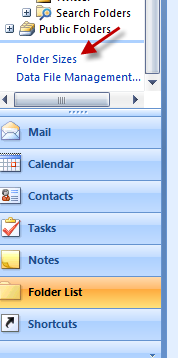
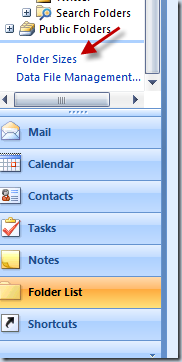
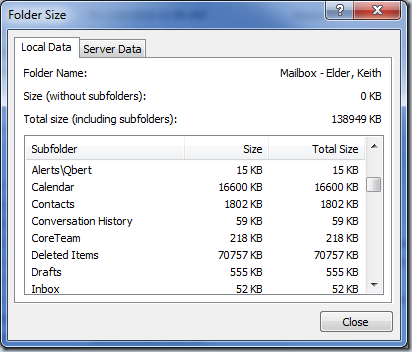
First I opened up my “Folder Sizes” in Outlook to see who the memory hog was. Turns out it was my calendar. Here is how you can find out your folder sizes:
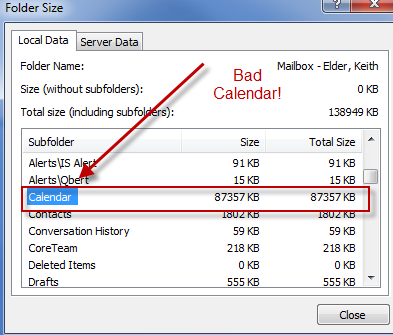
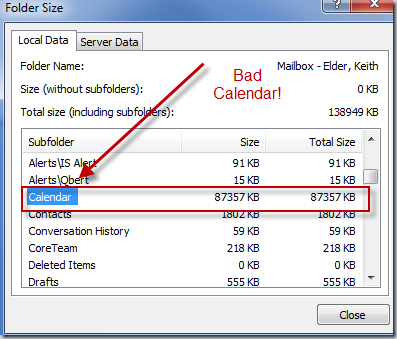
This will open the window which allows you to go through the folder sizes. As you can see my calendar was eating up about 87MB. When you only have a 100MB quota that doesn’t leave very much room for email.
After looking for a way to clean up the calendar data I gave up and asked one of our gurus at work and this is what he pointed me to.
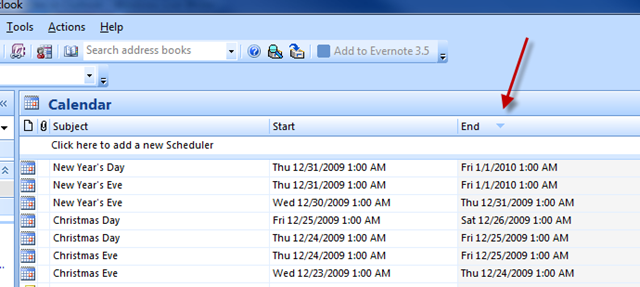
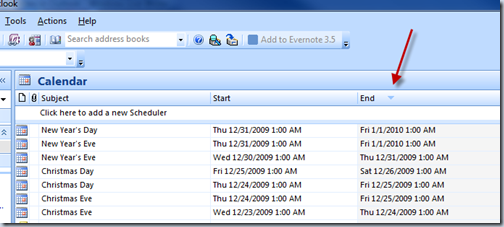
In Outlook click on your calendar so it is open. Then in the menu go to “View->Arrange By->Date”. Then sort by the “End” column. This will sort all of the things in your calendar by the end date. The view will look similar to this:
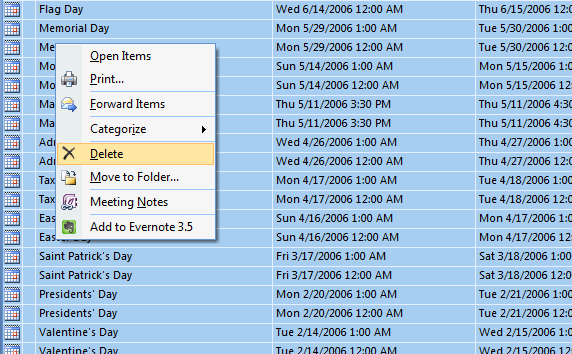
Now that we’ve got the dates sorted simply go back as far as you want and highlight the older dates that have ended and then delete those records.
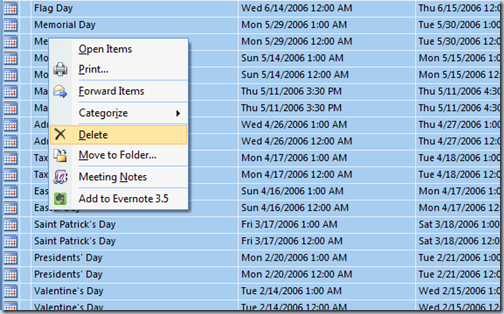
Tip: Select the one at the top you want to start with. Then scroll down to the last one you want to delete and press the shift key while you click on the row. All the items from the first one you selected to the last one will be selected. Right click and then delete.
NOTE: If you select everything as described above then any reoccurring appointments will also be deleted. Be careful!
As you can see much space has been recovered. But now they are all in “Deleted Items” which must now be purged in order to reclaim the space officially.
Now back to emailing.