Welcome

You have reached the blog of Keith Elder. Thank you for visiting! Feel free to click the twitter icon to the right and follow me on twitter.

TechEd or PDC – Which one do you like best?

Posted by Keith Elder | Posted in Uncategorized | Posted on 01-03-2007

This is the year that a lot of us will have to choose one conference over the other since PDC is on the 2007 calendar.  If you were given the choice where you had to choose one event over the other, which one would you go to? TechEd 2007 or PDC 2007? 

In 2005 I attended PDC 2005 and in 2006 I attended TechEd 2006 in Boston.  I’ve been to both events and enjoyed both.  PDC 2005 we got to first see Windows Workflow Foundation, Windows Communication Foundation and other goodies that just RTMed as of late.  They really are different type of events since PDC is going to talk about things that are on the horizon from the developer perspective and TechEd is focused more on today’s technologies.  On the flip side TechEd is a larger event and an opportunity to interact with more people and see a wider variety of topics.

For those of you that have been to both events more times than I have, which one do you enjoy the most?  Is it better to go to PDC 2007 and get an early jump on what is coming out?  Or, better to go to TechEd 2007 and take advantage of the labs and broaden your base of knowledge by stepping outside of your comfort zone?  Respond with your comments below if you don’t mind.

Technorati tags: , , ,

Enterprise Library 3.0 to have Environmental Overrides

Posted by Keith Elder | Posted in Uncategorized | Posted on 28-02-2007


Sometimes you read a blog post and you are so excited to see such a feature announced in a new product that you blog about it yourself.  This is one of those posts.

After moving to Windows Vista I had troubles with RSSBandit and had fallen behind on my news needless to say so sorry for those that already read this announcement from Olaf about EntLib 3.0.

Moving from environment to environment is something a lot enterprise customers deal with.  We spend thousands upon thousands of dollars replicating environments to test our software, yet we are left normally coming up with our own solutions to handle changes from environment to environment. 

That is why I am happy to see this new feature added to the CTP release of Enterprise Library 3.0.  Here is a screen shot of how things will be handled in the console tool:

Environmental Overrides in Configuration Tool


Here is how the system works as quoted by Olaf:

Every environment that is configured in the tool, will maintain its own “Environment Delta File” (or .dconfig file), which is updated after saving the configuration as a whole. This Environment Delta File contains all the differences specific to that environment and some additional metadata for merging the differences into a new and complete configuration file that can be deployed. The main advantage here is that an Environment Delta File can be distributed separately of the original configuration file and managed by someone that has access to all the passwords, server-names and what not of the different environment.

Very cool stuff.  Olaf also noted a command line tool which will assist in automating the build process for each environment.   Great stuff!

ASP.NET Web Services and WCF Very Different Animals

Posted by Keith Elder | Posted in .Net, Asp.Net, Web Services | Posted on 27-02-2007

For the past several days I’ve spent a lot of time trying to get up to speed using Windows Communication Foundation.  I’ve seen or watched enough “Hello World” demos of WCF over the past year to choke a good mule to death but I haven’t had a chance to write anything using WCF for real world experience.  I knew I’d get around to it eventually.  This is the point where you actually learn how to use a technology anyway.  Having done large scale applications with Asp.Net web services for quiet sometime I honestly didn’t figure it would be that difficult.   I was wrong.  My first real world venture into WCF left me scratching my head and feeling like a 12 year again. 

My reason for using WCF is I’m staring a new project which will be a Smart Client application used to build and manage business rules for different .Net applications leveraging the Windows Workflow Foundation rules API.  Since I was leveraging the .Net 3.0 framework anyway, I thought now was as good a time as any to jump into WCF. 

Once I defined my database structure and calculated which web service methods I was going to need, I created my ISomethingInterface contract which defined my methods.  I then implemented those methods in my service.  Very simple stuff at first, then I pressed F5 in Visual Studio and I was greeted with errors because my web.config file wasn’t configured.

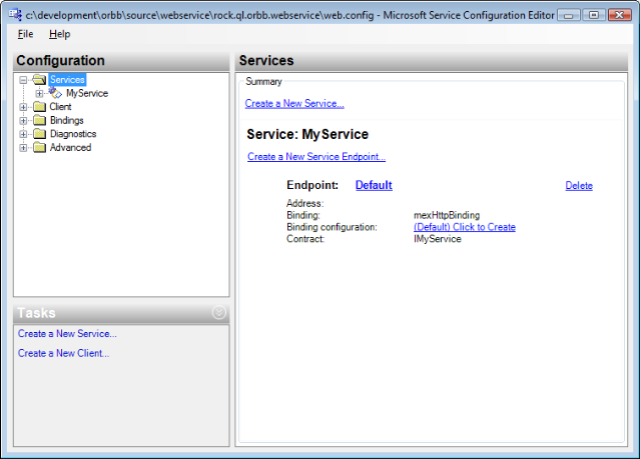
I knew I had to configure the service and so off I went researching how to write the web.config file to expose my service.  I went to MSDN only to learn that I was going to spend the next several hours reading all of these different configuration options (WCF is flexible, but with flexibility comes more to read).  I gave it a college try trying to configure the web.config by hand and then eventually got frustrated because it wasn’t working.  Finally after doing some other searches I see a screen shot of a new item menu in the context menu when you right click the web.config file called “Edit WCF Configuration”.  I click it and get this:

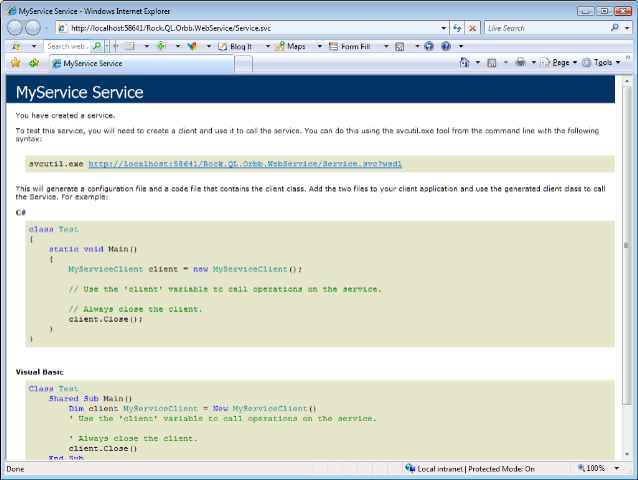
If I’d only know this was there earlier.   After I got my service configured so it gave me a result other than an error page I *thought* I was going to get the same type of page you get with normal Asp.Net web services which is a page that shows you the methods available.  I was wrong.  I got this:

Where’s my list of web methods!?  Not there.  Again different from what I was expecting.  By this point I had resigned myself to throwing everything I knew about ASP.NET Web Services out the window because obviously previous knowledge was not really helping. 

I decided to absorb my new service in my client.  Since I had gotten burned by the right mouse click thing earlier I decided to see if the WCF CTP put a menu item in my project so I could generate the class file with svcutil.exe instead of wsdl.exe. Sure enough it was there.  This was the only thing that left me warm and fuzzy, something I had done before.   I then wrote a quick line to leverage the service (which I had placed in a separate Class Project) and it didn’t work.   The app.config file generated was placed in the project file where the service was generated, but not in the project the application was going to run from.   Luckily I was smart enough to just copy the one created for me and it worked.  Again, different. 

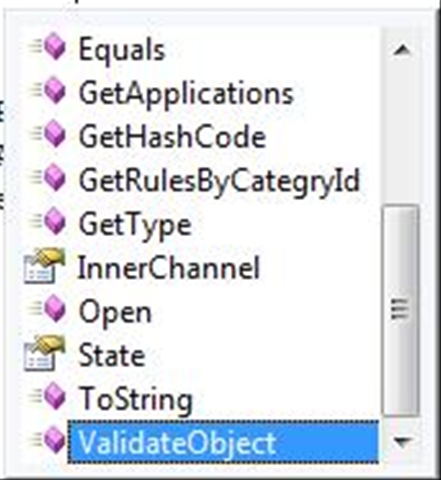
Feeling I had made progress I made the methods I wrote work, wrote unit tests for them and then baked them into the user interface of the application.  Then it hit me that I needed to call these services asynchronously.  So I typed “service.” and waited for intelilsense to see what the async calls were named.  They weren’t there!  Uh oh.

Doing some more digging I learned the svcutil.exe has a switch to generate asynchronous calls. The switch is /async.  Reading further there are different types of async calls and this is where I am currently at, trying to figure out what I really need to do and all the ins and outs of async calls in WCF.  Obviously lots of differences as I move further into WCF.

I did find a really good article which tells the developer what the differences between the two are, you may save yourself some headaches.  There are also some other documents nearby this one in the menu on MSDN that you may want to read as well.

Tips: Using Strong Typed DataSets with Web Services

Posted by Keith Elder | Posted in Uncategorized | Posted on 23-02-2007

Before I start this article, let me be up front and state that I do not use DataSets 100% of the time.  I do use the heck out of them in demos and presentations because, well, they demo well.  There is a never ending debate on whether to use DataSets or not.  I say use them, but not in all situations.  That’s my official stance on them.  In a lot of cases they make sense, espeically when doing binding to a DataGrid and reconciling changes, in others they don’t.  We are not here today to argue for or against them though.  What I will share with you are some tips that many may or may not know when using DataSets with Web Services.   

Tip #1:  Include Only What You Need

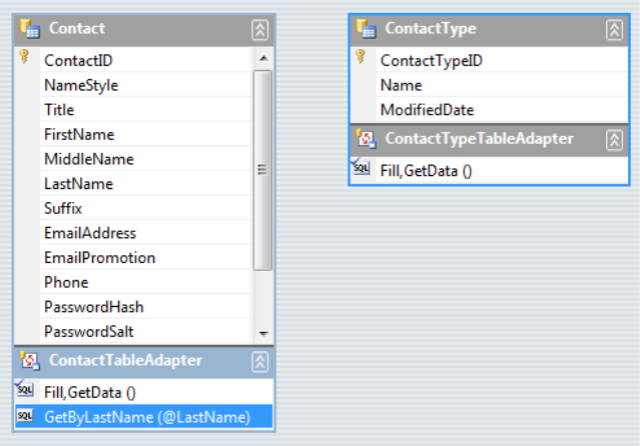
As the tip states, include only the tables you need.   I never create one master DataSet with all of my tables from my Database.  I find it to be hard to work with and typically if I am working on a module basis which means I don’t need everything anyway, just the tables that apply to the module I am working with.  I see a lot of time where people create DataSets where they include the entire database in a DataSet.  I don’t, especially for modules.  A lot of the time I will have a DataLayer that is made up of several different DataSets, not one large one.  Here’s an example of what I’m talking about:


This example from the AdventureWorks database has only two DataTables in it:  Contact and ContactType.  This is all I need if I am going to deal with a Contact.  It is easier to manage and look at, and less of a code footprint.   If you are passing this information over a web service, by default, the schema of the DataSet goes along for the ride.  Having more tables, means more schema information, which brings me to my second tip.

Tip #2:  Don’t Include Schema Information

If you are using a Strong Typed DataSet, before you return your DataSet from a Web Service, mark it to not include the schema.  Here is a sample web method using the Strong Typed DataSet seen above.

       [WebMethod]

        public ContactDataSet GetContactsByLastname(string lastname)

        {

            DataLayer.ContactDataSetTableAdapters.ContactTableAdapter ta = new DataLayer.ContactDataSetTableAdapters.ContactTableAdapter();

            ContactDataSet ds = new ContactDataSet();

            ds.Merge(ta.GetByLastName(lastname));

            return ds;

        }

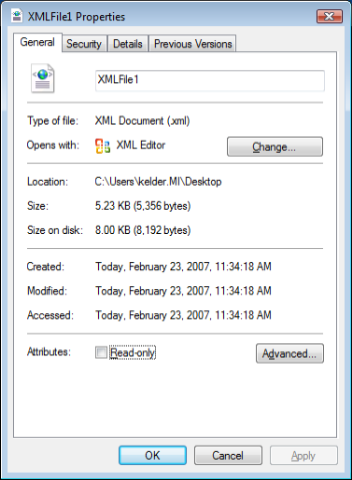
 Here is the output from this web method saved to the file system. 

The majority (95%) of what is in the file is the Schema Definition for the DataSet.  This is why the file is 5.23KB.  The only part we *really* want is the row data.  This is one of the major reasons people stay away from DataSets.  Which is a shame since they provide a lot of functionality.  It turns out we can fix this problem with one line of code.  Here is the new code sample whereby we exclude the schema:

        [WebMethod]

        public ContactDataSet GetContactsByLastname(string lastname)

        {

            DataLayer.ContactDataSetTableAdapters.ContactTableAdapter ta = new DataLayer.ContactDataSetTableAdapters.ContactTableAdapter();

            ContactDataSet ds = new ContactDataSet();

            ds.Merge(ta.GetByLastName(lastname));

            ds.SchemaSerializationMode = SchemaSerializationMode.ExcludeSchema;

            return ds;

        }

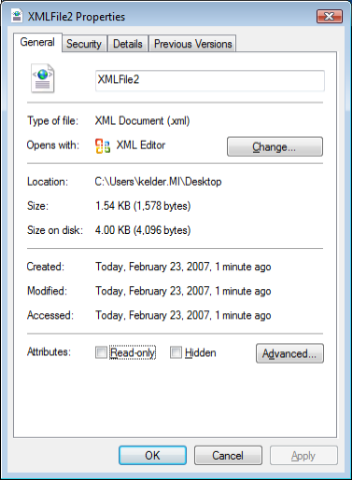
 If we run this example which excludes the XSD, we immediately see a smaller footprint.  We go down from 5.23KB to 1.54KB:

And here is the output from the web service.  Much much smaller than previous, and it contains the data we primarily care about althought it does include a few straglers which I would like to see removed entirely from future versions.  Maybe the .Net team can add a new flag to the enumeration which is SechamSerializationMode.JustGiveMeMyData. 🙂

<?xml version=1.0 encoding=utf-8?>

<ContactDataSet msdata:SchemaSerializationMode=ExcludeSchema xmlns:msdata=urn:schemas-microsoft-com:xml-msdata xmlns=http://keithelder.net/>

    <xs:schema id=ContactDataSet targetNamespace=http://tempuri.org/ContactDataSet.xsd xmlns:mstns=http://tempuri.org/ContactDataSet.xsd xmlns=http://tempuri.org/ContactDataSet.xsd xmlns:xs=http://www.w3.org/2001/XMLSchema xmlns:msdata=urn:schemas-microsoft-com:xml-msdata attributeFormDefault=qualified elementFormDefault=qualified>

        <xs:element name=ContactDataSet msdata:IsDataSet=true msdata:UseCurrentLocale=true>

            <xs:complexType>

                <xs:choice minOccurs=0 maxOccurs=unbounded />

            </xs:complexType>

        </xs:element>

    </xs:schema>

    <diffgr:diffgram xmlns:msdata=urn:schemas-microsoft-com:xml-msdata xmlns:diffgr=urn:schemas-microsoft-com:xml-diffgram-v1>

        <ContactDataSet xmlns=http://tempuri.org/ContactDataSet.xsd>

            <Contact diffgr:id=Contact1 msdata:rowOrder=0>

                <ContactID>19978</ContactID>

                <NameStyle>false</NameStyle>

                <FirstName>Keith</FirstName>

                <LastName>Elder</LastName>

                <EmailAddress>not@telling.com</EmailAddress>

                <EmailPromotion>1</EmailPromotion>

                <PasswordHash>hash</PasswordHash>

                <PasswordSalt>salt</PasswordSalt>

                <rowguid>cd9ea7c0-d192-4a9f-9999-e9a0c6b117a9</rowguid>

                <ModifiedDate>2007-01-30T11:16:48.703-06:00</ModifiedDate>

            </Contact>

        </ContactDataSet>

    </diffgr:diffgram>

</ContactDataSet>

Note, if you are using plain datasets, you have to include the schema, always.

 Tip #3:  Enable GZIP on IIS

The last tip while not exclusive to DataSets is worthy of noting nontheless.  That is to turn on Gzip compression in IIS.   You will notice a drastic performance increase of data moving over the wire.  XML compresses really well with Gzip and I’ve seen 20K or 26K messages get turned in 2-4K easily.  For smaller messages you may don’t want to Gzip since it will actually add to the message footprint.  The good news is when you create your proxy class to call the web service, you can choose if you want to support it or not.  Here’s an example:


MyService proxy = new MyService();
proxy.EnableDecompression = true;

This is supported in .Net 2.0.  The above lines will set the HTTP header when the service is called to tell IIS that Gzip compression is supported and IIS will then zip the contents and send them back down.  If you have a very small message then set this to false, otherwise you will add overhead of the compression. 

Technorati tags: , , , , ,

Like This Article?  kick it on DotNetKicks.com

.Net Engineer Openings – Those Who Have Passion Need Apply

Posted by Keith Elder | Posted in Asp.Net, Smart Clients | Posted on 20-02-2007

If you’ve been waiting for the right job to come along, specifically a job opening at one of the top companies in the country, your wait is officially over.   If you are passionate about programming and designing large scale Enterprise systems where you get to have a direct impact on the business, we need you!

We have several .Net Engineer openings available at my current employer Quicken Loans.  You can’t be considered if you don’t apply and you won’t get preferential treatment with your resume if you don’t contact me directly!

We have openings in several different areas and need people who have skills in all sorts of areas including Asp.Net, Smart Clients and back-end people with certain talents ( Biztalk, Workflow, WCF, etc).  The great thing about these positions is you will become part of a team who loves to automate business practices, embrace industry standards, embrace change and adopt early.  You’ll be given all the tools you need to succeed as well as a culture that is unlike any you’ve probably seen. 

If you would like my email address run this code in a console application, or guess the output. 

using System;

using System.Collections.Generic;

using System.Text;


namespace ConsoleApplication1

{

    class Program

    {

        static void Main(string[] args)

        {

            Email myEmailAddress = new Email();

            myEmailAddress.Prefix = “keith”;

            myEmailAddress.Connector = “@”;

            myEmailAddress.Domain = “keithelder.net”;

            Console.WriteLine(myEmailAddress.ToString());

            Console.ReadLine();

        }

    }


    class Email

    {

        private string prefix;


        public string Prefix

        {

            get { return prefix; }

            set { prefix = value; }

        }


        private string connector;


        public string Connector

        {

            get { return connector; }

            set { connector = value; }

        }


        private string domain;


        public string Domain

        {

            get { return domain; }

            set { domain = value; }

        }


        public override string ToString()

        {

            StringBuilder sb = new StringBuilder(3);

            sb.Append(this.prefix);

            sb.Append(this.connector);

            sb.Append(domain);

            return sb.ToString();

        }


    }

}