Welcome

You have reached the blog of Keith Elder. Thank you for visiting! Feel free to click the twitter icon to the right and follow me on twitter.

Mobile Alabama Code Camp – Good Food and Good People

Posted by Keith Elder | Posted in Uncategorized | Posted on 16-04-2007

1

Saturday was the Alabama Code Camp in Mobile, AL.  Doug and Matt, who run the Mobile .Net User Group, put on a heck of a show and raised the bar for code camps in the area.  I couldn’t believe how many speakers were there.  So many in fact there was only enough room for the majority of us to do one talk.  Speakers came in from as far away as Florida, Alabama, Georgia, and Mississippi. 

Friday night the speakers got together at Felix’s Fish Camp off exit 27 on I-10.  I had the barbeque shrimp which came complete with a bib (pictured to the left which More Wally took).   Notice they don’t give me peeled shrimp.  At Felix’s you get the REAL DEAL on the shrimp complete with tails and heads.  I have to say it was some of the best shrimp I’ve ever eaten.  Their sauce was incredible.  Ellen went with me on this trip as well, she is in the picture but cut off a little.  She’d been to Felix’s before and said we should go.  She was right, the food was excellent!

We got to Felix’s a little late thanks to me printing off the wrong directions from the wrong starting location.  Basically at the end of our table was the .Net 3.0 track presenters with Jeff Barnes doing WCF, Todd Miranda doing WPF and me doing WF (workflow foundation).  The seating arrangement wasn’t planned, it just sort of worked out that way.  Also at the end was Jeremy Chance.  Honestly, Jeremy  probably knows more about tires and trucks than I do about workflow.  I did learn while eating supper that I could fit 32 inch tires onto my Jeep Liberty.  As Jeremy explained the 33’s are too big and will rub the sidewall.  See, told you he knew more!  

There were also three Microsoft DE’s there:  Doug “I do psycho analysis on the crowd while I present” Turnure , Joe “I wear women shirts to code camps” Healy and Brian “I still need more wally” Hitney.  Actually I don’t know if Brian needs more Wally or not, but I had to work it in somehow for Wally to get two links from this post or he’ll kill me!  🙂
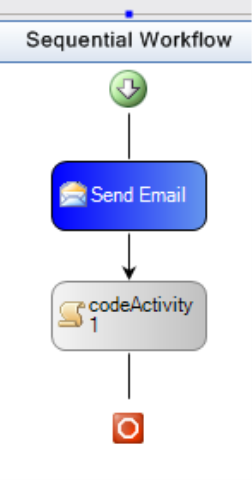
Like I said earlier I talked about Workflow Foundation.  Today I might add we rolled out a significant feature for our internal Smart Client CRM application which leverages workflow foundation from our services layer (middle tier).  Cool stuff.  For a topic I chose something I’d been doing a lot of and that was writing custom workflow activities.  Not that I measured it but I probably wrote the most code of anyone at the code camp.  I wrote the custom workflow activity completely from scratch without any pre-done samples, kind of a different approach for a “code camp” I know.  I hope those of you that were in the presentation liked this approach and enjoyed it.  I personally always get more out of watching someone go through the process.  If not, let me know and I’ll never do it again!  In the end we built the the custom SendEmail workflow activity you see to the left which we could drag from the toolbox onto the designer.  Fun stuff!

During the code camp I made a connection with a fellow Mississippian who relocated to the area I’m in.  While we aren’t in the same city, he is still the only .Net developer I’ve met.  We may be organizing something in our area in the future so stay tuned!  Aubrey, we’ll hook soon I’m sure!

The only thing that got me down about the camp was the fact that I lost my dang Canon SD630 camera.  Well I didn’t lose it, I left it at the code camp on the desk.  See, you really “Can’t Fix Stupid!”  (inside joke).  This is a bummer since I had worked out my hotel for free and everything. I really thought I was pulling an almost free trip using my Hilton Honors Gold VIP points.  Instead, I’m out a $300 camera. 
Working From Home Tip – Start With Your Headset

Posted by Keith Elder | Posted in Uncategorized | Posted on 15-04-2007

3

I’m a Software Engineer so it is easy for me to work from home.  Give me a high speed Internet connection, VPN into the office, forward my calls and I can work.  I’ve been working at home now for almost two years.  When I first started working remote from Hattiesburg I didn’t know how things would work out.  But after several months I got into a really nice routine.  One of the things I noticed initially was I am WAY more productive than working in the office.  I gained anywhere from 1-2 hours of chair time each day by not having to drive into the office.  And since I was at home, it only took me about 5 minutes to fix a sandwich and I was back at my desk.    

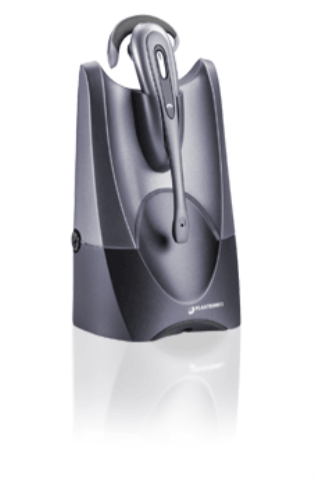
We actually have a fair amount of people that work from home at Quicken Loans.  A lot of team members get to work from home for several months at a time as a perk.  I usually get asked for pointers and tips on how to work effectively from home by fellow team members.  Some of the things I tell them are company specific but others are just general.  The number one thing I tell people is to invest in a headset.  And by invest I don’t mean $20, $40, or even $100.  When I first started working from home I immediately started researching which headset I was going to use.  I settled on the Plantronics CS50/HL10 headset as I discuss below.  For those working from home, start with your headset.  You’ll be happy you did.

Plantronics CS50/HL10

Your headset is something you will use everyday.  It is important you pick a great one.  Notice I said a “great” headset, not a good one, not a cheap one, not a descent one.  There is a difference in getting something that is good and getting something that is great.  I spent a lot of time researching my headset of choice before making the plunge.  I knew I was going to spend the majority of my time in conference calls, meetings, etc.  The features I wanted were wireless, enough battery life to last throughout the day, ability to answer if I was away from the desk and ability to get as far away from the desk as possible.

In the end I settled on the Plantronics CS50/HL10 which met all of my requirements. 

The Plantronics CS50 is a wireless headset that has a range of 300 feet from the base station and 8 hours of wireless hands free talk time.  You can buy the CS50 by itself, but don’t.  Without the handset lifter (HL10), the headset isn’t near as useful since you will not have a way to answer your phone if you are away from the desk.  The link I included above does include the HL10 bundle by the way.

The handset lifter sits on your home office phone and physically lifts the handset when you want to answer a call and drops the handset back down when you want to hang up. VERY COOL!  To use the lifter you do have to have a standard office phone the lifter will fit onto.  After mine arrived in the mail, I went to Office Depot with the lifter to fit it to a really good office phone.  The key is to not get one of the phones that are built at a high angle.  This causes the handset to fall off the phone when the lifter picks the phone up.  The flatter the better.

I’ve had my CS50 for about a year and a half now.  I haven’t had any problem with it except for some reason sometimes it takes it a few seconds to pickup the lifter after hitting the talk button.  All in all it has been the best thing I purchased for my home office. 

When I’m on long calls I don’t sit at my desk much.  I leave the desk and walk around the house.  Sometimes I jump on the treadmill if I am just listening in.  When I’m on long calls I pace around my house like a hamster in a cage.  My wife is worried I’m going to wear out our carpet pacing in circles from the kitchen, to the music room, to the living room and back to the kitchen.  If you think about it for a second I am at least getting some form of exercise.  If I’m on an hour conference call I may actually walk 30-40 minutes of it.  That’s a lot of walking if you think about it.  Yesterday for example I was on the phone for over 5 hours! 

The 300 feet range on the CS50 is impressive.  Example. Let’s say you are in the kitchen fixing a sandwich for lunch or on the way to the restroom and the phone rings. If you have your headset on just press the button on the side when the phone rings and it will answer (again, you need the HL10 lifter). 

The mute feature and volume control is located on the back of the headset and comes in handy as well.  I hate to admit it but I do some weird things while on the phone sometimes.  Sometimes I do light house work like sweeping the floor or venture outside play with the dogs.  I may even go all the way to the mailbox or water the flowers.  Without the mute button being accessible on the headset and the fact that it is wireless this wouldn’t be possible of course.  Now some of you may say, dude, your not paying attention if you are on the phone then.  Actually, wrong. I pay less attention if I sit at my desk.  Emails come in to distract me or instant messages.  I have found if I do something physical which takes zero brain power then I can still concentrate on the conversation.

As you can see, without my investment in my headset I would be severely tied my desk.  If you are working at home, take it from me, get a good headset, you’ll be happy you did.

Live Writer and Integrated Authentication Hate Each Other

Posted by Keith Elder | Posted in Asp.Net | Posted on 09-04-2007

2

I was setting up an internal blog site at my company today where developers and engineers can post blog entries.  After SubText was installed on the site I went to setup Live Writer.  This is the defacto blog editing tool I use for my blog and I was going to use it on the internal blog. 

When I went to setup the Weblog in Live Writer, IIS was configured with Integrated Authentication turned on (even though SubText uses forms authentication) and I got an error when configuring the blog of 401 unauthorized.  Obviously Live Writer wasn’t passing my windows credentials and this forced me to have to turn integrated authentication off on this site in IIS.  Not happy.  I really wanted to leave integrated authentication on because it would allow me to do some other things with custom permissions and the other reason being we can easily control who has access to the internal site via active directory roles. 

I can’t be the only person who has tried to do this.  Nevertheless this got me to thinking if Live Writer worked with Sharepoint 2007 to write blog articles which does use integrated authentication by default.  This isn’t supported it looks like either.  

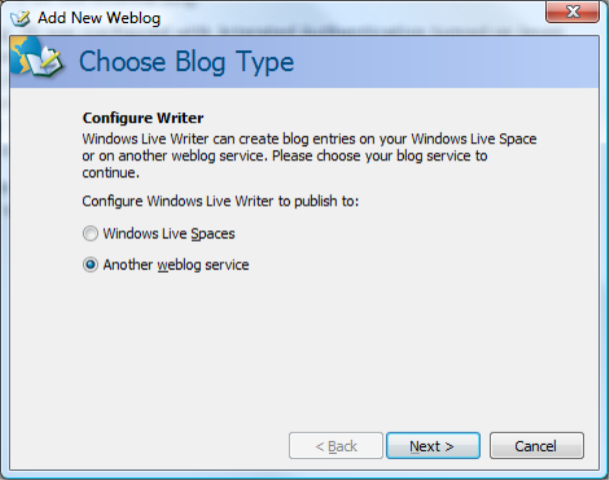
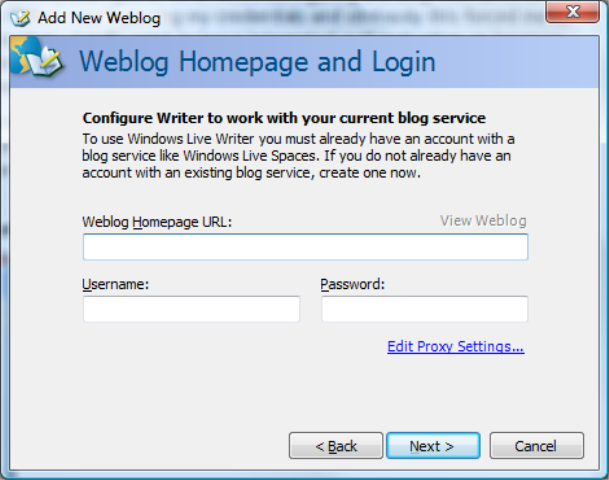
If you haven’t ever used Live Writer, here are the screens you go through to setup a new blog:

1.  Choose either Live Spaces or another blog

2.  Enter Blog Site and Credentials

It is this screen that needs to have the option to pass Windows credentials so I can connect to my internal site or Sharepoint 2007.  Live Writer is still in beta so the team does still have time to get this feature added 🙂

Interviewed on AG Speaks Podcast

Posted by Keith Elder | Posted in Uncategorized | Posted on 05-04-2007

0

Alfred Green who does a Podcast show called AG Speaks interviewed me a month or so ago and he finally got the Podcast posted up to his site.  I’ve known Alfred for several years where we first initially met at the Washtenaw Linux Users Group in the late ’90’s. 

The interview will probably give you more information about The Elder than you’ll ever want to know.  I’ve always found it interesting to know how people came to do what they do and the thought process that went into it.  This interview will provide you a lot of that information.  We started at the beginnings of my computer background and worked our way to almost present day.  It was a blast talking about what I’ve done, how I got started, and the journey that took me through Linux, Apple’s OS X, and now to the Microsoft platform.  Here are some of the things that were mentioned during the interview:

  • Sinclair 2000
  • Unix
  • WYSE Terminals
  • IRC
  • Open Source
  • Linux
  • Business
  • Programming
  • Perl
  • PHP
  • Hardware
  • Being a geek
  • PHP Training
  • Consulting
  • Switch to Apple
  • Teaching
  • Switch to .Net

Lots of interesting stuff to say the least.  You can download the 1:27 Podcast from here.