Welcome

You have reached the blog of Keith Elder. Thank you for visiting! Feel free to click the twitter icon to the right and follow me on twitter.

Exposing a WCF Service With Multiple Bindings and Endpoints

Posted by Keith Elder | Posted in .Net, WCF | Posted on 17-01-2008

52

Windows Communication Foundation (henceforth abbreviated as WCF) supports multiple bindings that allows developers to expose their services in a variety of ways.  What this means is a developer can create a service once and then expose it to support net.tcp:// or http:// and various versions of http:// (Soap1.1, Soap1.2, WS*, JSON, etc).  This can be useful if a service crosses boundaries between intranet and extranet applications for example.  This article walks through the steps to configure a service to support multiple bindings with Visual Studio 2008 and the .Net 3.5 framework.  For those that want to jump directly to the sample solution it can be found at the end of this article.

Setting Up The Test Solution

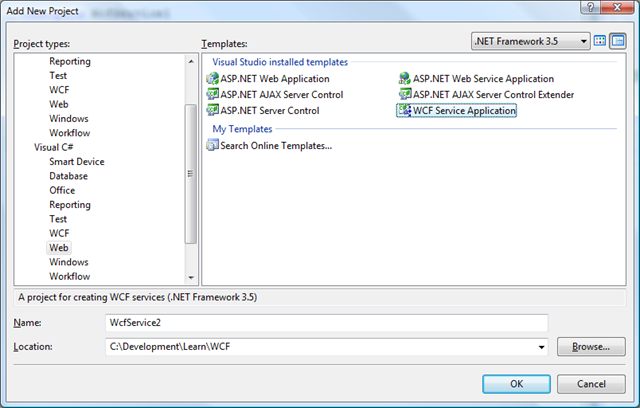
Below you will find the steps used to create the sample solution.  I’ll explain a few WCF concepts along the way but probably not all of them.  I will however link to relevant documentation where applicable.  To get started, within Visual Studio 2008 create a new WCF Service Application project.  This template can be found within the web section of Visual Studio 2008 as seen here.
image

After the project is initialized modify it so it contains four files, note this will require deleting the default files:  IMyService.cs, Service.cs, Service.svc, and Web.Config.  Once you have cleaned up the default template, it should look like this:

image

Creating Our Service Contract
The IMyService.cs file will contain our service contract.   In old ASMX services, in order to expose a method as a service one would attribute the method with the attribute of [WebMethod].  In WCF, everything is tied to a Service Contract.   By defining our service contract as an interface, any class that implements that interface can be exposed as a WCF service.  In order to achieve this a ServiceContract attribute will be placed on the interface and an OperationContract attribute will be placed on the method we want to expose for our service.  Our interface is going to be simple and will just contain one method to add two numbers.  Here is the sample.

[ServiceContract(Namespace="http://keithelder.net/Learn/WCF")]

    public interface IMyService

    {

        [OperationContract]

        int AddTwoNumbers(int x, int y);

    }

Implementing The Contract
The Service.cs file will contain the implementation of the IMyService interface.  Again, since we defined our contract as an interface our service class doesn’t need or have any attributes on it.  Here is the code:

    public class Service : IMyService
{
public int AddTwoNumbers(int x, int y)
{
return x + y;
}
}

Creating The Service Host
The file Service.svc will provide the endpoint for our URL that will be exposed by IIS.   Within this file, we only need one line which identifies the class that contains our service using the ServiceHost directive.  Here is the code for this file.

<%@ ServiceHost Language="C#" Debug="true" Service="WcfService1.Service" CodeBehind="Service.cs" %>

Now that we have the contract specified and implemented along with an endpoint to host the service everything from here on out is just configuration.  This is the beauty of WCF.   How we want the service to be exposed is stored within the web.config file.  There a lot of options in WCF and those just learning WCF are typically overwhelmed at the amount of options.  Luckily Microsoft has a tool to help us along.  The upside to this approach is we do not have to code how our service is secured as we did in older ASMX services.

Setting Up Basic Http Binding

Before we add multiple bindings to our single service, let’s focus on adding one binding.  In order to configure our service we are going to use the Microsoft Service Configuration Editor.  This editor allows us to configure our WCF service and can be launched right from Visual Studio.  To launch the editor, right click on the web.config file.  An option should be in the menu that says “Edit WCF Configuration”.  If it doesn’t don’t worry, sometimes, Visual Studio doesn’t pickup this option.  A trick is to go to the tools menu in Visual Studio and select the editor from there.  After the editor is launched it will then show up in the menu when you right click the web.config file.

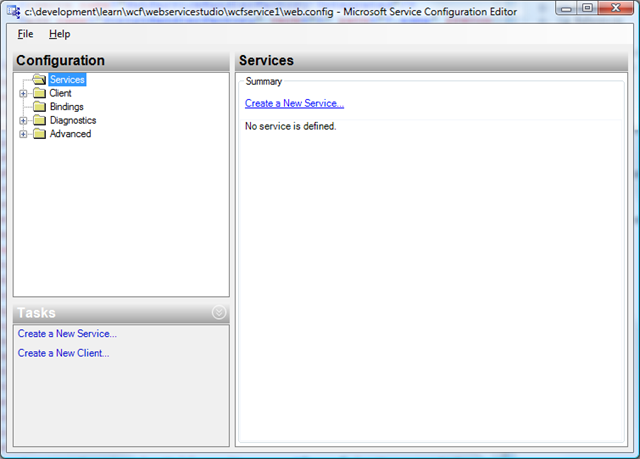
For this example I have removed everything from the web.config file before launching so I can configure the service completely from scratch.  Opening the web.config with the editor shows a blank configuration as follows.
image

Follow the steps to initialize the configuration.

Step 1
Make sure your solution builds.

Step 2
Click “Create a New Service” in the right panel of the editor.

Step 3
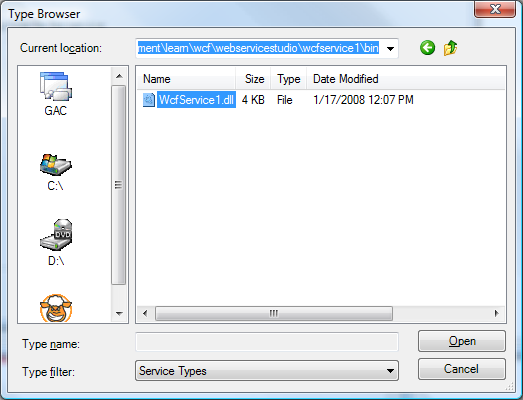
Browse to the bin directory and select the WcfService1.dll (if the file doesn’t show up, go back to step 1)
image

Double click this file and select your service implementation.

image

Step 4
The service type should be displayed on the previous screen.  Press Next->.

Step 5
Select the contract.  This should automatically be selected to WcfService1.IMyService.  Press Next->.

Step 6
Since we are using IIS to host our service select the HTTP option for the communication mode.
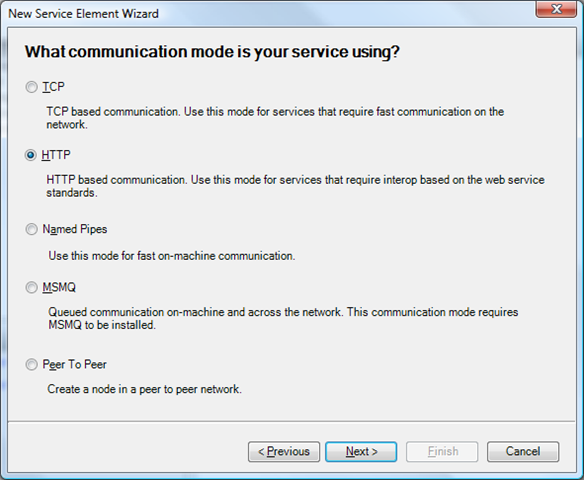
image 

Step 7
Select the basic web services interoperability.  We’ll come back later on and add advance web services interoperability.
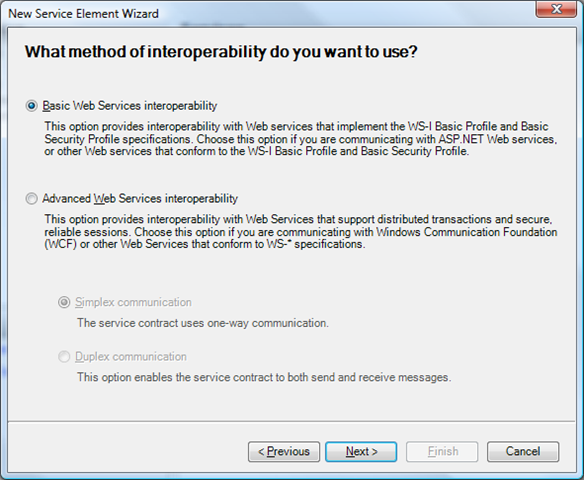
image

Step 8
Delete the “http://” from the address field.  Since we are developing we don’t know which port this will get assigned as of yet.
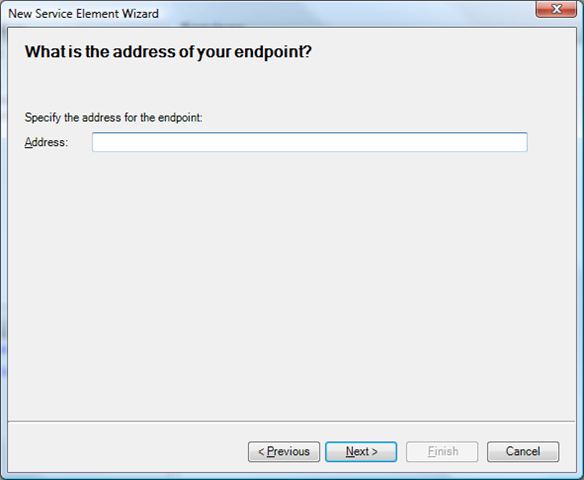
image

Press Next->.  A dialog will appear.  Select Yes.
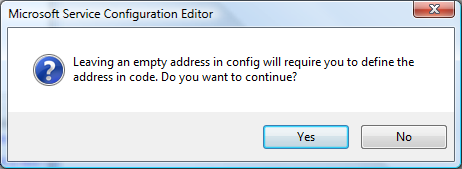
image

Press Finish on the next screen.

At this point we have an almost configured service.  If you drill down into the Services folder within the tool down to the end point the configuration should look something like this.
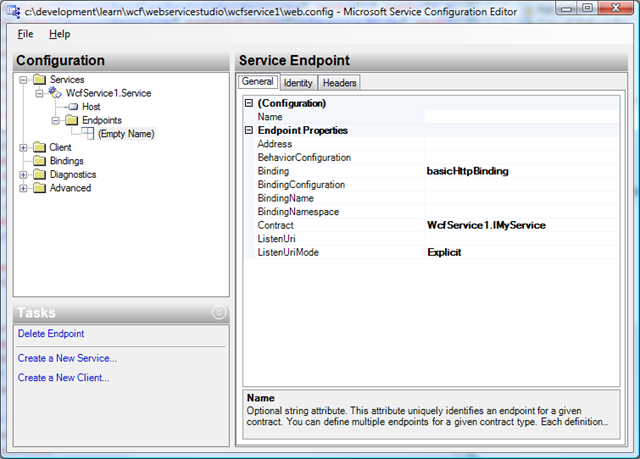
image

Step 9
Let’s clean up our configuration.  In the screen shot above in the configuration section.  Give this endpoint a name of “Basic”.  This will let us know later on this endpoint is our BasicHttpBinding configuration which supports the SOAP1.1 protocol.

Step 10
Click on the “Services” folder in the editor.
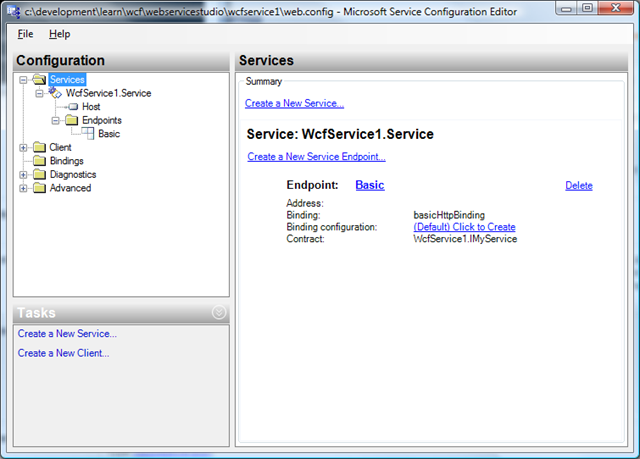
image

Step 11
Next to the binding configuration there is a link that says “Click to Create”.  Click this link to create a binding configuration.  While this isn’t necessary in all instances it is a good practice to have a binding configuration.  This gives you more control over how your binding is configured and is a good practice to initialize early on.

Clicking this link will create a new binding.  In the name field under the configuration section, give it a name of “Basic”.  The defaults for this example are fine.
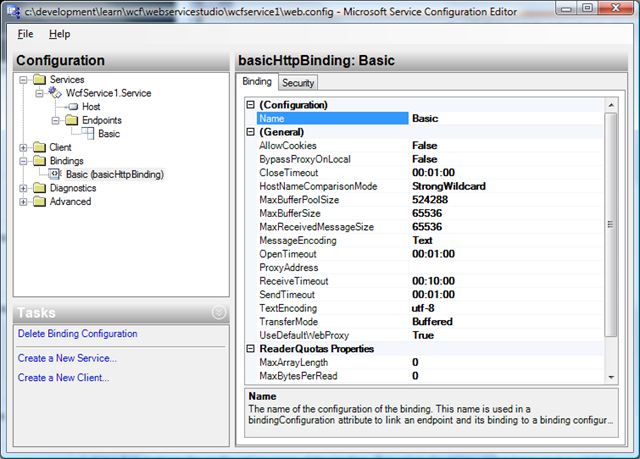
image

Note:  Clicking on the Security tab in the above screen the Mode should be set to None. 

At this point you should be able to save your configuration and press F5 in Visual Studio to launch your service in debug mode.  You should be presented with a web page that looks like the following:
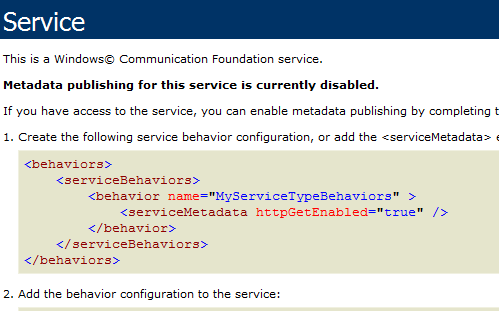
image

Exposing Our Service’s WSDL

Unlike previous ASMX services, the WSDL (web service definition language) for WCF services is not automatically generated.  The previous image even tells us that “Metadata publishing for this service is currently disabled.”.  This is because we haven’t configured our service to expose any meta data about it.  To expose a WSDL for a service we need to configure our service to provide meta information.  Note:  The mexHttpBinding is also used to share meta information about a service.  While the name isn’t very “gump” it stands for Meta Data Exchange.  To get started configuring the service to expose the WSDL follow the following steps.

Step 1
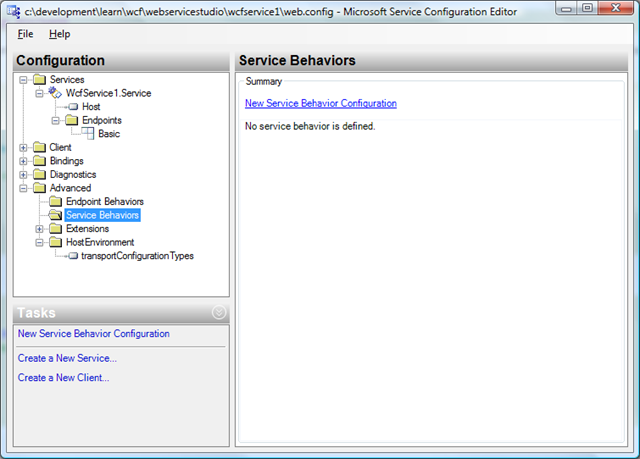
Under the Advanced folder in the editor, select the “Service Behaviors”.
image

Click the “New Service Behavior Configuration” link in the right pane.

Step 2
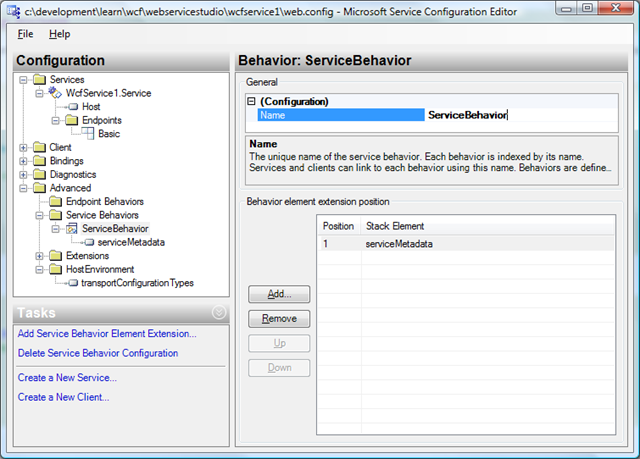
Name the behavior “ServiceBehavior”.  In the bottom section press the add button and select the “serviceMetaData” option and press Add.

image

The end result should look like the following.
image

Step 3
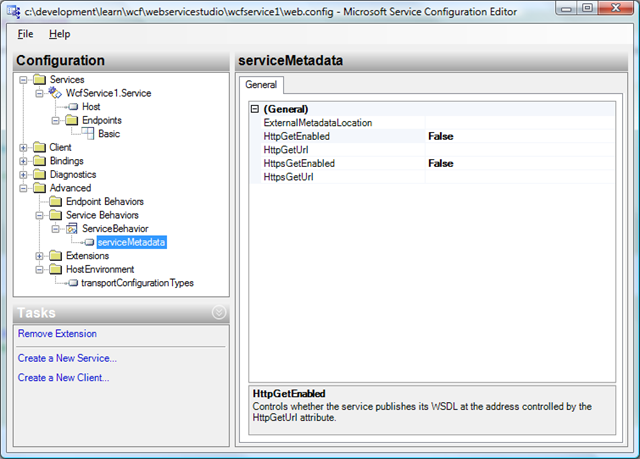
Under the “Service Behaviors” folder, select the newly created “ServiceBehavior” option and then the “serviceMetadata” option underneath that.  In the right pane change the HttpGetEnabled to True.
image

Step 4
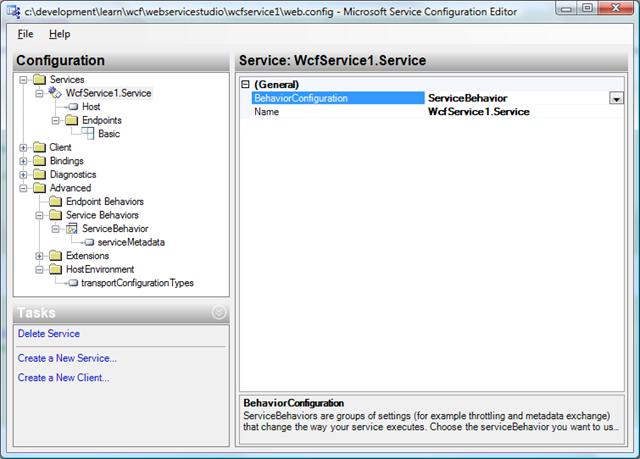
Select the service under the Services folder and apply the new service behavior to the service.
image

Step 5
Save the configuration and reload the service in the browser.  The page should be changed to the following:

image

Clicking on the link should display the WSDL for the service.

At this point our service is configured to support the SOAP1.1 protocol through the BasicHttpBinding and is also exposing the WSDL for the service. What if we want to also expose the service with the SOAP1.2 protocol and support secure and non-secure messages?  No problem.  We can expose the service all of those ways without touching any code only the configuration.

Adding More Bindings and Endpoints To Our Service

Now that we have the basic binding working let’s expose two additional endpoints for our service which support the WS* protocol but are configured differently.  We’ll expose a plain SOAP1.2 protocol message using the wsHttpBinding that is a plain message as well as a secured message using the wsHttpBinding.

Step 1
Under the Services folder select the EndPoints folder for the service and add a new service endpoint.  Give it a name of WsPlain.  This endpoint will serve as a standard SOAP1.2 message that isn’t encrypted.  Change the binding to wsHttpBinding.  In the address field, copy the address from your browser.  In my case, my project used the address of http://localhost:5606/Service.svc.  Paste this into the address field and add /WsPlain to the end of it so it looks like the following:

http://localhost:5606/Service.svc/WsPlain 

Each binding for each endpoint has to have a separate address.  Doing it this way allows us to keep our one service file and offer it up in various configurations.  In the contract option browse to the DLL in the bin directory and select the contract used previously.  The end result should look similar to this:
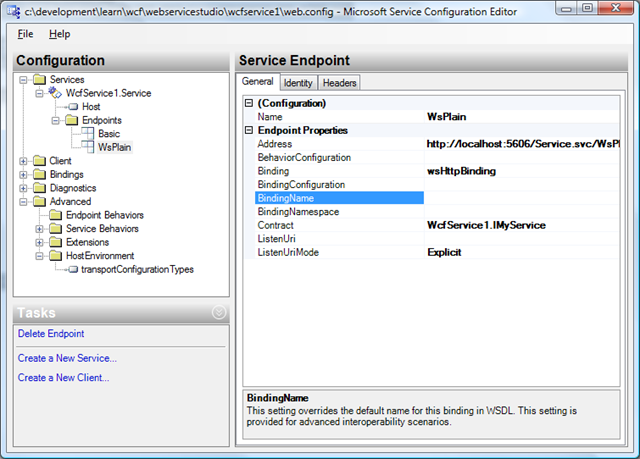
image

Step 2
Just as we did previously, click on the Services folder and create a binding configuration for this endpoint.  Refer to step 10 and 11 above.

Provide a name of WsPlain for the new binding.  In the security tab change the mode to “None” and set all other options to false or none.  This is setting up our binding so there is no security on our message.  By default the binding is configured to be secure.
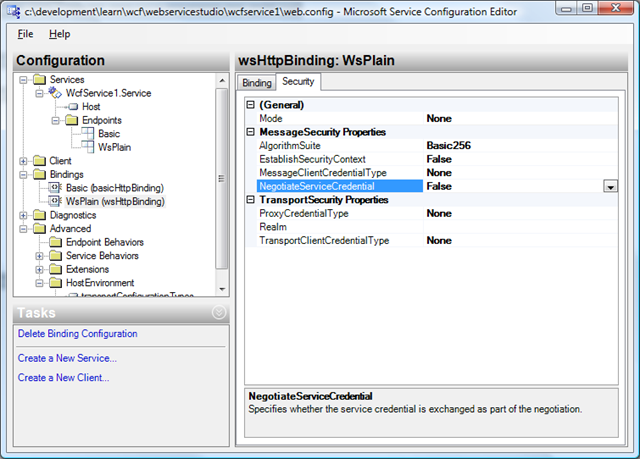
image

The final settings for the WsPlain endpoint should be similar to this.
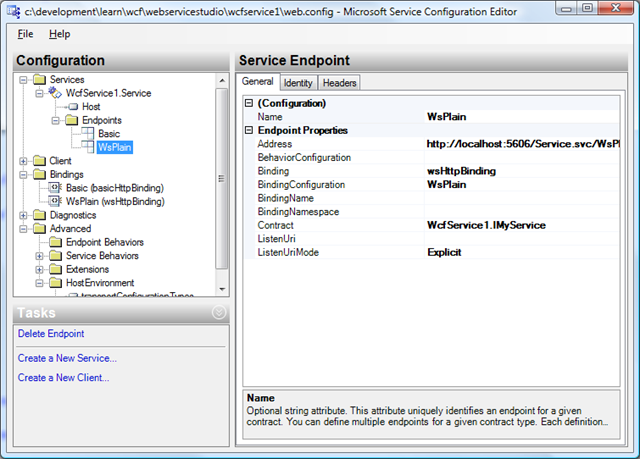
image

Step 3
To configure a secure binding using wsHttpBinding follow these same steps above but leave the default values in the security tab of the binding configuration.  Call this end point and binding WsSecured.  The new endpoint should look like this:
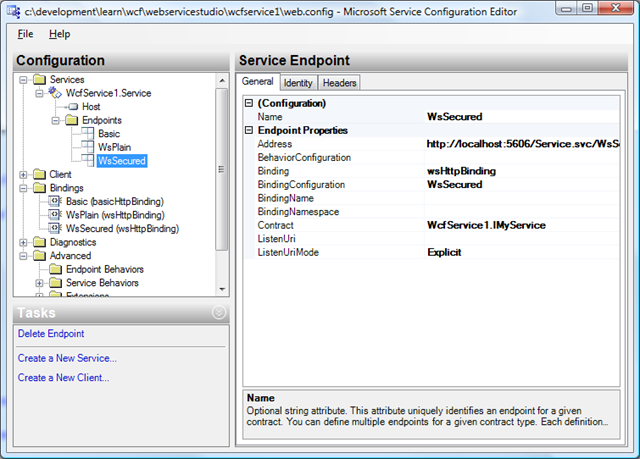
image

That’s it, our service is now configured three different ways and is configured to support SOAP1.1, SOAP1.2 and WS*.  Pretty cool huh?

Testing Our Service

Now that our service is configured with three different bindings, let’s look at the messages as they go back and forth across the wire.  In order to do this we are going to borrow knowledge from a previous article I did called “How to Get Around WCF’s Lack of a Preview Web Page and Viewing WCF Messages“.  From this article we are going to borrow the MessageViewerInspector class and build a small windows application to view our messages.

If you are still following along, add a new project of type Windows Application to the existing solution and then copy the MessageViewerInspector class from the referenced article and add it to the project.

If you have been following along you may have noticed that we only have one WSDL.  The WSDL contains all of our endpoints.  Even though we have three endpoints, we still only have one WSDL.  In testing with some third party clients my experience has been that clients only generate proxies for the endpoints they understand.  Add a service reference to the service to the windows application.

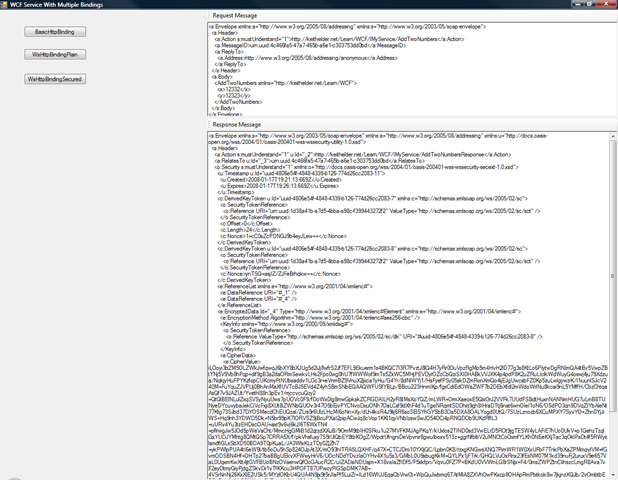
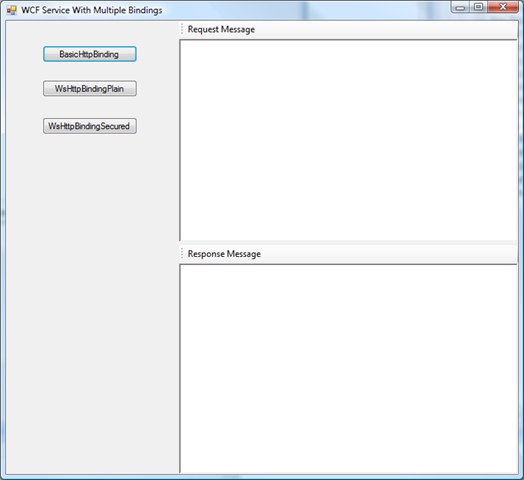
For the user interface I decided to use several split panels and create a three panel layout.  Here is what it looks like.
image

The idea is simple.  When I click on each button I want it to invoke my service and then display the request and response messages the service is using.  To do this I created one service method called CallService which is passed the end point name the service is to invoke.

        private void CallService(string endPoint)
{
MessageViewerInspector inspector = new MessageViewerInspector();

ServiceReference1.MyServiceClient proxy = new WindowsFormsApplication1.ServiceReference1.MyServiceClient(endPoint);

proxy.Endpoint.Behaviors.Add(inspector);
proxy.AddTwoNumbers(12332, 12323);
proxy.Close();

richTextBox1.Text = inspector.RequestMessage;
richTextBox2.Text = inspector.ResponseMessage;
}

The endpoint is the name of the endpoint we specified in our configuration.  For example to invoke the secure wsHttpBinding it is called like this.

CallService("WsSecured");

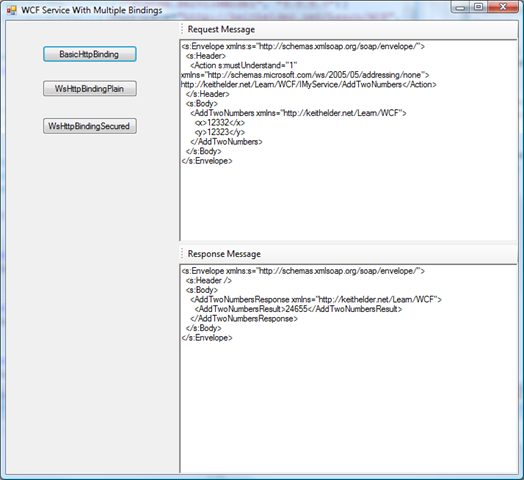
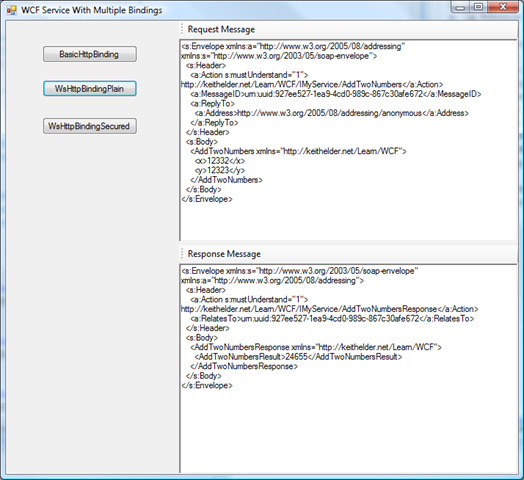
The first thing created is create the inspector so messages can be viewed coming in and out of the proxy class.  Once the proxy method is called we can then grab the messages and put them into the RichTextBox control on the form.  Here are screen shots of each call to the service.

BasicHttpBinding – SOAP1.1
image

WsHttpBinding – SOAP1.2 Plain / Unsecured
image

WsHttpBinding – SOAP1.2 Secured

image

Conclusion

WCF services are powerful as you have just seen.  It is possible to expose a single service in more ways than just one.  This allows developers to support things like net.tcp binary messages and SOAP messages from the same service.  If you are an enterprise developer supporting multiple clients this is a blessing since it means .Net consumers of your service can use TCP while other consumers use WS*.  The nice thing is the developer doesn’t have to code it, just declaratively express how he wants the service configured. 

Download Sample Solution:

Like this article? kick it on DotNetKicks.com

My Codemash Podcast Is Up!

Posted by Keith Elder | Posted in .Net, Smart Clients, Speaking | Posted on 15-01-2008

0

Chris Woodruff caught me at Codemash and we did a podcast together.  It was a very free flowing conversation.  We covered a lot of topics including my open source background, how I got started in .Net, Smart Clients vs Web Applications, WPF, music, the value of learning multiple languages and why Codemash is so unique.

You can grab the podcast here:

http://codemash.podbean.com/2008/01/15/codemash-2008-interview-with-keith-elder/

And you can also try playing the podcast below.


Powered by Podbean.com

By the way there are other podcasts from Dustin Campbell, Sara Ford and Michael Rozlog as well on the Codemash web site.

How to Get Around WCF’s Lack of a Preview Web Page And Viewing WCF Messages

Posted by Keith Elder | Posted in Asp.Net, WCF, Web Services | Posted on 15-01-2008

10

I have a love hate relationship with Windows Communication Foundation.  I love it because the concepts of building a service are so simple.  I love the fact that I can expose the same service three different ways supporting different interoperability points within the business.  I also hate it because a there are so many ways to configure the service it can get daunting at times.  Configuration isn’t as bad as the built-in lack of ability to view messages.  WCF doesn’t provide a sample message page describing the SOAP messages for a request and response like the old ASMX services.  While this may not seem like a big deal there are systems I am having to interop with that can’t simply point to a WSDL and generate a proxy client from it (yes there still are some out there) and it is a problem.

The Problem

WCF offers a lot of binding options but when interopping with non .Net clients the basicHttpBinding is the obvious choice because it is the simplest.  If you can’t get that to work, good luck on the other ones.   Here is the quote from the MSDN pages about basicHttpBinding.

Represents a binding that a Windows Communication Foundation (WCF) service can use to configure and expose endpoints that are able to communicate with ASMX-based Web services and clients and other services that conform to the WS-I Basic Profile 1.1.

Changing bindings is really easy in WCF.  In VS2008, right click the config file in the project and select “Edit the WCF Configuration”.   The Microsoft Service Configuration Editor will then appear.  In the Services folder select the endpoint you want to change and in the binding section select the one you want.  This is the easy part.  The hard part is showing someone the message tied to the binding the service expects if they cannot generate a proxy within their language or platform from a WSDL.  In old ASMX services if the URL of the service was visited it would generate some nice pages for us automagically like this:

ASMX services display methods in service 

image

ASMX services when running locally could be easily tested with a prebuilt form

image

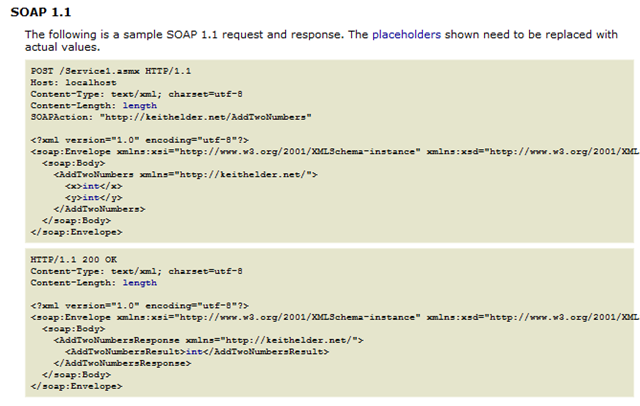
ASMX services provided a sample request and response XML message 

image

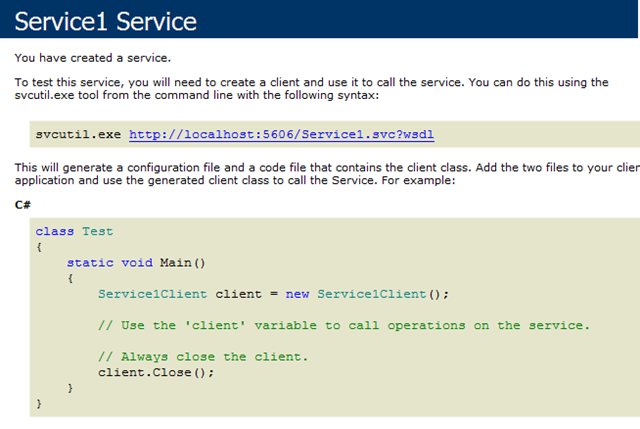
To the contrary WCF only provides .Net client info

 image

Yeah it is real useful isn’t it?

The Quick Fix

Why this is the case I have no good explanation.  One would at least think if the service was configured with the basicHttpBinding it would offer close to the same features of old.  Not the case though.  There is a big difference in the two obviously.  My first thought was to write a pluggin or some code that would provide the same functionality the old ASMX services do but I realized I had enough side projects to work on and I didn’t have the time.  Thus I was looking for a quick alternative to the problem.

The very first thing I did was open the Microsoft Service Configuration Editor and enable Message Logging in the Diagnostics folder.

image

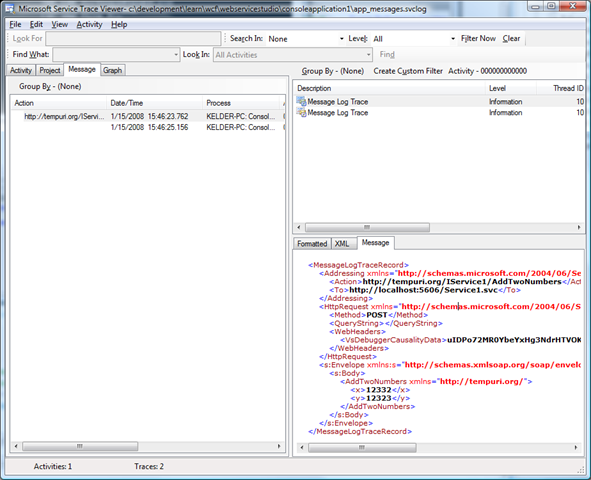
With this enabled messages are written to the client or server.  It is a nice built-in feature that takes a lot more work with ASMX services.  With message logging enabled I ran my test service which added two numbers and then opened the message log using the SvcTraceViewer.exe.  SvcTraceViewer is part of the Windows SDK and does not ship with Visual Studio by the way.  Here are the messages generated in the log and viewed via the trace viewer.

image

This almost gave me the result I wanted.  Notice that it includes a lot of extra nodes and information.  The only nodes we care about start and end with <s:Envelope />.  This is our actual SOAP message.  If the trace option is enabled in WCF via diagnostics even more information is shown within this message.  I wanted to know the *exact* message that was going over the wire and back and I wanted to be able to look at it as I wrote my service or debugged it not having to launch a new tool.  Here is what I came up with.

The Programmatic Fix

WCF has tons of hooks and hooks mean extensibility.  My goal was simple.  I wanted to capture the request before it left my client and then capture the response message when it was received.  At first I thought this was going to be hard.  Then I stumbled upon an interface called IClientMessageInspector and my troubles were then over.

The first thing I did was create a class called MessageViewerInspector which implemented two interfaces.  The IClientMessageInspector and IEndPointBehavior.  Then I added two properties to my object which contained the request and response messages.  After that I implemented both interfaces with the object.  The IEndPointBehavior interface has four methods that need implementing but I only needed to use one which was ApplyClientBehavior.  In this method I added my MessageViewerInspector to the clientRuntime.   The IClientMessageInspector has two methods that need to be implemented which are the before and after.  This is where we get to see the messages before they leave the client and as soon as they come back.  Here is the complete object that will allow us to view our messages in WCF.

    /// <summary>
    /// Provides a custom behavior that allows a client to capture messages and log
    /// them or assist in debugging messages.
    /// </summary>
    public class MessageViewerInspector : IEndpointBehavior, IClientMessageInspector
    {
        
        #region Properties
        public string RequestMessage { get; set; }
        public string ResponseMessage { get; set; }
        #endregion

        #region IEndpointBehavior Members
        public void AddBindingParameters(ServiceEndpoint endpoint, System.ServiceModel.Channels.BindingParameterCollection bindingParameters)
        {

        }

        public void ApplyClientBehavior(ServiceEndpoint endpoint, ClientRuntime clientRuntime)
        {
            // adds our inspector to the runtime
            clientRuntime.MessageInspectors.Add(this);
        }

        public void ApplyDispatchBehavior(ServiceEndpoint endpoint, EndpointDispatcher endpointDispatcher)
        {

        }

        public void Validate(ServiceEndpoint endpoint)
        {

        }
        #endregion

        #region IClientMessageInspector Members
        void IClientMessageInspector.AfterReceiveReply(ref System.ServiceModel.Channels.Message reply, object correlationState)
        {
            this.ResponseMessage = reply.ToString();
        }

        object IClientMessageInspector.BeforeSendRequest(ref System.ServiceModel.Channels.Message request, IClientChannel channel)
        {
            this.RequestMessage = request.ToString();
            return null;
        }
        #endregion
    }

All that was left was to add this custom inspector to the proxy as an endpoint behavior and we can see our messages coming and going.

Here is the code I added to my sample console application to test.

    class Program
    {
        static void Main(string[] args)
        {
            MessageViewerInspector inspector = new MessageViewerInspector();

            ServiceReference1.Service1Client proxy = new ConsoleApplication1.ServiceReference1.Service1Client();

            proxy.Endpoint.Behaviors.Add(inspector);
            proxy.AddTwoNumbers(12332, 12323);
            proxy.Close();

            Console.WriteLine("Request message:");
            Console.WriteLine(inspector.RequestMessage);
            Console.WriteLine(String.Empty);
            Console.WriteLine("Response message:");
            Console.WriteLine(inspector.ResponseMessage);
            Console.ReadLine();
        }
    }

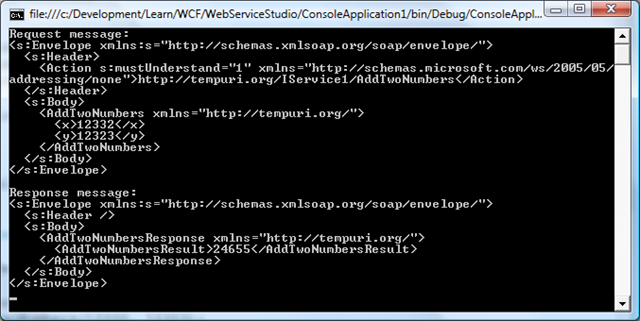
As you can see above I created an instance of my new inspector and then added it to my proxy class.  After my request ran I simply printed the messages to the console as seen here.

image

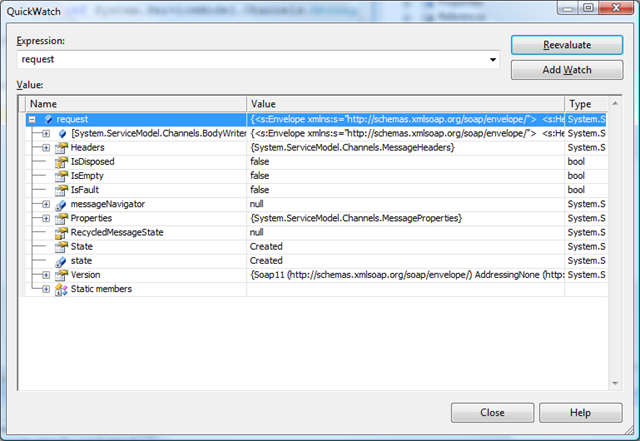
The really nice thing with this approach that I liked is I now have the ability to view the request and response objects by simply placing a break point in either the after or before methods in the inspector class.  For example, here is a QuickWatch of the request object:

image

Now that the basic plumbing is in place we can do all sorts of things.  For example if an exception is thrown we could now log the specific message that was requested to cause our client to throw an exception.  Of course this also solves my original problem of being able to grab the specific messages sent and received and works with all bindings supported.  I hope this helps. 

The Redneck Elder

Posted by Keith Elder | Posted in Funny Stuff | Posted on 15-01-2008

1

Today was my four year anniversary at Quicken Loans.  Anniversary day at Quicken is always fun because typically what happens is your team leader writes up an email about your accomplishments and emails it to all of Information Technology or various teams.  It is used as a time to say thank you for all of the hard work you have done at the company.  The rest of the day you are flooded with congratulations and funny responses to fill your day.  It is one of those nice things that makes us different and it is always nice to get propped out to your teammates. 

One of the guys took the time to make this commemorative photo to capture the occasion.  Oh how the Northerners I work with make me laugh.  Enjoy.

clip_image001

Codemash Timeline

Posted by Keith Elder | Posted in Presentations, Speaking | Posted on 14-01-2008

3


Intro

This year for Codemash I thought I’d do something a little different.  Last year I did a “Who’s Who’s at Codemash” that went over really well and I had several people asking me about it this year.  Since I spent most of my time looking through a camera last year and I had a lot more responsibilities (discussion panel moderation, two expert zones and two talks) I decided I would keep a mental note in my head and do a timeline instead.  I didn’t write anything down as I progressed through the conference because I wanted to just be free and not tied to a journal or a computer.  Since I didn’t write anything down I am sure I missed people or events and I apologize in advance.  If I missed something, email me, and I’ll gladly update this and add you into the timeline.  While I didn’t write any of this down until Sunday it was a fun brain exercise to recall every last step of what I did when.  I don’t recommend it though, it is hard.

Wednesday 2:30 PM

image The person I was riding to Codemash with this year bailed out a few weeks earlier.  This left me stranded at Quicken Loans in Livonia, MI with no way to get to Codemash.  Thankfully Jeff McWherter came to the rescue and was kind enough to give me a ride.  Jeff drove down from Lansing and arrived around 2:30 PM.  We jumped in his Mini Cooper and headed to Sandusky, OH like a speeding bullet.  If we got under 90MPH it was only to turn onto the turn pike.  We were traveling so fast for so long it reminded of a scene from the movie Spies Like Us when they get off the simulator and are walking down the hall with their mouths pressed back saying “You want some coffee?“.

It was a pleasant trip and great conversation.  Jeff and I met at DevLink this last past year and the more we talked the more we found out how many similar places we’ve been like the Metro Detroit Linux User Group and the Washtenaw Linux User Group.

Wednesday 5:00 PM

After arriving at the Kalahari Resort we got checked into our rooms.  Once settled in my room I headed down to the conference area and the first person I saw was Josh Holmes.  Josh was speaking to Steve Harman which I finally got to meet face to face.  Of course the Codemash organizers were hanging around registration such as Jason Gilmore, Jason Follas, Jim Holmes and Brian Prince.

After getting checked in the first thing I had to do is play Rock Band at the Quick Solutions booth.  I hadn’t played since the previous Saturday due to traveling so I was having withdrawals.  A couple of songs later and I wasn’t shaking anymore. 🙂 

After Rock Band I had to turn my attention to my first responsibility for the conference which was hosting the opening discussion panel.  I found a table out in the open and sat down to start working and Michael Letterle stopped by to say hello along with John Chapman.  It was my first time to meet John and turns out he knows a lot of guys I work with.  John and I got into an interesting conversation about CSLA and NHibernate that was a carry forward conversation from an earlier blog post.  BTW, later we hooked up on Rock Band, more on that later. 

It was a good thing I did some prior research before getting to the conference.  Everywhere I turned there was someone new to talk to.  Needless to say I didn’t have as much time as I had hoped to get my head cleared and focused.

Wednesday 7:00 PM

After reviewing bios and refreshing the aging memory on prior read information I made my way into the banquet room hoping the other panelist were gathering there as well.  A few minutes later Dianne Marsh handed me two books that we had to give away at the end.  We decided to give the first one away based on who came the farthest to the conference.  The second one we decided to throw in a nice twist and give it away based on who registered last. 

The panel was made up of Dianne Marsh (who I already knew), Joe O’Brien, Barry Hawkins and Scott Preston (who I met at Codemash 2007).  Knowing two of the four panelist made it easy for me since I had an idea of their personalities and what they might say in regards to the topic.  Joe and Barry thank goodness had blogs so I got to read up on them ahead of time and had a good idea as to what their responses might be. 

Wednesday 7:30 PM

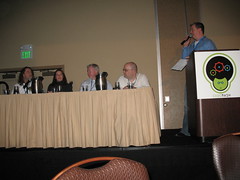
IMG_3581A minute or so after 7:30 I kicked off Codemash with the discussion panel.  It took a few tries to find a working microphone but eventually I prevailed.  The topic was “Technology for Humans: Selling Your Ideas, Products, and Services”.  I knew going into the discussion the panel was made up of consultants and my hunch was the majority of the attendees were not consultants.  A poll of the audience later confirmed my hunch.  I opened the discussion to the panelist so each could give their elevator thoughts on the topic.  It was interesting to see how varied the panelist were in their opening comments.  After a few discussions on selling services I wanted to make sure I pushed the conversation towards more of the ideas segment.  I felt it was critical to leave the attendees with something they could use in the office.  Some of the audience members threw in some questions as well. 

For the attendees in the audience that were not consultants I hope the light bulb went off which is ultimately all of us have to sell and having that skill is important.  Selling an idea could be as simple as convincing an end user who made a request that their request isn’t worth it or valid given the context of an application.  At the end I hope everyone took something away and realized that even though we are developers we ultimately do have to sell our ideas.

At the end of the discussion we gave away two books as I mentioned earlier.  The first book was claimed by a surprise guest Sara Ford from Microsoft.  As Sara noted on her blog she had her LSU shirt on and I didn’t even know it was Sara until she got close to the stage.  I say surprise guest for several reasons.  One, she was the only other known Mississippian present at Codemash and two because I was so behind on news I didn’t know she was coming.  By the way for those that asked me about the book I mentioned you can find it on Lenann’s web site called http://www.youcansell.com/.  For those selling services or those that want to communicate better it is well worth the read. 

Wednesday 8:45 PM

After the discussion panel we starting making our way to the bar for conversation and drinks.  I was walking over with Dustin Campbell, Chris Woodruff, Jeff McWherter and Jason Follas but somehow got distracted and wound up arriving a few minutes later.  It wasn’t long until things got interesting.  I met a gentleman named Rich (which I can’t remember his last name but he was from the UK but lived in Arizona, hopefully Rich is a reader and will add in his comment).   More on Rich later.  Sara joined us and we got caught up on her new role with CodePlex at Microsoft.   I turned around to order an appetizer and Dan Hounshell and Michael Eaton were nearby along with one of their friends for which I can’t recall his name (sorry email me!).  Dan I had met before but I hadn’t got to put a face with a name for Michael yet.  It is funny, each time I saw Michael throughout the conference I said to myself he should be playing guitar in a heavy metal rock band.  He just has that look.  The guys were really funny and we had several laughs.  Michael and Dan kept razzing me about my Fried Bologna Sandwich article I recently wrote.  I explained it that it was an inside joke (which I haven’t disclosed until now) and I won $100 for writing that article because someone bet me I couldn’t write an article about bologna.  Pretty funny.

As more people flooded in I can’t recall everyone I spoke to so pardon me for not adding you explicitly to this conversation.  Close to the end of the evening Michael Kimsal showed up.  He had been driving all evening from North Carolina.  Michael and I used to work together as consultants years ago selling services around the LAMP stack and Codemash is about the only time we get to catch up (which is what makes Codemash so cool, you get to see people that play with different technologies that you wouldn’t normally see).  He runs http://www.webdevradio.com so I was trying to hook him up with some talent to record some podcasts.  I do remember introducing Jay Wren to Michael and I *think* they got together for a podcast later on.  Michael is a talker so all he normally needs is “Mike this is ____” and he’s off to the races.  Great guy, I miss working with him.

By this time it was getting late and time for bed.

Thursday 7:00 AM

The alarm clock went off and I stumbled into the shower then down to the restaurant to get something to eat.  They have an awesome breakfast buffet in the resort with all kinds of interesting twists.  Knowing how long of a day was ahead of me I had to get a jump start with a good solid breakfast. 

Thursday 9:00 AM

After breakfast I caught the last half of Neal Ford’s keynote and then made my way into the speaker room.  It was time to check email, put out fires and then focus on my up and coming Workflow Foundation talk.  While I had done this talk before I try to never let a talk stay stagnant.  I am always thinking about how to make it better, how to communicate a topic better, and how to improve the demos.  Campbell, Follas and Woodruff were in the speaker room as well. 

This is the part where having to speak at a conference isn’t fun.  On one hand you want to attend the conference like a normal attendee and go to sessions and follow the herd.  But you can’t because you have to make sure demos work, slide decks are in order and balance the small amount of time you have.  Needless to say I spent the next several hours getting things ready for my talk later in the afternoon.  I knew starting at 12:00 I wasn’t going to have any further down time.

Thursday 12:00 PM

Codemash 2008 015Lunch with Scott Hanselman.  For those that remember last year, we had ScottGu at Codemash and a select group of us got to have lunch with the GuMaster to pick his brain about up and coming technologies (which have all been released now).  This year since ScottHa was giving a keynote after lunch so we got to do the same thing, except with ScottHa.  Scott gave some interesting insight into how things work at Microsoft.  He hasn’t been there all that long so he is still learning his way.  This gives him a unique perspective on things and it is definitely interesting to hear how things work on the inside. 

Thursday 1:00 PM

After lunch, Scott gave his keynote.  Well, first he gave a prelim keynote which he later told me didn’t go over very well with the Patterns and Practices team.  At Codemash, it was hilarious and a great fit.  I can’t count the number of laughs, it was quiet funny. 

His real keynote was on IIS 7 whereby he showed some of the new features using PHP and ASP.NET in a unique way to scale an out of the box PHP application.

Thursday 2:30 PM

After Scott’s keynote I met up with Chris Woodruff and we recorded a Codemash podcast.  I suspect it will be coming out over the next several days.  We talked about Codemash, Smart Clients, and just random stuff.  Honestly it felt like we weren’t even recording just talking.  I hope it turns out ok.  Time will tell.

Thursday 3:20 PM

My Introduction to Workflow Foundation session started.  I honestly had more people show up for this talk than expected.  To all of those that did, thank you for coming out and I hope it was worth your time. 

Thursday 4:45 PM

After my Workflow Foundation talk I went to the Expert Zone.  I had scheduled my Expert Zone session right after this talk so longer conversations could continue.  Several people including Jon Kruger of Quick Solutions showed up and we discussed more Workflow ins and outs and some of the tougher questions like long running workflows, persistence, etc.  Also added to the mix was WCF, CSLA, Workflow Foundation and Smart Clients.  I truly enjoyed the expert zone discussion because being an educator at heart I love the opportunity to pass on information and help those struggling through the same thing I have already struggled with.  It wasn’t long until I plugged up my laptop and did an adhoc session.

Thursday 6:35 PM

My expert session ran a little long so I was late for supper.

Thursday 7:00 PM

After grabbing a quick bite I headed out to the floor to play Rock Band.  Hanselman and I teamed up several times.  Let me just say that he loves the Reaper.  I was playing guitar, Matt was singing, Scott was playing drums, and others were joining in.  It was a blast.  We played so long the mixer party started and we moved Rock Band over to the party where we continued to play.  Jeff Blankenburg, John Chapman and me teamed up on one of the longest songs to get the most points so we could win the Rock Band contest for best band.  We tried it on hard and got 87% until we bailed out.  It was my fault because I couldn’t hear the music very well due to so much crowd noise. 

I played Rock Band and mixed with the crowd waiting on my next turn.  As noted by Bender, I do pretty well.

image 
http://benders-blog.blogspot.com/2008/01/codemash-day-1-part-2.html

Thursday 10:30 PM

I got word there was a Texas Hold ‘Em game going on so I grabbed my bag and headed over.  There was probably about 20 or so attendees playing.  I sat at the table with Blankenburg, Rich, John Chapman and three technical recruiters from Amazon.Com.  One of the recruiters from Amazon went out and got everyone some beer and chips which was extremely cool.  It was a great time to just relax and play cards.  Everyone that was playing was decent too which made it fun.  At the end it was getting late and I was completely worn down so I went all in on a King / 4.  John took me out with a King / 10 which got me to bed earlier.  Rich was amusing to play cards with because of his accent.  It was like playing cards with Robin Leach.  Rich and John kept going head to head, back and forth.  It was fun.  I think we should make this a Codemash ritual.   Amazon, thanks for the beer and chips.  With as much money as I’ve spent with you guys this year it was nice to get something back 🙂

Friday 1:00 AM

Bed.  Sleep.

Friday 9:30 AM

I missed the early morning keynote which I heard a lot of great things about.  I was up and would have went but I couldn’t because I had a server issue I had to resolve.  I managed to get to the conference a few minutes after Bruce Eckel’s talk began on why he loves Python so much.  I found a power outlet in the back of the room so I could work while listening.  From what I recall he had ten basic premises as to why he loved python and mainly picked on Java, C++ and some C#.  If I had to convince people to use Python I would have probably used a lot of the same arguments but ultimately for me it boils down to productivity within the platform as well as a language.  Of course there were about 25 points he made that I didn’t agree with but that is ok.

Friday 11:00 AM

I walked out of the session and John Chapman was hanging around the Rock Band set.  As I mentioned earlier John, Jeff and I went for the high score on a song the night before but didn’t make it.  Since Jeff was missing we wanted to warm up so we jumped in on “Enter Sandman” with another gentleman who picked up the bass.  We basically rocked it and got 390,000 points which put us in second place.  We call the band “The Mesopotamians” since our bassist had that on his shirt.  Pretty funny.  BTW the contest on Rock Band was the two top bands got $150 and $75 for the top two scores from Quick Solutions. 

Friday 11:30 AM

I headed to the speaker’s room to work on my Workflow Foundation talk I was giving later in the day.  Although I had given this talk before this is an extremely difficult talk because it requires about 50 minutes of straight programming from the hip with the end result having a custom activity in Workflow Foundation.  It is a fun talk but is also dangerous and requires practice practice practice to make sure it is done right.

Friday 12:15 PM

Lunch.  I sat with an awesome bunch of guys for lunch.  Let’s see, I know Joe Brinkman was there because we talked about Workflow Foundation and why DotNetNuke couldn’t use it initially.  Joe emailed me later to confirm that WF still isn’t an option they can consider because it requires full trust to run.  Something I hadn’t thought about.  Mike Wood was there as well along with Joe Whirtley and Brian Sherwin.  There were others but I can’t remember and I apologize for not being able to recall (email me and I’ll update this).

Friday 12:45 PM

It was back to the speaker room so I could concentrate on my talk coming up.  Did I mention when you speak at these things you really don’t get to enjoy them as much?  Anyway. 

Friday 2:00 PM

Sara Ford came into the speaker room and said she was going to go play Guitar Hero III.  Having been heads down for a stint I needed a break so I joined her.  For those that missed this, this was a Codemash highlight no doubt!  Two Mississippians going head to head on GH3 on……. easy.  Yes, we want on easy but you know what, it was more nerve racking than going hard or expert because EVERY single note counted and it wasn’t about who had the fastest fingers but who was more accurate.  A true test to ones skills.  In the end I prevailed with a 12,000 point victory but Sara fought a hard fight.  It was total fun.

Friday 2:30 PM

Since I had one of the last sessions of the day I headed to the Expert Zone once again.  I was looking forward to this since Dianne Marsh and I were scheduled to be in there.  I was looking forward to chatting with her but our chat got cut short because there weren’t enough rooms available for an adhoc Ruby talk so we gave up the Expert Zone room and moved it into the speaker’s room.

Friday 3:40 PM

My second Workflow Foundation talk started which was on creating custom activities in Workflow Foundation.  As I told the audience I just gave them all the skills they needed to be rich since there aren’t really a ton of third party workflow activities out there.  I think Michael Eaton is planning on becoming rich on my advice.

Friday 5:10 PM

I was late arriving into the banquet hall where prizes were given away.  I started standing at the back and Sara walked up.  She still had tears in her eyes from her Guitar Hero III defeat.

Dave Donaldson walked over to say hi which I didn’t recognize at first.  It had been a long time since I had seen him.  Sorry Dave I do apologize for not recognizing you at first but you don’t have a picture on your blog which I DO read!  This is yet another plug to tell people to put their photos on their blogs.  I do it so people know who I am when I go to a conference.  It works, trust me.   If it is any consolation Dave I am jealous of your dual 22″ monitors and you still need to come do a talk at our group in Livonia when you can.  🙂

While I didn’t win a book, Jeff McWherter picked out a book for me with his winning ticket since he gets a lot of books running the Lansing .Net User Group.  I am now the proud owner of the O’Reilly WCF book Michele wrote.  Thanks Jeff!

Brian Prince announced the winner of the Rock Band competition and The Mesopotamians took second place!  I got a $25 Best Buy gift card and hugged Brian’s neck 🙂

Friday 6:30 PM

Having eaten conference food for several days it was time to get something a little more tasty.  About eight of us headed to the restaurant in the resort to grab a bite including Chris Woodruff, Jeff McWherter, Sara Ford, Brian Sherwin, David Smith, John Hopkins, Chris Kotsis and myself.  Pretty much everyone got the buffet (pronounced baa-fey Sara not boo-fey 🙂  ) except for Brian and Jeff.  If you’ve never eaten with David, the guy can pump away some food and he only weighs like 150lbs soaking wet.  Dave, you are the man!

Friday 7:30 PM

Jeff and I jumped back in his light speed Mini Cooper and headed back to Detroit.  He dropped me off at the hotel near the airport and I basically fell into bed knowing I had to wake-up at 4:30 AM to catch my flight. 


Technorati tags: