Welcome

You have reached the blog of Keith Elder. Thank you for visiting! Feel free to click the twitter icon to the right and follow me on twitter.

Cleaning Up Your C# Closet, Making Messy C# Code More Readable

Posted by Keith Elder | Posted in C# | Posted on 22-12-2008

How Clean is Your Closet?
image

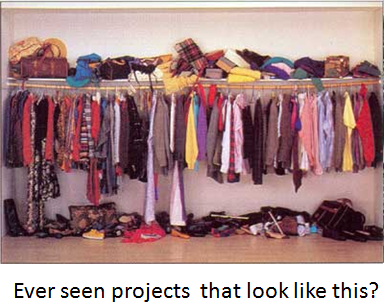
Have you ever been instructed to make an enhancement to an existing project where the codebase looked like the picture above?  I have.  As a matter of fact, I’ve done my fair share of creating messy code just like that.  I’m not saying I’m proud of admitting that but as they say, “The truth hurts”.

Let’s pretend for a moment this is my closet and you were visiting.  We were about to leave to go to town and you said, “Brrrr, it is cold outside, do you have a scarf?”.  I said, “Sure, it is in the closet, there is a purple one in there.”. 

You then stumble into the closet to find the scarf.  How long do you think it would take you?  The likelihood of you finding it within a few seconds is slim to none. 

Let’s switch gears to programming.  How long would it take to implement a task if the picture above represented the codebase of an existing project?  A long time for sure, definitely longer than it should take no doubt.  Why?  Because things that are messy take longer!  Here is an Elderism (common sense words of wisdom to live by) that sums up messy projects:

ELDERISM – “A messy project takes longer to understand and will only get messier.”

Switch gears for a moment and let’s say you needed to find the purple scarf in this closet.  Obviously since things are organized and well laid out, it becomes easy to locate, add, and remove things. 
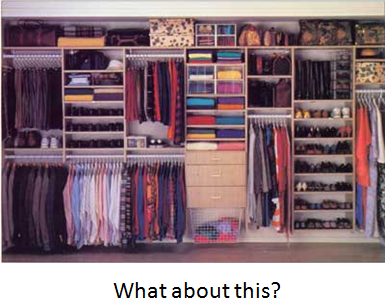
image The really sad part about this whole analogy is that for some reason, a lot of developers are happy with wallowing in a perfect mess.  Not only does this make things hard for them but for other developers on the team as well. 

A Real World Mess

I was reminded of this the other day when I started to work on Witty Twitter, an open source WPF Twitter client several of us work on.  I hadn’t worked on the project very much lately but I wanted to take some time during vacation to clean some things up and add some new features.  I know how most things work in codebase but the biggest problem with the codebase is the lack of structure and organization to it.  I started to implement a new feature and suddenly I realized I was contributing to the code rot.  Remember the Elderism, “A  messy project takes longer to understand and will only get messier.”?  Well, here I was adding more mess to the codebase to get something to work. 

Finally I said, enough is enough.  My contribution is going to be to simplify and clean up this code.  In other words, clean up and organize the closet.  To give you an idea of the mess staring me in the face, here is the constructor of the main application.  This is ONE function which initializes the main form Witty uses.

   1: public MainWindow()
   2: {
   3:     this.InitializeComponent();
   4:  
   5: #if DEBUG
   6:     Title = Title + " Debug";
   7: #endif
   8:  
   9:     // Trap unhandled exceptions
  10:     LayoutRoot.Dispatcher.UnhandledException += new DispatcherUnhandledExceptionEventHandler(Dispatcher_UnhandledException);
  11:  
  12:     #region Minimize to tray setup
  13:  
  14:     _notifyIcon = new System.Windows.Forms.NotifyIcon();
  15:     _notifyIcon.BalloonTipText = "Right-click for more options";
  16:     _notifyIcon.BalloonTipTitle = "Witty";
  17:     _notifyIcon.Text = "Witty - The WPF Twitter Client";
  18:     _notifyIcon.Icon = Witty.Properties.Resources.AppIcon;
  19:     _notifyIcon.DoubleClick += new EventHandler(m_notifyIcon_Click);
  20:  
  21:     System.Windows.Forms.ContextMenu notifyMenu = new System.Windows.Forms.ContextMenu();
  22:     System.Windows.Forms.MenuItem openMenuItem = new System.Windows.Forms.MenuItem();
  23:     System.Windows.Forms.MenuItem exitMenuItem = new System.Windows.Forms.MenuItem();
  24:  
  25:     notifyMenu.MenuItems.AddRange(new System.Windows.Forms.MenuItem[] { openMenuItem, exitMenuItem });
  26:     openMenuItem.Index = 0;
  27:     openMenuItem.Text = "Open";
  28:     openMenuItem.Click += new EventHandler(openMenuItem_Click);
  29:     exitMenuItem.Index = 1;
  30:     exitMenuItem.Text = "Exit";
  31:     exitMenuItem.Click += new EventHandler(exitMenuItem_Click);
  32:  
  33:     _notifyIcon.ContextMenu = notifyMenu;
  34:     this.Closed += new EventHandler(OnClosed);
  35:     this.StateChanged += new EventHandler(OnStateChanged);
  36:     this.IsVisibleChanged += new DependencyPropertyChangedEventHandler(OnIsVisibleChanged);
  37:  
  38:     // used to override closings and minimize instead
  39:     this.Closing += new CancelEventHandler(MainWindow_Closing);
  40:  
  41:     #endregion
  42:  
  43:     #region Single instance setup
  44:     // Enforce single instance for release mode
  45: #if !DEBUG
  46:     Application.Current.Exit += new ExitEventHandler(Current_Exit);
  47:     _instanceManager = new SingleInstanceManager(this, ShowApplication);
  48: #endif
  49:     #endregion
  50:  
  51:     // Set the data context for all of the tabs
  52:     LayoutRoot.DataContext = tweets;
  53:     RepliesListBox.ItemsSource = replies;
  54:     UserTab.DataContext = userTweets;
  55:     MessagesListBox.ItemsSource = messages;
  56:  
  57:     // Set how often to get updates from Twitter
  58:     refreshInterval = new TimeSpan(0, int.Parse(AppSettings.RefreshInterval), 0);
  59:  
  60:     this.Topmost = AlwaysOnTopMenuItem.IsChecked = AppSettings.AlwaysOnTop;
  61:  
  62:     // Does the user need to login?
  63:     if (string.IsNullOrEmpty(AppSettings.Username))
  64:     {
  65:         PlayStoryboard("ShowLogin");
  66:     }
  67:     else
  68:     {
  69:         LoginControl.Visibility = Visibility.Hidden;
  70:  
  71:         System.Security.SecureString password = TwitterNet.DecryptString(AppSettings.Password);
  72:  
  73:         // Jason Follas: Reworked Web Proxy - don't need to explicitly pass into TwitterNet ctor
  74:         //twitter = new TwitterNet(AppSettings.Username, password, WebProxyHelper.GetConfiguredWebProxy());
  75:         twitter = new TwitterNet(AppSettings.Username, password);
  76:  
  77:         // Jason Follas: Twitter proxy servers, anyone?  (Network Nazis who block twitter.com annoy me)
  78:         twitter.TwitterServerUrl = AppSettings.TwitterHost;
  79:  
  80:         // Let the user know what's going on
  81:         StatusTextBlock.Text = Properties.Resources.TryLogin;
  82:         PlayStoryboard("Fetching");
  83:  
  84:         // Create a Dispatcher to attempt login on new thread
  85:         NoArgDelegate loginFetcher = new NoArgDelegate(this.TryLogin);
  86:         loginFetcher.BeginInvoke(null, null);
  87:     }
  88:  
  89:     InitializeClickOnceTimer();
  90:  
  91:     InitializeSoundPlayer();
  92:  
  93:     ScrollViewer.SetCanContentScroll(TweetsListBox, !AppSettings.SmoothScrolling);
  94:  
  95:     //Register with Snarl if available
  96:     if (SnarlConnector.GetSnarlWindow().ToInt32() != 0)
  97:     {
  98:         //We Create a Message Only window for communication
  99:  
 100:         this.SnarlConfighWnd = Win32.CreateWindowEx(0, "Message", null, 0, 0, 0, 0, 0, new IntPtr(Win32.HWND_MESSAGE), IntPtr.Zero, IntPtr.Zero, IntPtr.Zero);
 101:         WindowsMessage wndMsg = new WindowsMessage();
 102:         SnarlConnector.RegisterConfig(this.SnarlConfighWnd,"Witty",wndMsg);
 103:         
 104:         SnarlConnector.RegisterAlert("Witty", "New tweet");
 105:         SnarlConnector.RegisterAlert("Witty", "New tweets summarized");
 106:         SnarlConnector.RegisterAlert("Witty", "New reply");
 107:         SnarlConnector.RegisterAlert("Witty", "New direct message");
 108:         
 109:     }
 110: }

In case you don’t scroll down and actually glance at the code, there are over 100 lines of code for this constructor.  No matter how smart you are, there is no way one can read that code and fully understand “what” it is doing without devoting an enormous amount of time to it.  Everything in there, with the exception of a few functions that get called, the code is all about “how”.  All of the code in that constructor is needed too.  It isn’t like it can be taken out, it must be there to set things up in the application. 

Cleaning Up The Closet

If you don’t take anything else away from this article remember this one fact.  Developers reading your code rarely are worried about the “how”, they need to know the “what” so they can figure out where to put their code.  This concept is earth shatteringly simple, yet as you can see with the above code, we have a perfect real world example of a “how” that has turned itself into a mess. 

Code Smell #87 – Comments

A code smell is something we refer to in the business as something that doesn’t look right, or that shouldn’t be done that way, or something that will lead the developer down a dark path.  It means many things and that’s why I labeled this as #87. 

Comments in code have saved many developers endless hours, but they have also cost many developers thousands of hours.  A rule I have, is code shouldn’t have any comments in the code.  My main reason for this is refactoring. 

Code refactoring is the process of changing a computer program‘s code to make it amenable to change, improve its readability, or simplify its structure, while preserving its existing functionality.

In software development we constantly refactor our code.  Guess what happens to those comments though?  They don’t get refactored! 

A developer can completely change how a program works and those nasty comments are still there.  Then along comes someone else who reads the comment and thinks the code is broken because it doesn’t do what the comment said it was doing.  They then refactor it back and things break.

The best thing to do is not comment your code.  If you have the urge to put a comment on something, that means you didn’t express the intent of the code clearly enough, thus it is a code smell.  Let’s look at a few examples from our example above to see how this plays out.

Let’s start with line #95 in the example above.  Here is that example:

//Register with Snarl if available
if (SnarlConnector.GetSnarlWindow().ToInt32() != 0)
{
    //We Create a Message Only window for communication
 
    this.SnarlConfighWnd = Win32.CreateWindowEx(0, "Message", null, 0, 0, 0, 0, 0, new IntPtr(Win32.HWND_MESSAGE), IntPtr.Zero, IntPtr.Zero, IntPtr.Zero);
    WindowsMessage wndMsg = new WindowsMessage();
    SnarlConnector.RegisterConfig(this.SnarlConfighWnd, "Witty", wndMsg);
 
    SnarlConnector.RegisterAlert("Witty", "New tweet");
    SnarlConnector.RegisterAlert("Witty", "New tweets summarized");
    SnarlConnector.RegisterAlert("Witty", "New reply");
    SnarlConnector.RegisterAlert("Witty", "New direct message");
 
}

Notice the comment in the first line of the code?  The comment is telling us “what” the if block is doing.  Even though I can read this:

(SnarlConnector.GetSnarlWindow().ToInt32() != 0)

I honestly do not know the Snarl API and thus I have no idea “what” that is doing, or why.  In this case, the developer that wrote this in their mind said this was something they had to figure out “how to do” so they wanted to leave a bread crumb here to tell everyone “what it’s doing”.

Now think for a second.  Without using a comment, how else could they have told us the exact same thing?  The answer: CODE. 

If a developer focuses on making their code more readable the end result will be much neater and it will also express the “what it is doing”.  This means other developers can move quickly through the project / closet to figure out where things are.

For those cleaning up code like this, more times than not you can just take the comments and turn that into functions.  This is the case so much in fact that Visual Studio plug-ins like Refactor! Pro automatically turn comments like that into the name of the function when extracting code into a method. 

In this example there are two comments.  We’d refactor this to read like this:

public MainWindow()
{
    RegisterWithSnarlIfAvailable();
}
 
private void RegisterWithSnarlIfAvailable()
{
    if (SnarlConnector.GetSnarlWindow().ToInt32() != 0)
    {
        CreateSnarlMessageWindowForCommunication();
    }
}
 
private void CreateSnarlMessageWindowForCommunication()
{
    this.SnarlConfighWnd = Win32.CreateWindowEx(0, "Message", null, 0, 0, 0, 0, 0, new IntPtr(Win32.HWND_MESSAGE), IntPtr.Zero, IntPtr.Zero, IntPtr.Zero);
    WindowsMessage wndMsg = new WindowsMessage();
    SnarlConnector.RegisterConfig(this.SnarlConfighWnd, "Witty", wndMsg);
 
    SnarlConnector.RegisterAlert("Witty", "New tweet");
    SnarlConnector.RegisterAlert("Witty", "New tweets summarized");
    SnarlConnector.RegisterAlert("Witty", "New reply");
    SnarlConnector.RegisterAlert("Witty", "New direct message");
}

With a simple refactor we have fully expressed the “what” the code is doing and made it more readable. 

Applying these simple concepts to the original example that was over 100 lines long, we can refactor this into readable code with zero comments that expresses what is going on instead of how.  The end result is less code to read in the constructor that reads more like a story describing what the constructor is doing. 

   1: public MainWindow()
   2: {
   3:     this.InitializeComponent();
   4:  
   5:     TrapUnhandledExceptions();
   6:  
   7:     SetupNotifyIcon();
   8:     
   9:     SetupSingleInstance();
  10:  
  11:     SetDataContextForAllOfTabs();
  12:     
  13:     SetHowOftenToGetUpdatesFromTwitter();
  14:  
  15:     InitializeClickOnceTimer();
  16:  
  17:     InitializeSoundPlayer();
  18:  
  19:     InitializeMiscSettings();
  20:  
  21:     RegisterWithSnarlIfAvailable();
  22:  
  23:     DisplayLoginIfUserNotLoggedIn();
  24: }

Do you see the difference?  It is night and day isn’t it?  There is no more wondering, guessing, and also worrying about doing something in the wrong place. 

If you are dealing with messy closets, I mean code, apply these basic principles and you’ll wind up with codebases that are more readable and easier to refactor down the road.  This is only one thing you can do to clean up messy projects.  There are others but we have to start somewhere. 

Once things are refactored so they express the what things will get more clear and other refactorings will start to bubble up.  For example, if you look at the final code above, you’ll notice the DisplayLoginIfUserNotLoggedIn() method is called last in the constructor.  This makes sense.  We should call the login screen after everything else is initialized.  However, in the original code it wasn’t last.  How would I have figured that out if I hadn’t made the code more readable?  Exactly my point!

It is a very powerful concept, give it try.
Witty Twitter 1.9.0.20 Published

Posted by Keith Elder | Posted in .Net, PC Software | Posted on 20-12-2008

Get Latest Version Here:

http://keithelder.net/software/witty/witty.application (requires .Net 3.0 framework)

It has been awhile since I published a version of Witty Twitter.  I was going to push one a month or so ago but new features were not ready for prime time.  This version has a few neat twists in it.  Here is a list of things that were added. 

image

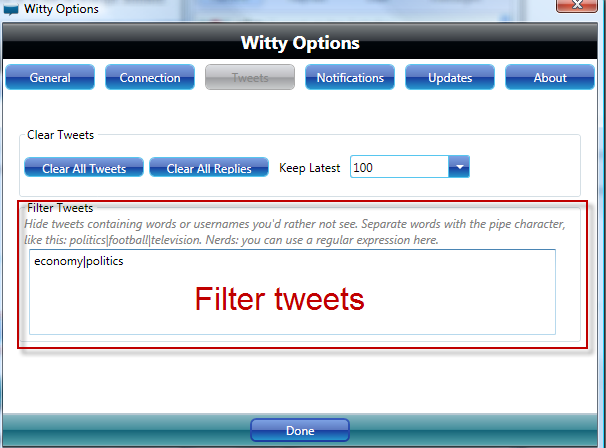
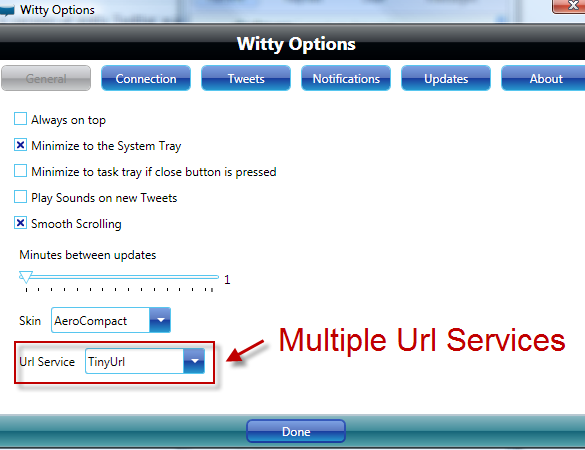
Witty now supports multiple URL services.  TinyUrl is the default, but it also supports Bitly and ISGD.

Another feature added is the ability to filter tweets.  This would have been handy during election time but there are other times you just want to tune out some noise.

image

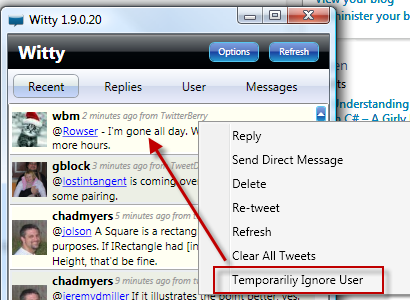
Another feature is the ability to temporarily ignore a user.  Sure everyone needs More Wally in their life, but there are times when there can be too much Wally.  Right click a user and click “Temporarily Ignore User”.  This will ignore that user for 30 minutes.  Very handy when someone you are following starts to get a little out of hand.

image

Thanks to Jon Galloway for putting most of these features in.  Enjoy.

A Blog Post About Nothing: Part 4 – The Circle of Trust

Posted by Keith Elder | Posted in General | Posted on 20-12-2008

imageHave you ever felt like the world was moving at the speed of light, yet you were just doing your own thing?  That’s how I’ve felt lately.  It seems everyone has tons of stuff to talk about on their blogs and Twitter.  I decided I was going to force myself to write a blog article this morning to start my Christmas vacation off and after thinking about what I was going to blog about it hit me.  I don’t have anything to blog or twitter about!  Call it a Blog / Twitter Slump if you will.  Then I started writing and things started to flow so much that I broke this post into a series of blog posts entitled “A blog post about nothing”, each one dealing with a different segment.

What’s Happening in Life

We have two dogs, both cocker spaniels to be exact.  Their names are Max and Simon.  Simon is a high energy chocolate cocker and Max is a buff cocker that is commonly referred to as “Old Man”.  That pretty much sums up his demeanor.  Of the two Max is the one you have to watch out after because food rules his thoughts and he wanders aimlessly.  Before you know it he’ll be across the road or over at a neighbors.  But he’s smart.

Why is My Dog Fat?

Like good doggy parents we moderate what they eat and they are not allowed to eat any human food.  They get the same portion in the morning and evening.  For some reason though, we could never figure out why Max always looked fuller than Simon.  It seemed he was just destined to be fat. 

In the mornings I let the dogs go outside so they can go to the bathroom before feeding.  Since they know they will get fed if they come back they don’t tend to wander too far.  Thus, I’d let them out and normally within about 5 minutes they were back at the door ready to eat.  Max started to not come back and so I started to have to call him.  After a few calls Max would show up, but I didn’t think anything about it.  After all it was Max and he tends to dilly dally.

It turns out that over time Max had learned there was cat food set out at behind a neighbor’s house across the road two houses down.  Remember I said he was smart?  Well, as soon as he was let out, he’d head over to the neighbors, eat as fast as he could in order to get back to get more food.  Aha!  No wonder he wasn’t at the correct weight. 

Creating The Circle of Trust

Besides the fact my neighbor had finally figured out who’d been eating all of her cat food, Max was crossing the street and that is not a good thing.  Thus a circle of trust had to be established around the house.  I had several options.  Either I was going to have to build a fence to keep the dogs contained or get one of those wired dog fences. 

imageI didn’t have $12,000.00 laying around to build a fence so I opted for the cheaper no fence dog fence.  After some research I decided on the Petsafe Wireless Dog Fence.  Notice I said “wireless”.  What does that mean?  Well there are two kinds of these fences.  One is you have to run wires in the ground.  If you have a very specific yard you want to cover, these are great, but take more time to install.   I got the wireless one which works similar to a wireless router.  The device you see pictured to the left mounts somewhere on the wall in your home and that is it.  The dog wears the collar and if they get to the edge of the perimeter they get a beep and if they stay put they’ll get shocked.

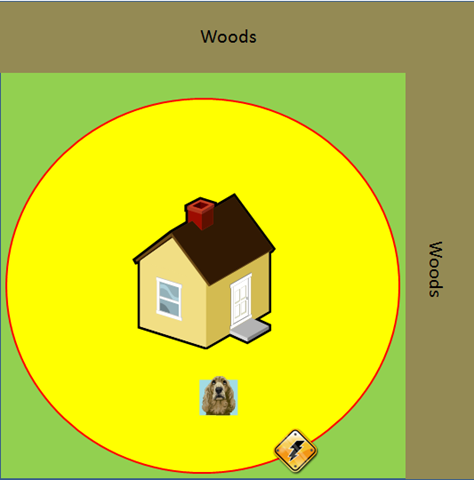
There are two settings, low and hi on the PetSafe Wireless Dog Fence.  The low setting goes out to a radius of 45 feet and the high goes 90 feet when turned up to the max setting.  There is a knob to adjust that shortens or lengthens the signal.   It will go as narrow as 10-15 feet in diameter and as large as 180 feet in diameter.  That’s a lot.

After testing the unit I learned I can set the setting on hi and turned all the way up.  This pretty much covered my yard although not quiet in the back.  With the magical of PowerPoint here is what this looks like at my house with the way the yard is configured.

image 

As you can see the circle covers the majority of the yard and doesn’t allow the dogs to get into the road either.  They have plenty of room to run around the house to get exercise.

If you notice in the picture with the unit above there are flags, 50 to be exact that come with the unit.  With a dog collar in hand you walk in the yard and when you hear a beep you put a flag down.  Then you have to train the dogs where their new boundary is and eventually you can take up the flags. 

To train the dogs I narrowed the circle down to a small area so they could see the flags.  I did the training with them as instructed.  Simon, caught on real quick and he only got shocked like once or twice during training. 

Did I mention Max wanders aimlessly?  Yes I did.  Well, even though he appeared to be trained after several days, I was in the yard with them and Max started wondering with his nose and he broke the circle.  He then started getting shocked but decided to run the wrong way and he kept getting shocked.  The unit shocks for 30 seconds if the dog stays outside of the perimeter.  Poor Max went the wrong way around the house and he was yelping.  He quickly got back within the circle and he had had enough, he was worn out.  At this point, let’s just call Max fully trained.  As a matter of fact, he was too trained.

After Max’s incident, he wouldn’t get off our deck.  He associated being outside in the yard with shock. I had to literally retrain him to go outside.  Finally after a few days he relearned he can play in the yard and all is well.  But, let me tell you what, he has learned that a beep means pain and he immediately heads the other way. 

I have to say the PetSafe Wireless Dog Fence works and anyone that wants to contain a pet without putting up a fence, it is worth it.

I am happy to report that Max and Simon are living happily within the circle of trust.

Read Part 1
Read Part 2 
Read Part 3

A Blog Post About Nothing: Part 3 – Biscuit Broke My Stove

Posted by Keith Elder | Posted in Funny Stuff, General | Posted on 20-12-2008

image

Have you ever felt like the world was moving at the speed of light, yet you were just doing your own thing?  That’s how I’ve felt lately.  It seems everyone has tons of stuff to talk about on their blogs and Twitter.  I decided I was going to force myself to write a blog article this morning to start my Christmas vacation off and after thinking about what I was going to blog about it hit me.  I don’t have anything to blog or twitter about!  Call it a Blog / Twitter Slump if you will.  Then I started writing and things started to flow so much that I broke this post into a series of blog posts entitled “A blog post about nothing”, each one dealing with a different segment.

What’s Happening in Life

image Here is a story for you.  Back in May or June (I can’t remember exactly) I woke up and took a shower and decided to cook a sausage and biscuit for breakfast.  I buy the Mary B’s Southern Made biscuits.  If you have never had these biscuits, they are the best and taste just like what Mom used to make at home on Saturday mornings when I was growing up.  There were two biscuits left in the bag and they were stuck together.  I took them out and tried to get them apart by hand, then a knife, and then I made the mistake of hitting them on the stove.  I didn’t think I was hitting them that hard but on the third hit on the stove the biscuits crashed through the stove top.  Yep, I broke our stove with a biscuit! 

Our stove, rest it’s soul, had a ceramic top.  It just so happened I was hitting the stove with the biscuit right in the center in the weakest part.  Ellen got up later and saw the mess I had made.  By the way I did defeat the biscuits and cooked them for breaking my stove.  When she came in and saw the mess she said, “Great…. it will be Thanksgiving before you replace the stove.”. 

Since it was during the summer we really didn’t miss the stove that much.  I grill out a lot of fresh veggies on the grill during the summer so it wasn’t that bad.  Plus we had some other things like a griddle we could cook on.  As colder weather started getting here I started missing the stove more and more.  But for some reason kept putting off getting another one.  Not sure why.  I think it has to do with the whole experience of going to Home Depot or Lowes, I hate dealing with them because they make things so hard.  If I could have just ordered it online I would have done it already.

Fast forward to the day before Thanksgiving.  Ellen came in from work and I said we are going to town.  I didn’t tell her where we were going.  She got in and we went to Home Depot and ordered a stove.  Yep, I couldn’t let her prophecy come true.  We had a good laugh about it.  Technically she was right because the stove didn’t arrive until the next Wednesday after Thanksgiving but at least I had bought it *before* Thanksgiving.

Read Part 1
Read Part 2
Read Part 4

A Blog Post About Nothing: Part 2 – Podcast

Posted by Keith Elder | Posted in General, Podcast | Posted on 20-12-2008

image

Have you ever felt like the world was moving at the speed of light, yet you were just doing your own thing?  That’s how I’ve felt lately.  It seems everyone has tons of stuff to talk about on their blogs and Twitter.  I decided I was going to force myself to write a blog article this morning to start my Christmas vacation off and after thinking about what I was going to blog about it hit me.  I don’t have anything to blog or twitter about!  Call it a Blog / Twitter Slump if you will.  Then I started writing and things started to flow so much that I broke this post into a series of blog posts entitled “A blog post about nothing”, each one dealing with a different segment.

What’s Happening With the Podcast

If you’ve been following along with the shows of Deep Fried Bytes, we are up to show #22 now.  And if you haven’t been listening, then Santa has you on his naughty list and isn’t going to come see you this year, but I digress.  Technically we should have produced show #24 by now but I have been traveling and getting ready for Christmas so not much time to do final production work although Woody has been staying ahead of me with his edits. 

Honestly, I never thought we’d make it this far with the show but we are starting to get into a groove with it.  We are working hard to tweak our post production work to make things sound as good as we can.  We’ve learned a lot over the past several months and continue to keep trying to get better.

To say having a podcast eats up a tremendous amount of time would be an understatement.  My co-worker beats me up all the time saying, “… you haven’t blogged anything good in awhile…”.  Which I then reply, “Well I blogged about the podcast that took 10 hours of work to create, that isn’t enough?”  Of course he laughs and then says no, it doesn’t count. 

It does take a lot of time to record, edit, finalize, mix down, normalize, compress, and then do final production work on the show.  The only thing that helps us to keep going is the community.  It is great when we are at an event and our listeners give us positive feedback.  Of course negative is good to hear as well since that makes us better, but knowing we are making a difference out there really matters. 

In community news, Deep Fried Bytes is an official sponsor of Codemash 2009.  Both Woody and I will be at Codemash 2009 and are planning on recording a lot of shows.   Anyone that wants to listen to us record a show live is welcome to sit in.  If nothing else it will give you an idea as to how much we have to edit out. 🙂

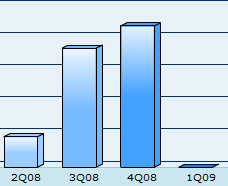
One of the things we watch closely on the podcast is our numbers.  We launched the show late in the 2nd quarter of this year and got off to a good start.  The 3rd quarter of this year broke all of our expectations and the 4th quarter this year has already beat the 3rd quarter.  The numbers for the show have grown each quarter and that is a good thing.  Especially in this economy.  Oh wait, we don’t charge for the show, I forgot 🙂

image

That means we are reaching more people and attracting new listeners.  A big thank you to everyone who has blogged, Twittered, Facebooked and whatever else you have done to help spread the word about the show.  We appreciate your efforts.

That’s pretty much the latest news on the podcast.  As always, keep your tea glasses full, and your axes sharp.  Deep Fried… out. 

Read Part 1
Read Part 3
Read Part 4