Welcome

You have reached the blog of Keith Elder. Thank you for visiting! Feel free to click the twitter icon to the right and follow me on twitter.

Microsoft’s Response To The iPhone Is Right Around The Corner

Posted by Keith Elder | Posted in Uncategorized | Posted on 12-01-2007

I had sort of an epiphany tonight while I was watching an interview of Scott Guthrie on Channel 9.  Scott is “the” guy when it comes to all of the tools Microsoft produces for developers such as the CLR, IIS, Visual Studio, LINQ, WPF, ASP.Net etc.  There were a couple of things that jumped out at me during the interview that made me start to put together a puzzle that I think is right around the corner which could overtake the buzz of the iPhone.  Stay with me on this one as I explain my thought process.  In the end I’ll get to the point, see if you agree.

#1: WPF/E

Before I get into the interview with Scott that released this epiphany, let me explain what WPF/E is for those that don’t know.  It is important to understand this before we move on.  It stands for Windows Presentation Foundation Everywhere.  The first part, WPF, is the graphics engine which is running in Vista that allows developers to write cutting edge user interfaces for their applications.   Instead of me telling you all of the technical details, take a look at a new application from Yahoo! that is leveraging WPF, their new Yahoo! Messenger.  Here is a video of the application to give you an idea what is possible with very little effort on the developer part.  WPF is very important because it is going to allow developers to push the envelope of their applications in terms of user interface.  Things that were technically impossible are now a reality.  The Everywhere part at the end takes the graphic engine and ports it to the web so developers can extend the richness of WPF into the browser.  Hopefully this makes sense because it is important to understand this in order to get where I am going.

During Scott’s interview he talked about WPF/E.  The first thing that jumped out at me was when Scott mentioned the fact they are working on C# for other platforms.  Rory, the interviewer, was caught off guard by Scott even stating this and asked if he wanted to cut the comment from the video and Scott declined.  Obviously this is a huge insight into where things might be going.  We are already seeing some of the efforts of this with WPF/E  running on different browsers such as Firefox as well as Safari on a Mac.  As Scott said, the same code base works on the different platforms so a developer can write C# for their WPF/E application that runs inside of a browser and it will in fact run on the Mac.  Being able to write once and run on different platforms is huge and it is probably coming.  With that said, now onto part two.

#2: WPF/E Is Only 1MB

The second thing that jumped out at me during the interview was the fact that the download to enable WPF/E in Safari is only 1MB.  I think that is pretty impressive, especially seeing some of the stuff that has already been built with the CTP release of WPF/E.   So if we take #1 and #2, add them together what do we have?

WPF/E + 1MB Download = Mobile Eye Candy

The fact that WPF/E is only a 1MB download got me to thinking and then it hit me.  Here is the “epiphany” part.  If WPF/E is only a 1MB download and it will run on lots of platforms Microsoft probably has the same plan for their mobile devices.   If that is the case, Microsoft is in a position to provide developers with the tools they need to create visually stunning mobile applications using WPF/E that will rival the iPhone in terms of eye candy.  All the pieces of the puzzle are in place for this to happen.  For me, the difference in current Windows Mobile devices and the new iPhone is just about eye candy.  Pocket PC devices have had touch screens for a long time as well as phones so this is nothing new.  However, what Apple has done with the iPhone is spend lots of time on the form factor and interface of the device.

Pocket PC Phones With WPF/E

Today Pocket PC phones do everything the iPhone does in terms of features (mail, videos, music, web surfing, sync contacts, calendar, etc) and even do things that the iPhone isn’t planning on doing, games.  Another difference between the two is the rich development platform Microsoft has built around its mobile line.  In typical Apple closed proprietary fashion, Steve Jobs announced yesterday that nothing will be installed on the iPhone unless Apple wants it to be there.   Closing the iPhone from developers and custom applications.  This is yet another reason the Windows Mobile platform is going to thrive because corporate America can adopt, customize and grow their mobile force.   Or anybody else for that matter.

Apple spent a lot of time on the interface of their phone.  The difference in the current offerings in Windows Mobile devices and the iPhone boils down to the software interface.  This is where WPF/E could play a major role in the future to combat the UI of the iPhone.  As Jobs pointed out during his keynote, the best interface is software.

This is all total speculation of course on my part, but imagine a Pocket PC phone running WPF/E.  Imagine all that would be possible.   If we are able to get WPF/E running on mobile devices with a touch screen things could really get crazy in the mobile space.  Of course Microsoft will come up with some very uncool name for it I’m sure but in the end this could be the response the Windows Mobile space needs to get an edge over the iPhone’s user interface.

Find this article interesting?  Then kick it on DotNetKicks.com

CodeMash Google Group Created

Posted by Keith Elder | Posted in Uncategorized | Posted on 11-01-2007

Patrick Steele noted on his blog there was a Google Group created for the up and coming conference in Sandusky, Oh called CodeMash.  As noted it is a place for finding opportunities for carpooling, ride sharing etc.  The conversation has already started. If you are attending, join in!

Technorati tags:

WinForm Programming: Send Email Using Outlook Interop or System.Diagnostics.Process

Posted by Keith Elder | Posted in .Net, Programming, Smart Clients | Posted on 11-01-2007

A lot of applications generate emails to alert users or send out notifications.  If you do WinForm programming the need to generate email from your application is something you will probably come across at one point or another.  There are essentially two ways I use to generate emails from WinForms or Smart Clients.  One is using the Outlook Interop and the other is simply starting a process using the System.Diagnostics.Process class.  Each has their own merits.  Depending on why you are generating an email from your application will ultimately determine which method you should use.  For starters, let’s take the easy road and start with the Process class.

Using System.Diagnostics.Process To Generate Emails

If you aren’t familiar with this namespace the purpose of it is to provide the .Net developer with a means to access processes running on the local computer.  It can also be used to start processes as well. 

Using this class we are going to borrower something from our HTML friends.  The “mailto” tag has been around forever and we can utilize this tag to start a new process.  The idea is that whichever mail client is setup as the default mail client, a process will be started to create a new email message.  The result is no different than clicking a mailto tag in a web browser.  The code for this is simple, only a few lines.  Since the process class implements IDisposable we are going to use the using construct to assist in disposing of the process once it is done.  Here’s the code.

            using (Process process = new Process())

            {

                process.StartInfo.FileName = “mailto:me@foo.com&subject=Hello”;

                process.Start();

            }

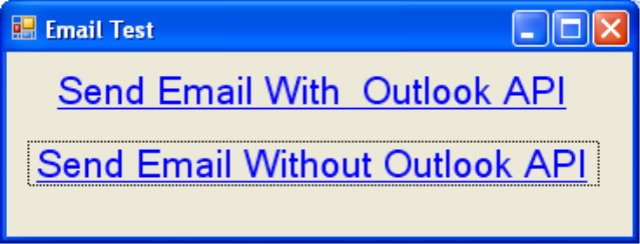
As you see in the above example, the “mailto” tag is used as the FileName property.  A new process is going to start and launch a new email message screen for the user with the email address of me@foo.com already entered and the subject “Hello”.    Here is the sample application running:

When the LinkLabel named “Send Email Without Outlook API” is clicked, it launches the default email client on our computer and enters a To and a Subject for us automatically.  Nothing fancy or ground breaking but it works.

System.Diagnostics.Process vs Outlook Interop

As we see above sending emails from our WinForm application with the Process class is very simple.  Why would we want to go through the trouble of using the Outlook Interop to send emails?  Won’t the above example work for any Windows computer no matter which email client the user has running, so isn’t that more flexible?   The answer is yes.  This solution will work on any Windows computer launching whatever the configured default email client is.  However, what if you need to log what the user wrote in the email?  This is where System.Diagnostics.Process falls down.

Let me expand on this.  Say for example you have a CRM application that needs to log emails sent by users to your clients or contacts or customers (whatever acronym you adopt).  Even though your user’s will have the message saved in their Sent folder in Outlook having it just in their email client doesn’t easily give the users of your CRM a quick view of activity.  You may also have auditing rules in your business requirements whereby you need to save the first 500 characters of each correspondence sent to client.  Using the Process example above doesn’t allow us to intercept the message so we have access to the complete message being sent.  However, using the Outlook Interop API we can keep track of everything as well as log the email to suite our business requirements. 

Let me go ahead and get this out of the way.  Yes this does require you to be in a controlled environment.  Most corporate and enterprise networks are controlled and you’ll know if this approach will work for you in your business. 

Using Outlook Interop To Generate Emails

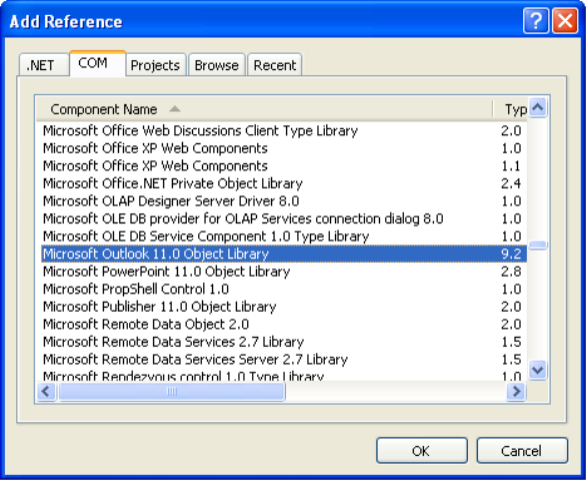
To get started using the Outlook Interop we first need to add the required DLL to our solution. In order to do this, right click on Add References in your solution and select the COM tab.  Scroll down about half way and select the Microsoft Outlook 11.0 Object Library.  Add this as a reference to your project. 

Once you add the required DLL to your project you are ready to start coding for the API.  One of the things I like to do is create wrapper classes for these interop classes that allow me to call them when I need them with just a few lines of code.  Here is an example of a wrapper class. 

using System;

using System.Collections.Generic;

using System.Text;

using OutlookApp = Microsoft.Office.Interop.Outlook;


namespace Common.Outlook

{

    /// <summary>

    /// Provides functionality so Outlook can be used to generate Emails.  Use the

    /// write event to log the email.

    /// <example>

    /// Email outlookMsg = new Email();

    /// outlookMsg.Message.Subject = “Foo bar”;

    /// outlookMsg.Show();

    /// </example>

    /// </summary>

    public class Email

    {

        /// <summary>

        /// Gets the current instance of Outlook

        /// </summary>

        OutlookApp.Application _outlookInstance = new Microsoft.Office.Interop.Outlook.Application();


        private OutlookApp.MailItem _message;

        public OutlookApp.MailItem Message

        {

            get

            {

                return this._message;

            }

            set

            {

                this._message = value;

            }


        }


        /// <summary>

        /// Constructor, gets current outlook instance

        /// and creates a blank email message

        /// </summary>

        public Email()

        {

            Initialize();

        }


        private void Initialize()

        {

            // create a blank email

            _message = (OutlookApp.MailItem)_outlookInstance.CreateItem(OutlookApp.OlItemType.olMailItem);


            // wire up the write event for logging

            _message.Write += new Microsoft.Office.Interop.Outlook.ItemEvents_10_WriteEventHandler(Message_Write);

        }


        /// <summary>

        ///  Used for logging after the end user presses the send

        ///  button in Outlook.  If you need to log the email that was

        ///  sent to a web service or something else, fill this in.  This is

        ///  called after the email is sent via Outlook.

        /// </summary>

        /// <param name=”Cancel”></param>

        void Message_Write(ref bool Cancel)

        {

          // ADD LOGGING HERE IF YOU NEED IT

        }


        /// <summary>

        /// Displays the outlook screen and shows the email message.

        /// </summary>

        public void Show()

        {

            _message.Display(false);

        }

    }

}

 Using the code above we can now enable the first link in our sample Email form above.  To create an email with Outlook it is now a few lines of code.

Common.Outlook.Email msg = new Common.Outlook.Email();

msg.Show();

Since we have access to the Outlook message we can set the Subject, To, CC, BCC, Format and other options.  We get a lot more control over our email message than with just by starting a process.  Here is a more fleshed out example.

            Common.Outlook.Email outlookEmail = new Common.Outlook.Email();

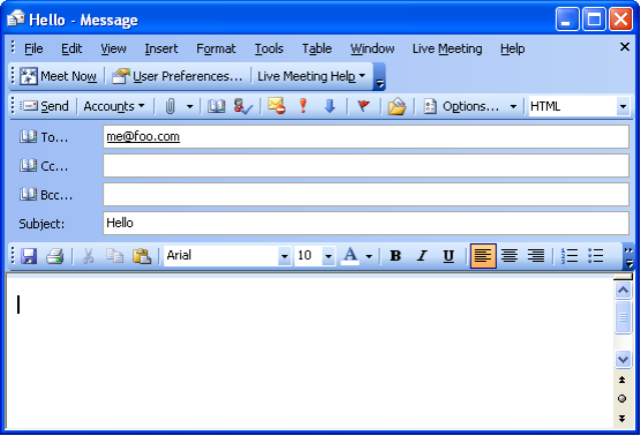
            outlookEmail.Message.To = “me@foo.com”;

            outlookEmail.Message.CC = “me2@foo.com”;

            outlookEmail.Message.BodyFormat = Microsoft.Office.Interop.Outlook.OlBodyFormat.olFormatPlain;

            outlookEmail.Message.Importance = Microsoft.Office.Interop.Outlook.OlImportance.olImportanceHigh;

            outlookEmail.Message.Body = “I love cookies!”;

            outlookEmail.Show();

 Will create the following:

The other thing using the Outlook Interop allows us to do is log the messages as noted earlier.  To do this we would add our business requirements into the Message_Write event.   In this event we have access to lots of information including a real sent time, the complete body, what importance was set, the subject and so on.  Obviously any property exposed in the API we can still reference.  This gives us a way to log the information via a database, web service or other means.

Like this story?  Then kick it on DotNetKicks.com

Take Securing Web Services With Username and Password One Step Further With a Custom SoapExtension

Posted by Keith Elder | Posted in Asp.Net, Programming | Posted on 09-01-2007

In a previous posts I showed how to secure your web services with a username and a password.  One of the readers added a comment and mentioned using an extension to provide authentication so I thought I would expand on how that is done.  If you haven’t read the previous posts do that first, then pickup with this.  And before we get started, thanks for the idea Kevin!

Have you ever wanted to intercept a web service method because you wanted to maybe log it or even as we are about to do authenticate a user?  Did you know you can intercept any incoming SoapMessage that is sent to your web service?  This is all possible because of the SoapExtension class in .Net. Not only can you intercept the incoming message but you can do it within one of four stages:

  1. AfterDeserialize
  2. AfterSerialize
  3. BeforeDeserialize
  4. BeforeSerialize

This allows us a lot of flexibility obviously.  In our example we are going to work with the AfterDeserialize stage which is after the message has been sent across the wire and serialized into a SoapMessage object.  Since we will have a full blown SoapMessage object, we can inspect the headers of the SoapMessage and take care of authentication then.  Our end goal with taking this approach is to allow us to authenticate a user with a WebMethod simply by adding an authentication attribute to the WebMethod like this highlighted in bold.

    1     [WebMethod]

    2     [SoapHeader(“CustomSoapHeader”)]

    3     [AuthenticatonSoapExtensionAttribute] (magic here)

    4     public int AddTwoNumbers(int x, int y)

    5     {

    6         return x + y;

    7     }

You’ll notice in this example we do not have to remember to call the code to authenticate the user manually as we saw in the previous article.  Instead by adding the attribute to the method it knows to call the authentication method.  To do this we need to first create a custom object that extends SoapExtensionAttribute and then another that extends SoapExtension.

Create a Custom SoapExtensionAttribute

In order to have the method call our custom SoapExtension we need to create an object that extends SoapExtensionAttribute.  It is a farily simple class with two overridden properties.  Here’s the code:

    1     [AttributeUsage(AttributeTargets.Method)]

    2     public class AuthenticatonSoapExtensionAttribute : SoapExtensionAttribute

    3     {

    4         private int _priority;

    5 

    6         public override int Priority

    7         {  

    8             get { return _priority; }

    9             set { _priority = value; }

   10         }

   11 

   12         public override Type ExtensionType

   13         {

   14             get { return typeof(AuthenticatonSoapExtension); }

   15         }

   16     }

You’ll notice about the only thing of real substance is the Extension type property which simply returns to us our custom extension.

Create a Custom SoapExtension

The last piece to pull this all together is a custom class which extends the SoapExtension class.  In this class we are going to write the code that does the actual authentication.  We are going to check for the AfterDeserialize stage and then first make sure we have a valid SoapHeader.   Once we do that we are going to call the static validation method and pass in the SoapHeader as we did above. 

    1 /// <summary>

    2     /// Custom SoapExtension that authenticates the method being called.

    3     /// </summary>

    4     public class AuthenticatonSoapExtension : SoapExtension

    5     {

    6 

    7         /// <summary>

    8         /// When overridden in a derived class, allows a SOAP extension to initialize data specific to an XML Web service method using an attribute applied to the XML Web service method at a one time performance cost.

    9         /// </summary>

   10         /// <param name=”methodInfo”></param>

   11         /// <param name=”attrib”></param>

   12         public override object GetInitializer(LogicalMethodInfo methodInfo, SoapExtensionAttribute attrib)

   13         {

   14             return null;

   15         }

   16 

   17         /// <summary>

   18         /// When overridden in a derived class, allows a SOAP extension to initialize data specific to a class implementing an XML Web service at a one time performance cost.

   19         /// </summary>

   20         /// <param name=”WebServiceType”></param>

   21         public override object GetInitializer(Type WebServiceType)

   22         {

   23             return null;

   24         }

   25 

   26         /// <summary>

   27         /// When overridden in a derived class, allows a SOAP extension to initialize itself using the data cached in the GetInitializer method.

   28         /// </summary>

   29         /// <param name=”initializer”></param>

   30         public override void Initialize(object initializer)

   31         {

   32 

   33         }

   34 

   35         /// <summary>

   36         /// After the message is deserialized we authenticate it.

   37         /// </summary>

   38         /// <param name=”message”></param>

   39         public override void ProcessMessage(SoapMessage message)

   40         {

   41            

   42             if (message.Stage == SoapMessageStage.AfterDeserialize)

   43             {

   44                 Authenticate(message);

   45             }

   46         }

   47 

   48         public void Authenticate(SoapMessage message)

   49         {

   50             ServiceAuthHeader header = message.Headers[0] as ServiceAuthHeader;

   51             if (header != null)

   52             {

   53                 ServiceAuthHeaderValidation.Validate(header);

   54             }

   55             else

   56             {

   57                 throw new ArgumentNullException(“No ServiceAuthHeader was specified in SoapMessage.”);

   58             }

   59         }

   60     }

The method that we are really concerned with is the ProcessMessage which checks for the stage and then calls the Authenticate method.  This in turn calls our static validation method which checks for authentication.  At this point light bulbs should be going off!   Since we have a SoapMessage object do we not know which method is being called?  Yes!  Could we modify the ServiceAuthHeaderValidation to check for a database instead of hard coding things?  Yes!  Now you are starting to see where this could really go.   SoapExtensions are powerful and only limited to your imagination. 

When I Test It, It Doesn’t Work, Why?

Once you get your SoapExtension in your solution setup and press F5 to debug it within Visual Studio  it will launch a new web server on a random port and bring you to your service.  You enter the parameters and submit the form and it by passes your validation.  Why!? 

This is suppose to happen and here is why. If you go to the service invoked from VS through the browser interface it will not invoke the authentication and it isn’t suppose to either. The reason is you are not invoking the service via SOAP but rather just a standard POST from a form. Therefore, the SOAP extension is never going to fire. This should be disabled when you publish your web service to production as only SOAP messages should be allowed. If you have a case where you need to allow GET and POST calls then the method of a custom SoapExtension isn’t going to work. Go back to the previous way outlined that I talked about.

As a benefit, Visual Studio builds the form for you automatically when you press F5 and allows you to pass parameters to the web method, but it does it via POST. If you invoke the web method from a console application or a real client making a SOAP call, you have to pass in the username and password.  I actually consider this behavior a feature.  If we didn’t use the SoapExtension to secure the method, we’d be forced to pass in username and password all the time which would mean we’d have to always call the secured web method from a test client.   Speaking from experience this isn’t fun.  Of course you should have Unit Tests for each web method anyway but it is really easy to pass in the params to a web form while debugging.

I hope you find this useful and now don’t feel so daunted because your team leader asked you how you were going to authenticate web service methods via a database.  The only thing left is for you to implement your required features.  Of course, if you are on an Intranet, instead of using username and password as we did in the previous post you could at the point of Authenticate(SoapMessage message) use the user’s integrated credentials and check for various groups in Active Directory or even using Enterprise Library Security Block. 

Like this article?  Then kick it on DotNetKicks.com

Apple Announces iPhone, Who’s Going to Buy One?

Posted by Keith Elder | Posted in Computer Hardware | Posted on 09-01-2007

Today at Macworld Apple announced what has been discussed and speculated to death on every blog and major publication, their iPhone.  Ok, so let’s talk about who is going to buy one.  Honestly I’ll probably buy one for Ellen.  She has been wanting a new phone since her Motorola phone is showing wear and she still uses the iBook I bought her several years ago.  We also have Cingular and we are due an upgrade (although I don’t know what the upgrade price will be).  I am not happy about the lack of 3G.  How can you release a new phone and not have it 3G enabled.  I guess we’ll have to wait for iPhone 2.0. 

Besides my wife, who else will get one?  If you are planning on getting one add a comment.  Of course a lot of the MacFanBoys will be jumping on one no doubt.  But who else?   What about corporate America?  The Enterprises?  Will they give up their Blackberry’s?  I don’t think so.   Why not?  Well the iPhone only supports IMAP and POP email which allows you to only check personal email.  Basically the phone is going to be really good for personal use, but will not see adoption in the Enterprise.  A lot of companies don’t allow phones with cameras to be brought even into the work place so there is another reason.  Thankfully, I don’t work for one though.  Which means Palm with their Treo’s running Goodlink or the Blackberries are safe for now in corporate America.

However, if this device takes off then that creates demand.  With demand comes market share and with market share comes third party ad ons.  So if you are Blackberry or Goodlink and you read this start now developing a “plugin” or something for the iPhone to get it into the enterprise.  You’ll make millions.

Anyone else planning on buying one for the whopping $499 for the 4GB version or $599 for the 8GB version?