Welcome

You have reached the blog of Keith Elder. Thank you for visiting! Feel free to click the twitter icon to the right and follow me on twitter.

Xbox 360 IPTV Video

Posted by Keith Elder | Posted in XBOX 360 | Posted on 09-01-2007

The other day I posted an article about how the Xbox 360 was one upgrade away from taking over my living room.  It looks like I get my wish!  At CES an announcement was made which will provide Xbox owners the ability to watch live TV and record live TV.  Obviously someone else agreed with my post at Microsoft and they threw this together real quick.  I’m kidding of course, but this is extremely cool.  Instead of me telling you all about it just go watch the video on http://on10.net.

Key points:

  • Available holiday 07
  • Added a new option in the media section called “Television”
  • Supports picture in picture
  • Record and pause live TV

If you are familiar with Media Center the interface is going to look very familiar.  The video is about 9 minutes, enjoy.

How To Add Feedburner FeedFlare to Your SubText Blog

Posted by Keith Elder | Posted in .Net, Blog Updates, Programming | Posted on 07-01-2007

I started using FeedBurner.Com to power the RSS feeds for my blog and I am quite happy in doing so.  I like the stats they provide and the guidance they provide on various tweaks to the feed without having to re-code anything.  One of the items I added to the RSS feed and to the site is FeedFlare.  FeedFlare places a simple footer at the bottom of each entry which allows people to distribute the entry to other sites or to inform other users of an entry.

Step 1:  Configure your FeedBurner account for your blog

This may seem pretty obvious, but at the risk of someone being confused in order to do this, you have to create a FeedBurner account.  The cost is free.  Once you create an account and link up your feed which points to your real RSS feed on your site, configure it.   Select your blog via the control panel and click on the Optimize tab.  In the left menu select “FeedFlare” and configure the options you want.

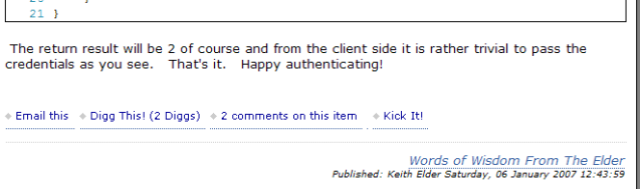
There are two options:  Feed and Site.  By placing a check in one column or another will determine where the FeedFlare shows up.    By choosing the “Feed” option, it will place the particular flare chosen at the bottom of your feed as seen here from RSS Bandit.

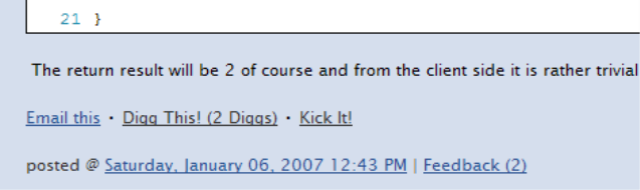
Choosing the “Site” option will display the chosen flares in your web site next to each item as seen here:

Step 2:  Add any custom flares to FeedBurner

Once you are done configuring which built-in flare options you may want to add other flares.  In the FeedBurner FeedFlare section there is documentation on how to add additional flare items so I will not cover it in detail but I will give you a quick sample on how to add a flare for http://www.dotnetkicks.com.  Essentially you create an XML file which is uploaded to a web server.  Here is the XML to add the flare as seen above for Kick It!

    1 <FeedFlareUnit>

    2     <Catalog>

    3         <Title>Kick It!</Title>

    4         <Description>Submit this post to DotNetKicks.Com</Description>

    5     </Catalog>

    6     <FeedFlare>

    7         <Text>Kick It!</Text>

    8         <Link href=”http://www.dotnetkicks.com/submit/?url=${link}”/>

    9     </FeedFlare>

   10 </FeedFlareUnit>

If you would like to use this particular one it is available here:  http://keithelder.net/feedflare/KickIt.xml

Step 3:  Modify SubText.Web.Skins.YourSkinName.Controls.Day.ascx control

I did some searching and couldn’t find any examples on where to place the script needed to insert the feed flare under each entry.  I had to dig into the code a bit to find which variable was needed to get access to the URL of each entry from within the template.  And I had to find the template.

The control we are going to modify is the Day.ascx control which is located in the Skins/YourSkinName/Controls directory.  The variable that we need to place in our user control is “FullQualifiedUrl”.  Since each item on the home page is printed using a Repeater we have to use the DataBinder.Eval to get each item’s FullyQualifiedUrl property.  Here is the sample code you need to place in your Day.ascx user control.  Don’t forget to modify the one associated with your skin and replace the word “yourname” with your appropriate FeedBurner name.

            <div>

                <script src=”http://feeds.feedburner.com/~s/yourname?i=<%# DataBinder.Eval(Container.DataItem, “FullyQualifiedUrl”) %> type=”text/javascript” charset=”utf-8″></script>

            </div>

Once you have this placed in your template where you want it, upload your newly modified template to your web site overwriting the existing one.  You only need to copy this one file.  Reload your home page and your new flare should appear. 

Xbox 360 is One Upgrade Away From Taking Over My Living Room

Posted by Keith Elder | Posted in Uncategorized | Posted on 06-01-2007

I’ve only had my Xbox 360 for a few weeks and since I got it I’ve been spending quite a bit of time with it.  In my usual geek curiosity fashion I’ve been going through every single screen, menu and configuration option.  I’ve played games on Xbox Live, downloaded new arcade games for free from Xbox Live, and even rented a movie (Mission Impossible III) by downloading it with some Microsoft points from the Xbox Marketplace.  I even connected it to my Media Center running Vista and streamed live TV and watch some recorded shows. 

It then started to hit me.  The Xbox is an upgrade away from taking over my living room.  If it JUST was a DVR to boot I would kick my media center PC out of my living room and place the Xbox front and center.  Will I ever see it happen, I doubt it, although the rumor mill is churning around the next release of the Xbox 360 from CES which is suppose to have a bigger hard drive (120gb) and HDMI support. 

Honestly, the ONLY reason I have a media center PC running is to record TV.  With one upgrade of a CableCARD and dual HD Tuners the Xbox 360 could be the killer device to have in the home.  It would also have the largest DVR install base surpassing Tivo and others.  Play games, download movies, watch and record TV all in one unit.   Surely some of the folks at Microsoft have thought the same thing.  The market is ripe for the taking if someone released a DVR to record HD TV and combine all the cutting edge devices and all of the high-end TVs that are being sold which do 1080i or 1080p. 

The Xbox community has already added this functionality to their Xbox’s by modding them up to run Media Center.  We are so close to having the ultimate converged device I can’t stand it.  How long will I have to wait?

Securing Web Services With Username and Password

Posted by Keith Elder | Posted in .Net, Asp.Net, Programming | Posted on 06-01-2007

I was going through my news feeds this morning and stumbled across this article about securing web services.  The article is short and doesn’t give any examples of one of the methods I use a lot.  I thought I would elaborate on one of the topics it touches on which is securing a web service with a Username and a Password.  While there are other ways to secure web services I find this particular method works really well when dealing with internal systems that may not speak .Net.  It is also simple to implement on both sides.  These systems could be in Java, PHP or even 4GL.  If you are a .Net developer and want to secure a web service with a username, password, or even other information, here is what you need to get going.

1.  Create an object that extends SoapHeader

The first thing you need to do is create an object that extends the built-in SoapHeader object.   The object can be simple or complex. Add the tokens you want to authenticate against.  Here is a sample:

    1 /// <summary>

    2 /// Extends from SoapHeader and provides a username / password

    3 /// for web methods that need authentication.

    4 /// </summary>

    5 public class ServiceAuthHeader : SoapHeader

    6 {

    7     public string Username;

    8     public string Password;

    9 }

2.  Add a property to your service class that uses the class above

Once you’ve created your base soap header class, add it as a property to your service class.

    // SoapHeader for authentication

    public ServiceAuthHeader CustomSoapHeader;

3.  Attribute the method you want to secure

Add the SoapHeader attribute to each or certain methods you wish to secure pass in the name of the property that is defined as the SoapHeader object in step 2.

    1     [WebMethod]

    2     [SoapHeader(“CustomSoapHeader”)]

    3     public int AddTwoNumbers(int x, int y)

    4     {

    5        

    6         return x + y;

    7     }

4.  Create a method to process your SoapHeader for authentication

The last big step is to create a static method that will take in your custom soap header class and process it for validation.  The first thing we want to do is make sure that some type of credentials were passed in the SoapHeader and that the properties we are looking for are not null.  Finally we want to validate each property contains the information we are looking for. This could be read from the web.config file, database, or other places.


    1 public class ServiceAuthHeaderValidation

    2 {

    3     /// <summary>

    4     /// Validates the credentials of the soap header.

    5     /// </summary>

    6     /// <returns></returns>

    7     public static bool Validate(ServiceAuthHeader soapHeader)

    8     {

    9         if (soapHeader == null)

   10         {

   11             throw new NullReferenceException(“No soap header was specified.”);

   12         }

   13         if (soapHeader.Username == null)

   14         {

   15             throw new NullReferenceException(“Username was not supplied for authentication in SoapHeader.”);

   16         }

   17         if (soapHeader.Password == null)

   18         {

   19             throw new NullReferenceException(“Password was not supplied for authentication in SoapHeader.”);

   20         }

   21 

   22         if (soapHeader.Username != “myusername” || soapHeader.Password != “mypassword”)

   23         {

   24             throw new Exception(“Please pass the proper username and password for this service.”);

   25         }

   26         return true;

   27     }

   28 }

5.  Add validation to service method


    1     [WebMethod]

    2     [SoapHeader(“CustomSoapHeader”)]

    3     public int AddTwoNumbers(int x, int y)

    4     {

    5         // Test to see if the proper credentials were passed in.

    6         ServiceAuthHeaderValidation.Validate(CustomSoapHeader);

    7 

    8         // If we get this far the user has been validated.

    9         return x + y;

   10     }


That’s it. You now have all the pieces of the puzzle to process a request and validate the credentials of the calling client via a username and or password.  If we launch the solution we will see that our XML for our service has been updated and now contains an XML Node called ServiceAuthHeader which contains two sub nodes: username, password.

Passing SoapHeader Credentials To Your Service

Now that we have our service secured, we need to now call the service and pass the credentials expected from a client.  Based on the example above, once you add a web reference to the service and instantiate the service in code, the thing you want to look for is a new property of your service proxy called ServiceAuthHeader. This is converted into a property called ServiceAuthHeaderValue.  This property needs to be an instantiation of the ServiceAuthHeader class where you set the username and password properties.  Here is an example of a console application calling our service and passing the required information to authenticate.

    1 using System;

    2 using System.Collections.Generic;

    3 using System.Text;

    4 

    5 namespace ConsoleApplication1

    6 {

    7     class Program

    8     {

    9         static void Main(string[] args)

   10         {

   11             localhost.Service service = new ConsoleApplication1.localhost.Service();

   12             localhost.ServiceAuthHeader header = new ConsoleApplication1.localhost.ServiceAuthHeader();

   13             header.Username = “myusername”;

   14             header.Password = “mypassword”;

   15             service.ServiceAuthHeaderValue = header;

   16             int x = service.AddTwoNumbers(1, 1);

   17             Console.WriteLine(x);

   18             Console.ReadLine();

   19         }

   20     }

   21 }

 The return result will be 2 of course and from the client side it is rather trivial to pass the credentials as you see.   That’s it.   Happy authenticating!

[Related Link]
To take authenticating one step further with a custom SoapExtension read this follow up article.
http://keithelder.net/blog/archive/2007/01/09/Take-Securing-Web-Services-With-Username-and-Password-One-Step.aspx


 

A Seven Year Blogger Recounts His Blogging History

Posted by Keith Elder | Posted in General | Posted on 06-01-2007

In many circles today I would be considered what the community refers to as a blogger.  Seven years ago though, we didn’t really have a name for it except an online journal maybe.  For those of us that had our own personal web site we just called it “cool” and thought of it as another feather in our never ending geek hats.  Back in the day (late 1999 and early 2000) those of us fortunate enough to have the know how to program and do system administration were posting news to our personal web sites hoping someone would stop by and ultimately leave us a comment on something they read.  Today this scene has changed, some would even say drastically changed.  Today, we call it blogging.  Back then, we just called it, well, nothing really.  We were just being geeks.

Recently I made the transition into one unified blog and as a result I had to go back through a lot of articles to update links, pictures, videos, and webcasts so they pointed to the correct location.  As I was updating information and pouring over my archives one thing hit me, I had been blogging for over 7 years! 


Although I don’t officially have the original posts in December of 1999, that is when I started what most people know today as “blogging”.  Back then we didn’t call it blogging.  We just called it our site “news”.  Essentially it was just a way for friends and family to read up on what we were doing or when the next capture the flag tournament in Quake was going to be held.  It was also a way for us to cut our teeth on web programming.  Probably more than anything this is what drove us, writing code.  I keep using terms like “us” and “we” because I wasn’t the only one.  Several of my friends like Joe and Paul got into the act as well.  It always seemed like we were always trying to out do the other.

I can remember when I use to run my own Quake Q3F server.  I had a dedicated static IP that ran into my apartment so what better way to use it than for online fragging.  Since the Quake server spit out log files, I parsed them and put stats on my site where players could have public bragging rights.  Having your stats show up was incredibly addictive.  Apparently this is what Microsoft is finding out about achievements in the Xbox.  I would like to say that because of my grass roots movement Xbox Live owes me a lot of royalties for this idea but I would be lying if I did.

Today Content Is King

Today we have the luxury of being alerted when someone posts a news article to their blog via RSS readers.  In late 1999 and 2000 we actually had to go to the site to see if anything new was posted.  Whenever a free moment at the computer was achieved you literally typed in a friend’s web site URL and browsed the site for new content and design changes.  Obviously if you have 100 friends, it is really hard to browse 100 sites and this is why we use RSS Readers today.  With the creation of RSS feeds and RSS readers the need to physically view a friends web site is a thing of the past, literally.  Today, a lot of bloggers spend crazy amounts of time to tweak their web site designs, only to have them never viewed by the general public because of RSS Readers.  It is humorous if you think about it.  In 1999 and 2000, you could move one image or change one little piece of design and hear about it for a week if your friends didn’t like it.  Today we can keep track of several thousand web sites with a good RSS reader so the need to visit a web site is sort of a thing of the past.  Content is more important than design.  And according to my law of any successful web site, this is going to hold true for a very long time.  I can’t think of a single web site I visit just because it looks pleasing to the eye.

Going Back In Time

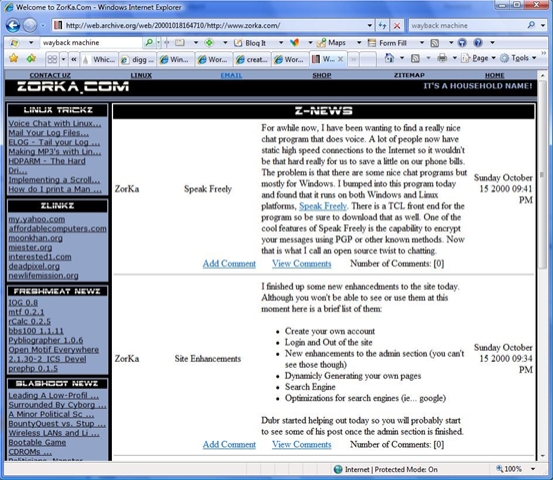
One of my original blog sitsI decided to go back in time and see what was in the archives for my original blog site.  I wish the archives went further back so I could show you the real humble beginnings but Oct 18th, 2000 is as far as it goes back.  In order to find my original blog you have to go back to one of the first domains I ever purchased, Zorka.Com.

Most people that know me today will not be familiar with Zorka.Com or even know that it is a web hosting company that I started about 8-9 years ago by accident.  To lessen the confusion, here is a quick time line of events that will get you caught up:

  • 1993 – Coined myself as “ZorKa” on the Internet while obsessed with IRC(Internet Relay Chat) during college.  I logged countless hours at the dumb terminals in college and because of this, this is where I was first introduced to Unix, scripting, shells, etc.   ZorKa actually means business savvy and intelligent so I thought it fit.
  • 1997 – I purchased the domain Zorka.Com and hosted it out of our (yes I was married then) apartment on my own custom built Linux server.  We lived on campus at the University of Michigan in family housing where they gave us static IPs and 150K DSL lines.   Why let it go to waste I thought. 🙂
  • 1998 – Started hosting other domains for friends on the Zorka.Com server.
  • 1999 –  I was really heavily involved with PHP so I needed a way to vent my creative side besides writing a shopping cart for my employer.  As a result, I took the Zorka.Com domain and started building out my own personal site that was a reflection of my interests.
  • 2000  – I updated the site to the theme you see pictured.
  • 2001  – February of 2001 I stopped writing my own software for my personal site.  Time had become a factor.   I had to save time because hosting started eating up a lot of my free time along with teaching at the college.  As a result, I installed PHP Nuke to help run my site.
  • 2003 –  Zorka.Com hosting had blossomed through word of mouth and by this point I had 5 servers running in a data center.  I needed to turn the site into a real company front facing web site to assist with help desk, upgrades, etc.  As a result my blog was moved to blog.zorka.com (a subdomain).  I ran iBlog as the blog engine which copied flat html files to the server from my Powerbook.
  • 2004  – By this point I was spending all my free time doing server upgrades for Zorka.Com.  It is sad, but I didn’t even have the time to do the conversion from iBlog to WordPress myself.  As a result I paid a deserving college student who had interned with me for several years to do the port. 
  • 2006/2007 – At the turn of the new year a new blog was born once again, this time under a new domain I had been holding onto, http://keithelder.net.  Due to my heavy involvement with .Net I migrated all of my years of blogging from Zorka.Com and blog.zorka.com to http://keithelder.net/blog/ under the SubText blog engine.

Whew!  That is a mouth full needless to say.  The good news is that even through all of that, I managed to keep my blog content while moving around (comments and trackbacks I didn’t).  I don’t plan on moving my blog again for a long time either.  It is just too much work.  Not to mention my Google rankings suffer and Internet surfers can no longer find the content they were looking for because of broken links (although my previous post about redirects should help with this).

Articles Of The Past

What I always find amusing about blogging is there are times when I write something and I think it is going to be a hit with my readers.  I post what I consider a gem and it just sits there, lost in cyberspace.  Then I’ll post something weird or a review of some type of gizmo and it becomes a defacto standard.    The post that is going through the roof lately is the one I did about Rasmus publishing a new PHP book (Rasmus is credited with creating PHP for those that aren’t in the know).   Within just the past few days this post has been read about 1600 times.  Honestly, there is nothing ground breaking in this entry.  I just happened to catch Rasmus in a chat room.  We were talking about his new book and I posted about it.  I haven’t even read the book! 

It isn’t until months later when search engines index the content of a site do you really get a feel for what is popular.  I measure the long time value of posts through my server logs.  In other words, which articles stand the test of time and are read or searched for on the Internet the most. 

As I was going back through my archives and several stood out either through hit count or because of something else.  Here are my top blog entries of all time (in no official order). 

  • New PHP Book by Rasmus from O’reilly – Number one entry on the site for months.  Still haven’t even read the book.
  • Ruger P345 .45 ACP Pistol – Last year I purchased a hand gun.  It seems a lot of other people are interested in my take on it and providing self-defense for themselves.
  • Total Protect Home Warranty – Good Or Bad? – This is one of the posts I wish I was able to keep all of the comments on when moving blogs.  They were good and a lot of people basically saying, don’t do it, it isn’t worth the paper it is printed on.
  • Treo 650 vs Blackberry 7290 – This was a sort of a review I did.  While not very well written, it does provide the reader with a different insight.  Even though not a lot of people comment on it, it is read heavily with referrals from search engines.
  • Debian Installation Howto – Debian Linux install guide.  It used to get thousands of thousands of hits after it was first posted.  Today, it is a little outdated because the software has changed and people use other Debian-based distros.  Still it has been a great entry over time, even linked directly from the Debian home page at one point.
  • Apple, Open Source and State of Linux – Being entrenched in open source software as I was, this is a good post that explains my open source philosophy along with other things.  It is one of those articles that can only be written by someone that has lived through it and it has struck home with a lot of people. 
  • Switching Phone Companies to Vonage – This entry was passed around inside of Vonage recently although it had been posted years ago.  I was contacted by Vonage’s marketing department asking if they could use me in national ad campaigns.  I sent in my survey and am currently waiting to hear back.  My goal is to be the next Jared from Subway. 🙂
  • How an Open Source Developer Transitioned to .Net – Of all of the things I have written, in my blog over the years, this one entry has had the most profound affect.  It got me a trip to an ASP.Net summit at Microsoft among other accolades and I think it is now required reading for all newly hired Developer Evangelist at Microsoft. 

As you can see the top list is all over the place categorically speaking.  I would say that all of the top articles except one are still technology related. Who knows what the next seven years will bring in terms of content and posts.  Maybe kids? Maybe wood work?  Maybe an infatuation with rebuilding old cars?  How about motorcycles or even four wheelers?  The answer is I don’t know.  You’ll just have to keep reading to find out.  Cheers.