Welcome

You have reached the blog of Keith Elder. Thank you for visiting! Feel free to click the twitter icon to the right and follow me on twitter.

Installing Silverlight 2 on Windows Server 2008

Posted by Keith Elder | Posted in Windows | Posted on 08-08-2008

The Olympics are upon us!  I called myself preparing for the Olympics last night by installing Silverlight so I could watch the Oylympics via http://nbcolympics.com.  I’m running Server 2008 and I quickly ran into a problem.  The work around turned out to not be that difficult at all so here is a walk through.

Step 1

Save the Silverlight.exe to your hard drive. Although you can run it directly it doesn’t work because of the default policy set on Server 2008.

Step 2

Right click the Siliverlight.exe and click “Run as administrator”.

image

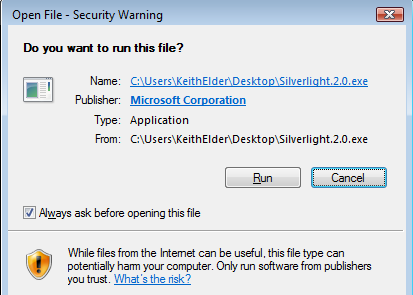
Step 3

Click Run.

image

Step 4

Press Install.

image

Step 5

Close the installation dialog.

image

Step 6

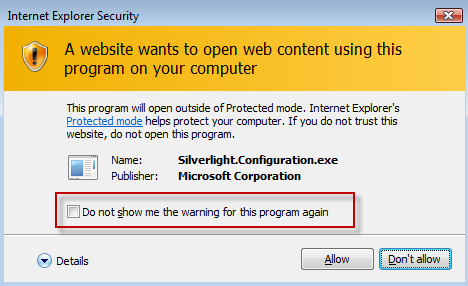
The first time you visit a Silverlight site you’ll be given a security prompt.  I suggest checking the box in the dialog so you don’t get this again.

image

Vendor Support via Twitter and other Social Networking Mediums

Posted by Keith Elder | Posted in Internet | Posted on 05-08-2008

I was eating lunch today and listening to music via my favorite new music listening means, Pandora.Com.  For those that don’t know about Pandora it plays music that you like and allows you to build stations that play music you like by looking at difference characteristics of music based on how you have rated previous music.

A Random Problem

Today I was eating lunch and decided to switch my station on Pandora.  After I switched my station I pressed the CTRL-T key to open a new tab to go somewhere.  I pressed the key numerous times and it wouldn’t go anywhere.  I had to press another tab to open a tab.  Weird.  I decided to Twitter about my problem.  Here is my tweet.

image

An Unexpected Response To Problem

About an hour later I received an email that someone had commented on my tweet.  Low and behold it was someone from Pandora.  How cool.

image

Does your company provide this type of support via Twitter or other social networking sites?  If not, it should.  And quick before the competition one ups you.  I know for example we do with Deep Fried Bytes.  We watch feedback from Twitter, blogs, Facebook and other means.  If someone wants to contact us to provide feedback we are easily within reach and able to carry on a two way conversation or move it to a more immediate communication channel if needed. 

How To Join In

I’ve heard stories of Comcast having a presence on Twitter and fixing solutions as well as other companies.  If you own a large company the best thing you can do to really find out what people think about your product or services is get into the social networking game.  Take Twitter alone.  It is really easy to figure out what people are saying about your product or service.  Twitter recently acquired Summize which was a search engine built on top of Twitter.  Today it is known as http://search.twitter.com.  It is really simple, almost Googlish.

image

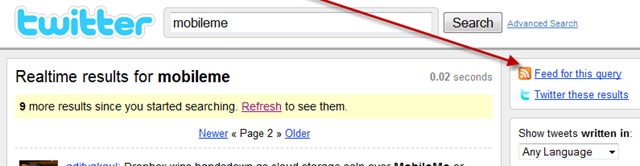
Once you go to the site, enter a word and press search.  A result is then displayed in chronological order.  Of course you may not want to stare at the results and wait from someone to post.  No problem, just subscribe to your query via an RSS feed and get alerted when new items come in.
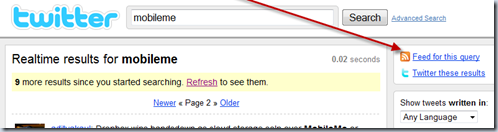
image

For example today there was a lot of news surrounding the MobileMe launch and how it was handled poorly (the replacement for .Mac).  It doesn’t take a genius to figure out there is a problem with MobileMe, just watch the feedback.  You’ll notice comments like:

In today’s “duh-duh” statement, Steve Jobs admits in a memo that MobileMe wasn’t ready for prime time.

Why does Mobileme keep popping up saying my account has expired when i have 40 more days left on my account?

MobileMe support guy suggests using email form for escalation, but form doesn’t exist. He’s not sure of what email to sent to either.

It isn’t hard to see something is really wrong.  It is just one of many examples of how fast companies can connect with their customers today.  Instead of being reactive they can be proactive.  I love proactive support and this could be just the tip of the iceberg.  Imagine a day when systems are smart enough to detect you are having a problem with something.  Maybe the BluRay player can detect you hit the play button 5 times in a row but the movie still isn’t playing.  It could then generate an alert to customer support who then is able to pop up on your screen and ask you to press 1 if you need support.  This is the type of thing we need to move towards.  I think we are seeing just the beginning.  I want to see more companies offer proactive support and feed off the pulse of the social paradigm.  It will be a win win for everyone.

Windows Server 2008 as a Workstation and UPnP Network Discovery

Posted by Keith Elder | Posted in Windows | Posted on 03-08-2008

I’ve been running Server 2008 as my main workstation for a few weeks now and so far so good.  The only thing I haven’t found a solution for yet running the x64 version of Server 2008 is Windows Live Photo Gallery.  I have Live Writer and Messenger working, but cannot find a version of Windows Live Photo Gallery.  Live photo gallery has a really nice import feature that allows the timeframe to be adjusted when importing pictures as well as integration with Flickr.  Two very important features that make it a really nice app.  Beyond that I find the occasional thing I have to work around.  Tonight it was UPnP that wasn’t working. 

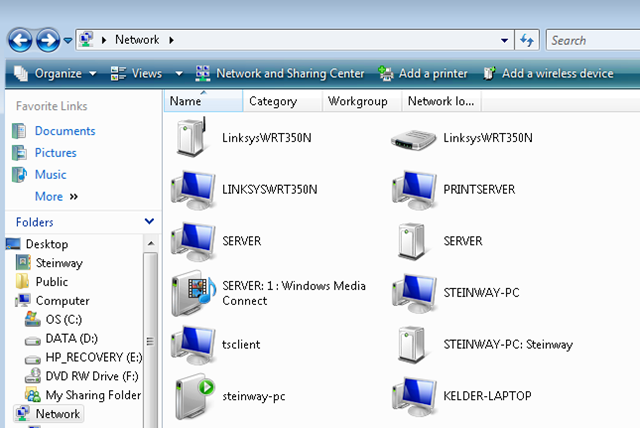
I was setting up Windows Home Server this evening and noticed two different views when viewing the network.  From my wife’s computer running Vista Ultimate it looked like this:

image

As you can see from above the devices that support UPnP show up nicely.  Specifically the home server for windows media and the router.

In Server 2008 it looked like this:

image

Yuck!  Definitely not as nice and it doesn’t help managing UPnP devices either.  I started digging around and knew there was a service was that wasn’t running but which one?  It turns out the one that needed to be enabled was the SSDP Discovery service.  To start this service press the windows key and type “services.msc”.  Right click and run as administrator and start the service.  After the service is started refresh the network and the UPnP devices will show up.

I have an article that outlines how to setup Server 2008 for VMWare and basically I apply the same setup to configure 2008 as a workstation.  This is just another tip if you are going down this route.

Authentic Elder

Posted by Keith Elder | Posted in Funny Stuff | Posted on 01-08-2008

I was in the sporting goods store the other day and came across this.  Had to take a picture.

image

Apparently someone named Elder makes socks.  Who knew.

Deep Fried Bytes Episode 8: Behind The Scenes At Microsoft.Com

Posted by Keith Elder | Posted in Podcast | Posted on 01-08-2008

In episode #4 we recorded a show with Joe Stump from Digg.Com.  In that show we talked about how a site like Digg.Com scales using Linux, Apache, MySQL and PHP.  I thought it would be cool to do the same kind of show but look at it from the standpoint of using Microsoft technology.  What better place to get the scoop on something like that than Microsoft itself!?  Thus we sat down with Brad and Jim from MSCOM which run the IT department at Microsoft that is in charge of Microsoft.Com.  Here are some interesting facts we learned:

  • They use all Microsoft technology.  Have been for years.
  • Do not run a firewall.
  • Have 80-120 servers that power Microsoft.com across two data centers.
  • Support over 350 applications.
  • 35,000 concurrent sessions
  • 15,000 requests / second
  • 5Gb/s to 500Gb/s of throughput
  • 260 Million unique visitors per month visit the site world wide.  55 million from the United States.
  • Microsoft.Com was once run from one computer under someone’s desk.
  • They take availability seriously and use products before they launch to put them under stress before customers get them.

Listen to the show


Ways To Listen To The Show

There are several ways to listen to Deep Fried Bytes.

1. Directly From The Web Site (or click the link above)

When you visit the site look for this:

Clicking the triangle will launch the Yahoo! media player and automatically start playing the show for you. As long as you leave the browser window open the player will stay open. Clicking off the page WILL stop the player!

2. Subscribe via iTunes and Zune

If you have iTunes or Zune installed on your computer you can subscribe to our show. In iTunes open the Music Store and search for “Deep Fried Bytes”. In the Zune software, go to the MarketPlace select Podcast and search for “Deep Fried Bytes” to subscribe to the show. You can also click either of the two icons below to automatically subscribe to the show if you have iTunes or Zune installed.

Subscribe via iTunes Store Subcribe via Zune Market Place

3. Subscribe to RSS Feed

To stay current and up to date with the show, subscribe to the site’s RSS Feed. If you don’t know about RSS feeds you can read more here: http://en.wikipedia.org/wiki/RSS_(file_format)

If you already have an RSS reader installed and setup, click the feed icon below to grab our news feed.

Subscribe to our podcast!