 A few weeks ago we launched a new feature for one of our internal applications that leveraged Workflow Foundation extensively. When working through a new technology you will always find curve balls along the way. I like to call these shiny pennies and rusty washers. For example, something may seem like a shiny penny when you first see it in a demo. After much consideration of weighing the features vs the learning curve of the new technology you decide to use it a production environment. Once something goes into production the game changes. This is the point where you are going to be held accountable by the business or your client for the technology you chose to use. This is the point where you have to go deep with the new technology because you have to support it once the “copy to production” button is pressed. It is during this phase you find some of those shiny pennies are actually rusty washers.
 You will always find rusty washers when you work through a new technology. There are even some recent examples of this I ran across in blog posts. For example Jeff Barnes has a blog post about how WCF proxies can only fault once. If you’ve done ASMX proxies you know we don’t have to deal with this. With WCF apparently the game has changed. It is an example of a rusty washer with WCF that you wouldn’t know until you tried to put it into production. Another example of recent that comes to mind is Ayende’s post about NHibernate one-to-one mappings. Again, another example of something you wouldn’t find out when watching a demo.
To help you limit the amount of rusty washers you will run into with Workflow Foundation, I wanted to share our team’s experience in working through Workflow. In this multiple part series we’ll look at some of the challenges the team faced and how we solved some of these. I say “some” of these because we took side steps around the rusty washers we found due to our short time frame. Hopefully this brain dump of information will save others time who are about to start using Workflow Foundation. I’ll cover some of the in and outs where you will want to look into workflow and some of the pitfalls we had to work around (the rusty washers).
First let me say that all in all we are extremely happy with the end product after launch. We are going to be able to easily modify business rules and adjust quickly for the business. As a matter of fact we have already had to modify our business rules and add new features. Our end goal for selecting workflow foundation for this particular project was future agility. Using Workflow allowed us to hit this mark, but not in the way we originally intended. If we would have had more time we could have worked through the rusty washers and turned them into shiny pennies. This brings me to my first point of this series.
It is just an API
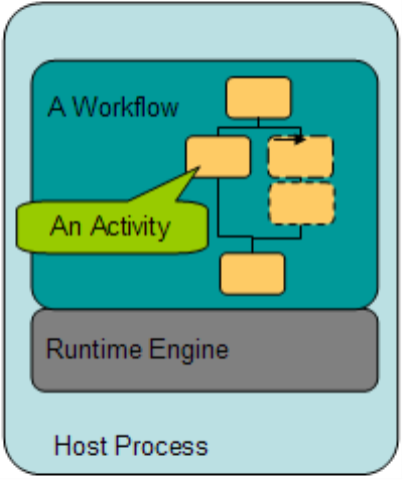
 The first thing I think everyone needs to understand about Workflow Foundation is it is just an API. Or to borrow the word from its own name, a foundation to build upon. It is really no different than building a house whereby you first pour the foundation and then you build something on top of it. A lot of experienced .Net developers (including myself) think of Workflow Foundation as more of an extension to the core .Net 2.0 framework although it was released with .Net 3.0. Technically this is true since .Net 3.0 is just that, an extension to the .Net 2.0 framework release whereby WPF, WCF, and WF were added.
The reason I point out that WF is just an API is to set the initial expectation. A lot of people I’ve come in contact with seem to think Workflow Foundation is in fact a shiny penny that will magically solve all of their problems. I’ve heard them say, yeah it is cool, you just drag and drop and you’ve got workflow. This is where I have to jump in. The reality is it a core framework for building workflows and Microsoft provides several key components with the workflow framework. Out of the box you get a:
- Runtime – the brain of the workflow engine that is constantly running in memory and processing workflows
- Component model – the pretty user interface that let’s you build workflows within applications or visual studio
- Rules engine – well, it really isn’t an engine (it is just an API) but a processing mechanism to process business rules against workflows or use as a stand alone rules processor
- Services – they provide various things such as how workflows should be processed (manual or default) and also things like persistence and tracking. Services allow you to customize and tweak how Workflow Foundation works. Example, if you don’t like the built-in persistence table structure you can create your own service and persistence store.
As you can see you get a lot out of the box. All for the low low price of $0.00. Not a bad investment huh?
Question: What do I do with all this?
Answer: Anything you want that fits this tools job description.
The point I am trying to make here is Workflow Foundation provides a base model to build anything on top of it. Take Winforms for example. Microsoft didn’t ship a collection of pre-built out of the box applications. Instead they provided the base framework so you, the developer, can build any type of Winform application you need. Please don’t think of Workflow Foundation in any other way. In other words, leveraging Workflow Foundation should be treated like an infrastructure investment, not an application investment. In part two we’ll cover some of the key points you should focus on when building out your workflow infrastructure. See you in part two!
It is easier to modify a workflow than it is to modify thousands of lines of C# code.
Like this post?